• We’re currently investigating an issue related to the forum theme and styling that is impacting page layout and visual formatting. The problem has been identified, and we are actively working on a resolution. There is no impact to user data or functionality, this is strictly a front-end display issue. We’ll post an update once the fix has been deployed. Thanks for your patience while we get this sorted.

Replace HDD with SDD

Rollcage

Member
Hi all,

Have a Lenovo z580 that is really really slow. Tried changing from Win8.1 to a fresh Win7 and was a bit better for a week and now crashing and dying. Takes forever to load programs.

Replace
SAMSUNG Spinpoint M8 ST1000LM024 (HN-M101MBB/EX2) 1TB 5400 RPM 8MB Cache SATA 6.0Gb/s 2.5"

With a SDD? RAM slots filled, but can buy 2x new if necessary. Buy new?

thanks!
John
 
I didn't really understand if you were asking if you should install or if you did already but if you currently have a hdd that is 5400 rpm 8mb cache thats pretty cheesy sounding so id recommend an ssd personally. But also if you do a fresh install of an os you would need to install all drivers because not the right drivers or no drivers can cause problems to. And every lenovo ive delt with usually has cd's to re-install all drivers and programs. So if you don't have the backup and restore cds from lenovo than try making sure you have the right drivers before you buy an ssd.
 
Do
IT
NOW....

Going from a 5400/8mb HHD to an SSD will be a striking improvement in every way...and if your machine has at least 8GB of ram and decent graphics, stick with 8.1 instead of 7 cause it will be faster too (at least if you disable touch and all the background crap that most people never use)
 
Get an SSD. Please. For the good of humanity.

Honestly, it's by far the best upgrade you can get for any computer that doesn't have one already. Ever since I sprung for an SSD for my laptop five years ago, I've never been able to use a computer without one without going slightly bonkers.
 
Is there anything special or different "slots" with different laptops/motherboards in laptops, or simply any 2.5" SSD? Any recommendations? Size?
 
Your Ideapad Z580's HDD is installed in a cage/caddy. Any standard 2.5-in SSD should fit into that cage. Your User Guide tells you exactly how.
 
Yes I already took the HDD out to take a look. easy. just wondering about different connections as I doubt it can be changed/altered/adapted
 
Evo 850 256gb?

Sure - if you're getting the SATA version. (Some newer SSDs also come in PCI versions, but with the same name. It's silly.)

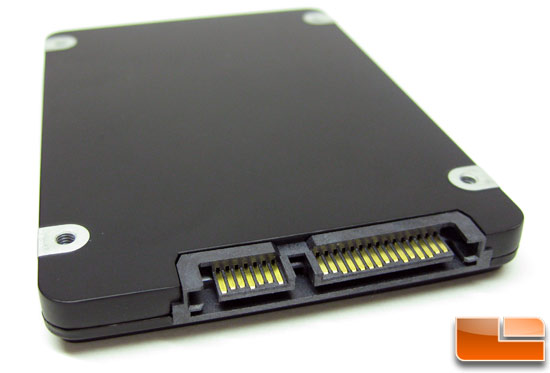
Plugs on it should look like this:

kingston_sata_ssd.jpg
 
Back
Top