• We’re currently investigating an issue related to the forum theme and styling that is impacting page layout and visual formatting. The problem has been identified, and we are actively working on a resolution. There is no impact to user data or functionality, this is strictly a front-end display issue. We’ll post an update once the fix has been deployed. Thanks for your patience while we get this sorted.

R260/270/280/290/290x Review thread

Page 50 - Seeking answers? Join the AnandTech community: where nearly half-a-million members share solutions and discuss the latest tech.
In default, aka quiet mode, you lose roughly 30% performance over prolonged gaming. Its simply a disaster. And the uber and full fanspeed mode is not much better.

analysis_quiet.gif


Once 2000 RPM is reached, which is the maximum fan speed the "Quiet" BIOS allows (to keep noise levels down), fan speed stays the same while temperatures continue to rise. At this point, clocks still hold on to their slow rate of decline.
Only when GPU temperature reaches 94°C, which is the default temperature limit for both BIOSes, will clocks decrease faster to ensure the GPU doesn't crack the temperature limit.
Temperature and fan speed stabilize after another while, but clocks only run at a fraction of the 1000 MHz. The card was in our case seen to run as low as 570 MHz instead, which reduced performance greatly.

Is the quoted text from TPU? I really hate when people don't link back to sources.
 
Now this doesn't mean the REAL Hawaii or Maxwell will be in our Easter baskets, but the predictions of Q4 are probably just as inaccurate.

Really. Apparently Apple and Qualcomm have been willing to pay a lot more for early non-risk wafer starts. Rumor was that Apple paid enough to even lock out Qualcomm for the first three months (and TSMC may have accepted just to get Apple on board). I'm sure TSMC would make sure AMD and NV get enough wafers to do qualification and yield development work, but that's probably it.

Sucks for GFX enthusiasts. On the plus side, the cost curve for 20nm will have dropped a bit by the time the next gen GPUs are released (I'm sure AMD and NV are desperate to have something online and in store for Thanksgiving in the U.S.).
 
So they used Furmark? So this graph is even more pointless?

Nope.

At the beginning, we find the card idling happily at 300 MHz, with low temperature and fan speed.
Once we put some load on the card (not Furmark), frequency immediately jumps to 1000 MHz, its full clock speed. There is no delay for some kind of boost to kick in.
As temperatures increase because of the workload, fan speed will be adjusted accordingly, and clocks will very slowly go down again.
Once 2000 RPM is reached, which is the maximum fan speed the "Quiet" BIOS allows (to keep noise levels down), fan speed stays the same while temperatures continue to rise. At this point, clocks still hold on to their slow rate of decline.
Only when GPU temperature reaches 94°C, which is the default temperature limit for both BIOSes, will clocks decrease faster to ensure the GPU doesn't crack the temperature limit.
Temperature and fan speed stabilize after another while, but clocks only run at a fraction of the 1000 MHz. The card was in our case seen to run as low as 570 MHz instead, which reduced performance greatly. We also found that PowerTune kept on adjusting GPU clock to maximize performance, which is a good thing.
 
So they used Furmark? So this graph is even more pointless?


Yeah, they say it isn't Furmark, which is important, but it would be even more important to state what the load really was. And they don't label the axis they just say it's time - is it 5 minutes or 2 hours. Sloppy science. So it's indicative of there being a problem, but completely useless in defining what the parameters of the problem are. I hope some else tries some tests like this and we get better answers for those who buy and use reference designs.
 
If Gibbo over @ overclockers truly thought he was being cute and messed up as bad as it looks.....this thread is pointless.

Halloween will be bringing a treat that will place all currently available cards, including 290x, off my radar.
 
If Gibbo over @ overclockers truly thought he was being cute and messed up as bad as it looks.....this thread is pointless.

Halloween will be bringing a treat that will place all currently available cards, including 290x, off my radar.

Did he say something about the 780 Ti ???
 
So they used Furmark? So this graph is even more pointless?

Argggg. I have been reading this tpu here and for your remark i have noticed its furmark actually reading into it. What a waste of time. Man i hate that useless virus. There should be laws agains synthetic bm and junk like furmark. Could we please get rid of this poluting garbage forever.
 
Argggg. I have been reading this tpu here and for your remark i have noticed its furmark actually reading into it. What a waste of time. Man i hate that useless virus. There should be laws agains synthetic bm and junk like furmark. Could we please get rid of this poluting garbage forever.

Its still not furmark. :whiste:
 
Whatever it is, I bet it's not a game
Why state it's not furmark when you could say what it is, it's lame

Why not just load it with 4 different games with an actual name and present it to us?

Anyway. We have hardocp results. As usual they are the ones striving hardest for the most realistic setup.
 
The history is not over yet: we have to see what custom PCBs/Cooling Solutions can make to 290X power consumption.

HardOcp review highlighted that 290X can have performance gains (compared to uber mode) once you enable the 69dB fan full speed.


---
Oh, yes, i'm was forgetting the link...

1382088059a47QS23bNQ_13_1.gif


1382088059a47QS23bNQ_13_2.gif


http://www.hardocp.com/article/2013/10/23/amd_radeon_r9_290x_video_card_review/13#.UmrbGhCmYVm


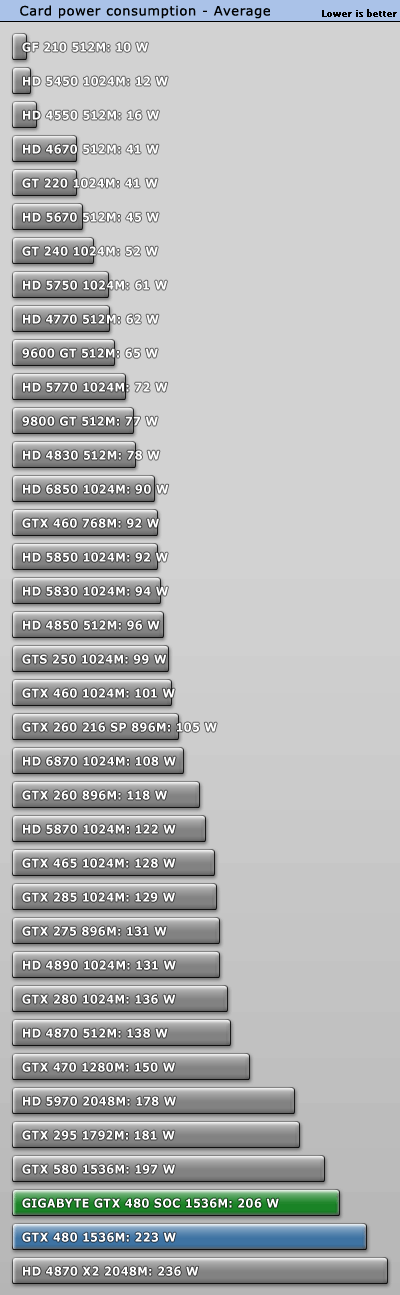
As for information purposes:

power_average.gif

In farcry where the difference is, notice fan stopped at 65% anyway. Good or bad news?
Well it means for sure that if you put it at 100% you get every inch of performance from this card in all games.... if your case is well ventilated. Lol.
 
well given that this cooler in a tweaktown review is on par with a water block, why wouldn't you?

http://www.tweaktown.com/reviews/4993/prolimatech_mk_26_video_card_cooler_review/index8.html

OCuk has a pretty good rep, why would they lie, they appear to be selling all there stock regardless....


I'm looking specifically at 1.4v and the performance of the stock cooler at 1.4v and 1200MHz.

I wasn't looking at the card snapper cooler.

I have used car salesmen phobia. :|
 
Back
Top