
gdansk
Diamond Member
Similar scores. 28.5 in FF. 50.2 in Edge.can you try in perf mode?

Similar scores. 28.5 in FF. 50.2 in Edge.can you try in perf mode?
Not bad. Not M5 (spaceship) territory, but quite a bit ahead of the Windows competition.

Yup, in line with the QRD.Similar scores. 28.5 in FF. 50.2 in Edge.
Nice. Can you use hwinfo to check power draw in ST results? Allegedly Qcomm added support for this, in this gen.Zenbook A16 has arrived. Screen looks great. No notch. Ceraluminum might be a marketing name but it feels nice whatever it is. Bloatware and stickers. They never learn. Fan noise is tolerable in normal usage. In whisper mode I haven't heard it using the web. Maybe they finally did it. In performance mode it is comically loud, so I am avoiding that even for the tests here. Track pad isn't bad except the click mechanism but you can avoid that.
It wants a 130W charger. That sucks because everyone in my family uses Apple laptops so our homes are littered with their 100W chargers. It'll be weeks before I know typical battery life.
It really sucks in Firefox. About 1/2 the score of a 9950X3D in Speedometer 3.1. Does okay in Chromium-based browsers. ~40 compared to ~50 for 9950X3D. It is a laptop, however, and it feels responsive so far despite that.
GB6.7
GB6.2 (No SME)ASUS Zenbook A16 UX3607OA - Geekbench
Benchmark results for an ASUS Zenbook A16 UX3607OA with a Snapdragon X2 Elite Extreme - X2E94100 - Qualcomm Oryon processor.browser.geekbench.com
GB5.5ASUS Zenbook A16 UX3607OA - Geekbench
Benchmark results for an ASUS Zenbook A16 UX3607OA with a Snapdragon X2 Elite Extreme - X2E94100 - Qualcomm Oryon processor.
ASUS Zenbook A16 UX3607OA - Geekbench
Benchmark results for an ASUS Zenbook A16 UX3607OA with a Snapdragon X2 Elite Extreme - X2E94100 - Qualcomm Oryon processor.
Cinebench 2026
Normal performance mode
616 ST
5977 MT
9.71x
Benchlight 0.9.7 (WSL)
101.gcc: 11.05
102.xz: 3.66
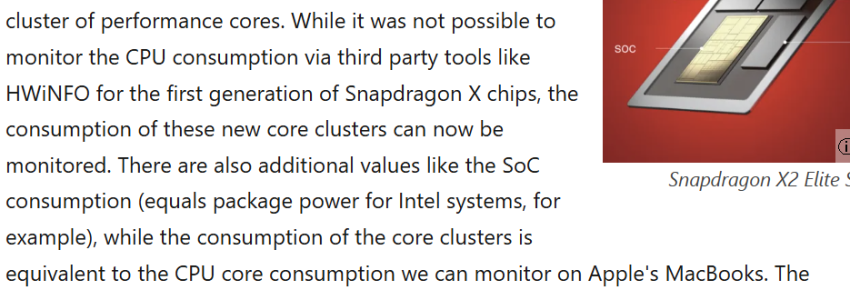
My initial impressions keep getting better and better.Not bad. Not M5 (spaceship) territory, but quite a bit ahead of the Windows competition.
I tried running the beta version. I'm not sure why if it's 1T it has two clusters active.Nice. Can you use hwinfo to check power draw in ST results? Allegedly Qcomm added support for this, in this gen.
...
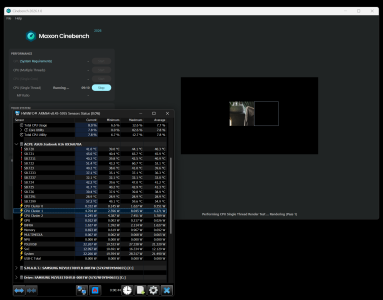

Does it go up 60 watts for the MT testI tried running the beta version. I'm not sure why if it's 1T it has two clusters active
Depends on the mode. Whisper mode reports ~50W. Standard mode ~75W. Performance mode ~100W.Does it go up 60 watts for the MT test
Accurate enough.Depends on the mode. Whisper mode reports ~50W. Standard mode ~75W. Performance ~100W.
I'm not sure how accurate this is.
You can measure at the wall. But yeah looks about right for a cpu with 18 cores on N3X.Depends on the mode. Whisper mode reports ~50W. Standard mode ~75W. Performance mode ~100W.
I'm not sure how accurate this is. And my bet is that vendors can play stupid power limit games given these are Asus power modes.
Wow yeah, that's super weird. Are the other cores also boosting in the other clusters?My initial impressions keep getting better and better.
The biggest negative impressions so far have all been Asus/Microsoft bloat and shenanigans. Those are outside of Qualcomm's control.
- Driver software for my Logitech mouse just worked.
- I'm compiling projects now and it is faster than any other laptop I've used that can run full Visual Studio. The fans didn't turn on in the time it took to build.
- Some old 32-bit only game I play works in emulation. I really did not expect that. It barely works on modern Windows x86.
- WSL just worked and installed aarch64 Linux.
I tried running the beta version. I'm not sure why if it's 1T it has two clusters active.
It looks like it is switching between 1T on each cluster, but rather quickly. If I switch to different performance modes it does that less. Maybe thermal management.Wow yeah, that's super weird. Are the other cores also boosting in the other clusters?

My initial impressions keep getting better and better.
The biggest negative impressions so far have all been Asus/Microsoft bloat and shenanigans. Those are outside of Qualcomm's control.
- Driver software for my Logitech mouse just worked.
- I'm compiling projects now and it is faster than any other laptop I've used that can run full Visual Studio. The fans didn't turn on in the time it took to build.
- Some old 32-bit only game I play works in emulation. I really did not expect that. It barely works on modern Windows x86.
- WSL just worked and installed aarch64 Linux.
I tried running the beta version. I'm not sure why if it's 1T it has two clusters active.
Oh I did run them in WSL. Do you want me to send the results?Any chance you feel like running some other benchmarks? Perhaps source-based benches that imitate SPEC subtests?
Send send send!!!Oh I did run them in WSL. Do you want me to send the results?

It sounds like ARM Windows is maturing up nicely.My initial impressions keep getting better and better.
The biggest negative impressions so far have all been Asus/Microsoft bloat and shenanigans. Those are outside of Qualcomm's control.
- Driver software for my Logitech mouse just worked.
- I'm compiling projects now and it is faster than any other laptop I've used that can run full Visual Studio. The fans didn't turn on in the time it took to build.
- Some old 32-bit only game I play works in emulation. I really did not expect that. It barely works on modern Windows x86.
- WSL just worked and installed aarch64 Linux.
I tried running the beta version. I'm not sure why if it's 1T it has two clusters active.

Can you try running some games with Prism or FEX?My initial impressions keep getting better and better.
The biggest negative impressions so far have all been Asus/Microsoft bloat and shenanigans. Those are outside of Qualcomm's control.
- Driver software for my Logitech mouse just worked.
- I'm compiling projects now and it is faster than any other laptop I've used that can run full Visual Studio. The fans didn't turn on in the time it took to build.
- Some old 32-bit only game I play works in emulation. I really did not expect that. It barely works on modern Windows x86.
- WSL just worked and installed aarch64 Linux.
I tried running the beta version. I'm not sure why if it's 1T it has two clusters active.
Isn't FEX Linux-only?Can you try running some games with Prism or FEX?
Yeah, I forgot.Isn't FEX Linux-only?
According to this, you could use it as the emulation back end in Windows too...Isn't FEX Linux-only?
This is how the OS knows where to locate a 32-bit emulator (whether hardware sandbox or software translator) to inject into the 32-bit process. You should now realize that the x86-to-ARM64 translator is a pluggable component listed in the registry. This is the key to plugging in other implementations from Microsoft or third parties. The Wine 9.0 release notes recently disclosed that Wine now implements that same registry key, opening the door for third party emulators on Linux such as FEX to plug in. Very cool! Obviously the emulator that kicks in on macOs is Rosetta today. What would be far more interesting to me (as a Windows user and developer) would be to see a third party emulator used for Wine on Linux get ported over to Windows as an alternative to xtajit.dll and xtajit64.dll.
In the case of 64-bit emulation, there already is a pluggable third party emulator (of sorts) - the xtabase x64 interpreter which I'd written as a test and validation tool has been included in both Windows 11 SV1 and SV2 (builds 22000 and up) for almost three years. It was my original predecessor to xtajit64.dll during development and features extras such as: implementation of the CPUID ABM feature (which is mostly just implementing the LZCNT instruction which AMD had introduced over 15 years ago), very accurate 80-bit x87 floating point emulation using a pure software 80-bit floating point emulation package, and more accurate and deterministic EFLAGS arithmetic flags emulation than JIT translations. That is why xtabase was used as the reference interpreter when getting the JIT up and running.
I don't have benchmark results but I can say the following games worked or not:Can you try running some games with Prism or FEX?
Yes that's an emulator so it could be used in many places... provided a lot of work:According to this, you could use it as the emulation back end in Windows too...
Indeed technically it can be done, but good luck 🙂There is no reason the efforts already taking place on Linux with QEMU and FEX can't be adapted to run on Windows PCs.


