
-
We’re currently investigating an issue related to the forum theme and styling that is impacting page layout and visual formatting. The problem has been identified, and we are actively working on a resolution. There is no impact to user data or functionality, this is strictly a front-end display issue. We’ll post an update once the fix has been deployed. Thanks for your patience while we get this sorted.
You are using an out of date browser. It may not display this or other websites correctly.
You should upgrade or use an alternative browser.
You should upgrade or use an alternative browser.
PrimeGrid Races 2018
Page 13 - Seeking answers? Join the AnandTech community: where nearly half-a-million members share solutions and discuss the latest tech.

biodoc
Diamond Member
Is the best way to determine run times to disable networking and view the finished WUs, then?
That's what I'm doing. That's about all we can do, right?

crashtech
Lifer
I thought so, but there's plenty of tricks that I have yet to learn!That's what I'm doing. That's about all we can do, right?
I've meant to ask you, how did you determine that SMT needed to be disabled on your AMD chip(s)? I didn't have time to test both ways.


Markfw
Moderator Emeritus, Elite Member
My Ryzen is running pretty fast now, but I can't tell you the times, but the units are disappearing from the queue pretty good now.I thought so, but there's plenty of tricks that I have yet to learn!
I've meant to ask you, how did you determine that SMT needed to be disabled on your AMD chip(s)? I didn't have time to test both ways.
Oh, and SMT ON. I think faster than my 2683v3
crashtech
Lifer
It's not exactly apples to apples, but here's a bit of the raw data:
Xeon E5-2667 @ 3.2GHz, HT ON, 5 threads, avg of 10 WUs: 8,928 sec.
E5-2680v2 @ 3.0GHz, HT ON, 6 threads, avg of 10 WUs: 8,628 sec.
i7-8700K @ 4.7GHz, HT ON, 5 threads, avg of 4 WUs: 4,680 sec.*
Ryzen 1700 PRO @ 3.7GHz, SMT ON, 5 threads, avg of 10 WUs: 11,418 sec.
Ryzen 1700 PRO @ 3.7GHz, SMT OFF, 4 threads, avg of 5 WUs: 8,460 sec.
i7-3930K @ 3.9GHz, HT ON, 6 threads, avg of 10 WUs, 7,254 sec.
i7-6700 @ 3.7GHz, HT ON, 4 threads, avg of 10 WUs, 8,652 sec.
i7-2820QM @ 2.4GHz, HT ON, 7 threads, avg of 10 WUs, 8,946 sec.
Edit: These times were taken from the BOINC client in H:M:S and converted into seconds for ease of averaging.
Edit 2: I'm working to eliminate data where CPU threads were over-allocated due to GPU tasks running concurrently.
*Updated to 2 tasks 5 threads instead of 2 tasks 6 threads.
Xeon E5-2667 @ 3.2GHz, HT ON, 5 threads, avg of 10 WUs: 8,928 sec.
E5-2680v2 @ 3.0GHz, HT ON, 6 threads, avg of 10 WUs: 8,628 sec.
i7-8700K @ 4.7GHz, HT ON, 5 threads, avg of 4 WUs: 4,680 sec.*
Ryzen 1700 PRO @ 3.7GHz, SMT ON, 5 threads, avg of 10 WUs: 11,418 sec.
Ryzen 1700 PRO @ 3.7GHz, SMT OFF, 4 threads, avg of 5 WUs: 8,460 sec.
i7-3930K @ 3.9GHz, HT ON, 6 threads, avg of 10 WUs, 7,254 sec.
i7-6700 @ 3.7GHz, HT ON, 4 threads, avg of 10 WUs, 8,652 sec.
i7-2820QM @ 2.4GHz, HT ON, 7 threads, avg of 10 WUs, 8,946 sec.
Edit: These times were taken from the BOINC client in H:M:S and converted into seconds for ease of averaging.
Edit 2: I'm working to eliminate data where CPU threads were over-allocated due to GPU tasks running concurrently.
*Updated to 2 tasks 5 threads instead of 2 tasks 6 threads.
Last edited:
It's one way. Though you need to be there to control the supply of tasks.Is the best way to determine run times to disable networking and view the finished WUs, then?
You can also look into the event log of the client and see when tasks were started and finished. The run times computed from this may be off by 1 or 2 seconds.
As you know, I turned to scripted testing outside of boinc, which has the benefit that WU variability is eliminated, but the drawback that the test machines are blocked from real work (DC or otherwise).
biodoc
Diamond Member
I've meant to ask you, how did you determine that SMT needed to be disabled on your AMD chip(s)? I didn't have time to test both ways.
I didn't know. It's just a test.
crashtech
Lifer
I've turned off SMT on one of my Ryzens (1700 PRO) as well. I have some data on how it does with it on, and it's not encouraging.I didn't know. It's just a test.
biodoc
Diamond Member
I've turned off SMT on one of my Ryzens (1700 PRO) as well. I have some data on how it does with it on, and it's not encouraging.
That's consistent with the data I have too. It's better with SMT on.

crashtech
Lifer
Well, I would think that the completion times would need to be less than half with SMT off for there to be an advantage, all else equal. I'll know by the end of the day how SMT OFF is working out on the 1700 PRO.That's consistent with the data I have too. It's better with SMT on.
Are you really driving all 6 cores under AVX load at 4.7 GHz? (If so, didn't the TIM vaporize by now?) ;-)i7-8700K @ 4.7GHz, HT ON, 4 threads, avg of 4 WUs: 10,320 sec.
Assuming an average of 1,690 credits/task and 3 tasks running in parallel, this makes a host throughput of
1,690 credits/task * 3 tasks * 24 h/d * 3,600 s/h / 10,320 s = 42,450 credits/day.
i7-7700K @ 4.2GHz, HT ON, 7 threads/task (leaving one thread for background stuff such as SZTAKI):
2,937 s for a 1,678 credits task
1,678 * 1 * 24 * 3,600 / 2,937 = 49,360 credits/day
--- Edit: Wait, I did test SR5-LLR with 2 tasks at a time, 4 threads/task. It gave 44,020 credits/day for the i7-7700K host.
Either your setting of 3 tasks on socket 1151 is quite a bit off from Coffee Lake's optimum, or/and you have some phantom throttling going on (on a moderate level).
--------
PS,
the default BIOS settings on my ASRock board had the i7-7700K try to run all-core AVX loads at a turbo clock of 4.4 GHz, causing it to run into the thermal wall and throttle intermittentlym, despite watercooling. For this reason I switched the BIOS towards an AVX offset of the equivalent of minus 0.2 GHz, and no longer have any throttling, thermal or otherwise.
Last edited:
crashtech
Lifer
Are you really driving all 6 cores under AVX load at 4.7 GHz? (If so, didn't the TIM vaporize by now?) ;-)
Assuming an average of 1,690 credits/task and 3 tasks running in parallel, this makes a host throughput of
1,690 credits/task * 3 tasks * 24 h/d * 3,600 s/h / 10,320 s = 42,450 credits/day.
i7-7700K @ 4.2GHz, HT ON, 7 threads/task (leaving one thread for background stuff such as SZTAKI):
2,937 s for a 1,678 credits task
1,678 * 1 * 24 * 3,600 / 2,937 = 49,360 credits/day
I have not tested two tasks at a time on the i7 with SR5-LLR. Butin my tests with one or another longer running LLR subprojects I saw the 4C/8T Haswells and Kaby Lakes perform best with only one task at a time.
--- Edit: Wait, I did test SR5-LLR with 2 tasks at a time, 4 threads/task. It gave 44,020 credits/day for the i7-7700K host.
Either your setting of 3 tasks on socket 1151 is quite a bit off from Coffee Lake's optimum, or/and you have some phantom throttling going on (on a moderate level).
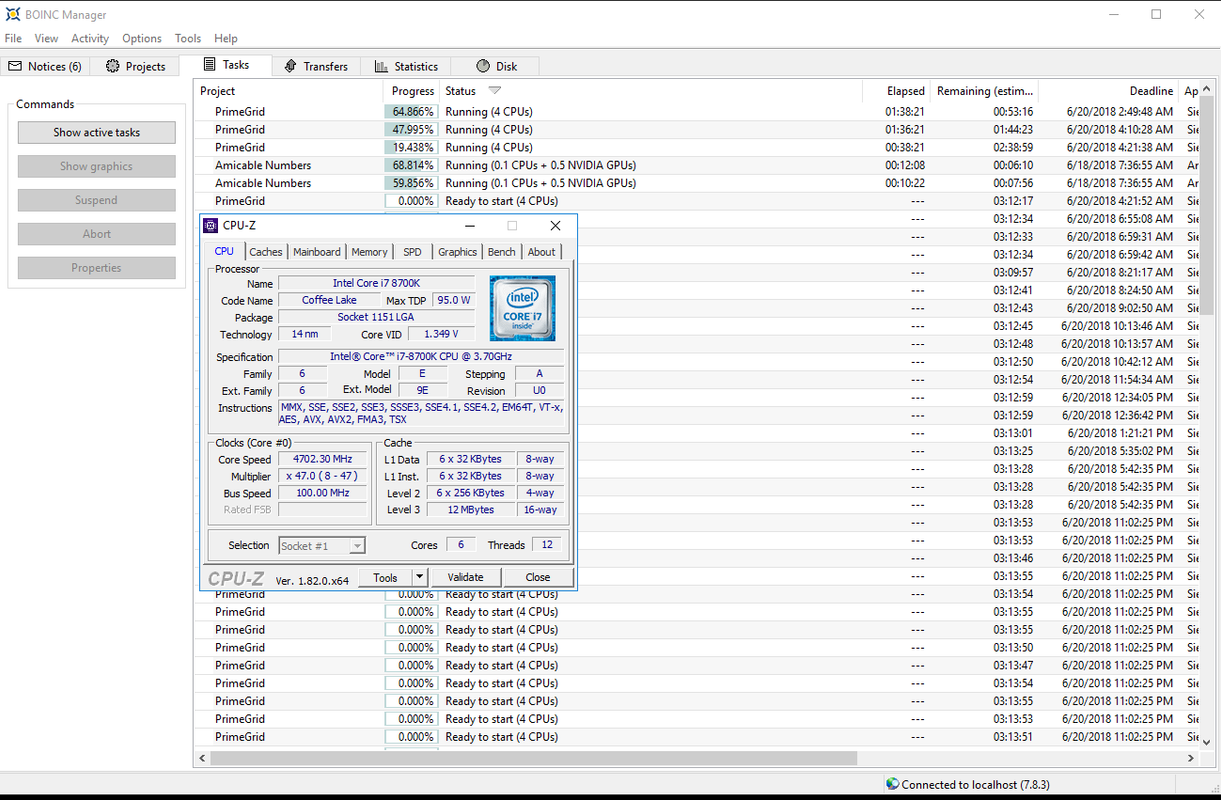
It's delidded and running under water with a 280mm radiator, 5.0GHz with a -3 AVX offset. It does seem that my setup is off the pace, though. I am running Amicable numbers on the 1070ti concurrently, perhaps I ought to be leaving an entire thread for that. Any suggestions on config modifications would be much appreciated!
Ah, that's different then.It's delidded
OK, this additional I/O load on the processor is certainly among the reasons why your CFL puts out a little less SR5-LLR than my KBL. Finding optimum PrimeGrid settings when running concurrently with a defined GPU load opens up a whole other branch to research...I am running Amicable numbers on the 1070ti concurrently,
In contrast to you, I chickened out and switched all GPU loads off for the duration of this challenge. Actually, I originally wanted to run this challenge only on GPU-less hosts for best perf/W. But after I saw my individual rank after ~ half a day, I could not resist and switched the GPU equipped PCs on too.
Hmm. 1 task/socket may not be the best advice for a 6C/12T CPU anymore, since there is no good scaling past 6 or 8 threads per task to be expected in SR5-LLR. So, maybe 2 tasks at a time, 5 threads per task for PrimeGrid, and the rest for Amicable and the system?Any suggestions on config modifications would be much appreciated!
Last edited:
crashtech
Lifer
Done, and perhaps I should do similarly to all the rest which are running GPU tasks, since the drag of the GPU probably makes my CPU performance data pretty useless. I was just going for maximum throughput by trying to use all threads for SR5....So, maybe 2 tasks at a time, 5 threads per task for PrimeGrid, and the rest for Amicable and the system?
Our new leet acronym is catching on.We will become 7AA7 quite soon.
From SETI.Germany's forum:
On June 15/ 00:01UTC pschoefer said:The first day of the challenge is over. The interim results:
1 __ Czech National Team ____ 3,081,257.94
2 __ SETI.Germany ___________ 2,958,538.30
3 __ Aggie The Pew __________ 2,597,659.52
4 __ TeAm AnandTech _______ 2,407,351.58
5 __ Sicituradastra. __________ 1,694,937.87
6 __ BOINC@Poland ___________ 687,824.26
7 __ BOINC@MIXI _____________ 608,600.24
8 __ Crunching@EVGA ________ 589,799.54
9 __ BOINC@AUSTRALIA _____ 409,316.34
For 18 hours we were able to hold our lead after the first delivered WUs, until the Czech National Team passed us, and even pulled away a little bit in the meantime. Once again, Aggie The Pew takes a bit longer to get going, but we know the game well enough. Behind them, 7AA7 moves on an unfamiliar rank, which seems relatively safe as S* presents itself very weak. The trio who contend for sixth place, with slight advantage for BOINC@Poland, runs the risk of being skipped by a kangaroo.

biodoc
Diamond Member
Ryzen 2700X@3.8 GHz on 64 bit linux: I downloaded a bunch of tasks and turned off networking to obtained run times with the boinc manager. It looks like SMT "on" is the way to go for this subproject.
SMT on (2 x 8 threads): Average of 7 tasks = 7197 seconds
SMT off (1 x 8 threads): Average of 7 tasks = 4337 seconds (Needs to be lower than 3598 seconds for SMT off to be beneficial)
SMT on (2 x 8 threads): Average of 7 tasks = 7197 seconds
SMT off (1 x 8 threads): Average of 7 tasks = 4337 seconds (Needs to be lower than 3598 seconds for SMT off to be beneficial)
Last edited:
@crashtech, I just remembered another potential factor: My 7700K is run by Linux, which generally keeps quiet and lets applications do their work. Your 8700K is run by Windows, which may have background stuff enabled that MS deems worthy of your processors' frequent attention.
@biodoc, how about 2x4? (Also, 50 % CPUs in BOINC & SMT on may be a little bit better than 100 % & SMT off, if the kernel's process scheduler is working right.)
@biodoc, how about 2x4? (Also, 50 % CPUs in BOINC & SMT on may be a little bit better than 100 % & SMT off, if the kernel's process scheduler is working right.)
crashtech
Lifer
See my updated result, you may find it more consistent with expectations. Apparently over-allocating can do more harm than good.@crashtech, I just remembered another potential factor: My 7700K is run by Linux, which generally keeps quiet and lets applications do their work. Your 8700K is run by Windows, which may have background stuff enabled that MS deems worthy of your processors' frequent attention...
Guessing 1,600...1,700 credits/task, that would be 59...63 kPPD. Now that's better!See my updated result, you may find it more consistent with expectations.
LLR being AVX and cache/memory intensive, combined with PrimeGrid using fixed credit, over-allocation should be bad, agreed.Apparently over-allocating can do more harm than good.

indydude345
Member
My Ryzen 1600 jumped to completing tasks in... around 18 hours. With SMT off and the app_config.xml change. There was one task that had been running for 21 hours and had not completed yet. I may be having a slight problem. Have I configured something wrong?
crashtech
Lifer
You should turn SMT back on, the advice to have it off apparently applies mostly to older Intel CPUs. Can you post your app_config.xml? Did you restart the client after making changes to app_config.xml?My Ryzen 1600 jumped to completing tasks in... around 18 hours. With SMT off and the app_config.xml change. There was one task that had been running for 21 hours and had not completed yet. I may be having a slight problem. Have I configured something wrong?
TRENDING THREADS
-
 Discussion Zen 5 Speculation (EPYC Turin and Strix Point/Granite Ridge - Ryzen 9000)
- Started by DisEnchantment
- Replies: 25K
-
Discussion Intel Meteor, Arrow, Lunar & Panther Lakes + WCL Discussion Threads
- Started by Tigerick
- Replies: 25K
-

-

-
