
• We’re currently investigating an issue related to the forum theme and styling that is impacting page layout and visual formatting. The problem has been identified, and we are actively working on a resolution. There is no impact to user data or functionality, this is strictly a front-end display issue. We’ll post an update once the fix has been deployed. Thanks for your patience while we get this sorted.

Please explain this to me?

CDC Mail Guy

Golden Member
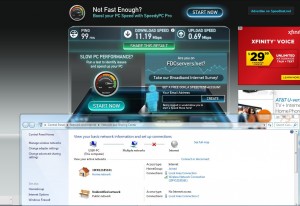

How do I have a ping of 99, a download speed of 11.19Mbps and yet there is a red X between me and the internet?

I can download, surf pages, but I keep getting disconnected from Black Ops II server?

I am behind a proxy, would that be the reason maybe?

Also, I have wired and wireless connection hooked up, but I doubt that would be the reason...

Can someone tell me wth is going on?
 
Sometimes Windows reports wrong information. I've occasionally seen the network connection icon stuck believing the machine doesn't even have an ip address assigned to it, yet it does and the internet is fully functional.

That and the Black Ops II issue may be completely independent of each other.
 
Last edited:
I usually suggest to people who have little knowledge of Networking to keep only the One NIC that is used for Internet On and disable other NICs on the computer.

.
 
Agreed with JackMDS. I never ever ever, for home use, use more than one NIC at a time. Disconnect your wifi, and I'm fairly positive your problem will go away.
 
Okay...first off, sorry for late reply...I so totally forgot about this thread, lol.

Well...I disconnected the wireless. Actually, I took the wireless card out of the case altogether. Still have the red X, but speed has improved (with the exception of Facebook with Chrome for some reason)

The wireless is messed up on the router, one of those free Westell modems from Frontier. I am upgrading my plan to 15 down, and will be getting a new modem/router on the 16th.

My Google Nexus can connect just fine, but my and my GF's phones shows no wireless connectivity, even though the network is there. Just another thing for the Frontier guy to help with...but I am HOPING a new modem/router will work.

Thanks to all for the suggestions and help, even though the problem still exists, the wired connection works GREAT!!!
 
It's probably the proxy. You are limited by the speed of the proxy, most of them are very slow as they are typically machines that arn't even suppose to be pubic but people found and submitted to whatever proxy list you got it from.

The proxy is also an extra step for your data to travel to. Though, depending on how this proxy works it should only be affecting specific services such as web, and not your gaming.
 
It'll show a "!" symbol by your internet connection in 8/8.1 if that is what occurs. Or for a number of other reasons, like it gets a DNS resolution error, or DHCP error.

In Win 7 and maybe Vista, it'll tell you the network you are connected to, but no internet access if NCSI lookup fails, but it sees other connected devices on the network (IE you are connected to SOMETHING).
 
I stand corrected. As of this morning, neither my nexus nor laptop can connect to the wireless network, even though the network shows, and the devices show they're connected. I stopped using the proxy, and am SO glad I am getting a new modem/router on the 16th 🙂 Hopefully, that will help. The hard wire connection is working splendidly 🙂

There is no "!" by the connection.
 
Back
Top