
Question PCI Express root error - Crashing

qais

Junior Member
Dec 1, 2025
13
6
36
Hey guys,

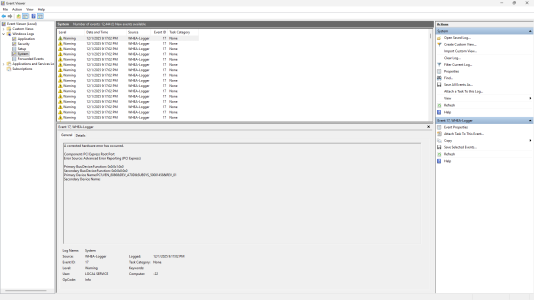
I built a PC around a month ago, and it's been crashing a lot lately. I logged back into the event viewer to check the error and it repeats this like a million times at the time of the crash:

A corrected hardware error has occurred.

Component: PCI Express Root Port

Error Source: Advanced Error Reporting (PCI Express)

Primary Bus:Device:Function: 0x0:0x3:0x1

Secondary Bus:Device:Function: 0x0:0x0:0x0

Primary Device Name:pCI\VEN_1022&DEV_1453&SUBSYS_14531022&REV_00

Secondary Device Name:

Can anyone pls help stop the crashing?
 

Attachments

  • Screenshot (449).png
    Screenshot (449).png
    116 KB · Views: 6

In2Photos

Platinum Member
Mar 21, 2007
2,625
2,794
136
The primary device name points to AMD. Do you have an AMD GPU? If so, make sure the GPU is seated properly. If there is excessive GPU sag put something in to prop it up and keep it level. Make sure the power is plugged in correctly and if you are using any splitters try connecting them directly without splitters.
 

DAPUNISHER

Super Moderator CPU Forum Mod and Elite Member
Super Moderator
Aug 22, 2001
32,303
33,158
146
Welcome to the forums.

Full system specs please. It greatly accelerates the troubleshooting process.
 

qais

Junior Member
Dec 1, 2025
13
6
36
The primary device name points to AMD. Do you have an AMD GPU? If so, make sure the GPU is seated properly. If there is excessive GPU sag put something in to prop it up and keep it level. Make sure the power is plugged in correctly and if you are using any splitters try connecting them directly without splitters.


Thanks for the suggestion! My GPU is actually an NVIDIA 5060 not AMD, and it’s seated properly in the PCIe slot. The 8-pin (6+2) power cable is connected directly from the PSU without any splitters. So that part shouldn’t be causing the crashing.
 

qais

Junior Member
Dec 1, 2025
13
6
36
Thanks! Here are my full system specs:


  • GPU: RTX 5060
  • CPU: Intel i5-14400F
  • RAM: 32GB DDR4
  • PSU: 700W
  • Motherboard: Gigabyte B760M DS3H
  • Storage: Patriot M.2 1TB 3500MB/s
    Welcome to the forums.

    Full system specs please. It greatly accelerates the troubleshooting process.
 
  • Like
Reactions: DAPUNISHER

mikeymikec

Lifer
May 19, 2011
21,369
16,579
136
Did you take the boot drive from a system with AMD hardware in? It's just that VEN_1022 is AMD, that's why included that in my last comment.
 

qais

Junior Member
Dec 1, 2025
13
6
36
Did you take the boot drive from a system with AMD hardware in? It's just that VEN_1022 is AMD, that's why included that in my last comment.
No, the boot drive has always been in this Intel system. I understand VEN_1022 refers to AMD, but there has never been AMD hardware connected to this drive.
 

In2Photos

Platinum Member
Mar 21, 2007
2,625
2,794
136
Can you check the device manager and see if there are any devices with an exclamation point? Also, does the motherboard have the latest BIOS?
 

qais

Junior Member
Dec 1, 2025
13
6
36
Can you check the device manager and see if there are any devices with an exclamation point? Also, does the motherboard have the latest BIOS?
No, there are no errors in Device Manager. My motherboard BIOS is not the latest version. I saw on Reddit a similar issue where they changed the CPU PCIe Link Speed to Gen3 and PCH PCIe lanes to Gen4 in BIOS. I did the same on my system and the Event Viewer PCIe errors disappeared, but I’m not sure if this completely fixed the crashing issue yet.
 
  • Like
Reactions: DAPUNISHER

DAPUNISHER

Super Moderator CPU Forum Mod and Elite Member
Super Moderator
Aug 22, 2001
32,303
33,158
146
No, there are no errors in Device Manager. My motherboard BIOS is not the latest version. I saw on Reddit a similar issue where they changed the CPU PCIe Link Speed to Gen3 and PCH PCIe lanes to Gen4 in BIOS. I did the same on my system and the Event Viewer PCIe errors disappeared, but I’m not sure if this completely fixed the crashing issue yet.
I have read that as well. For as long as I've been building my own systems, things that should work automagically, have been problematic. Necessitating manual changes.

A quick search showed raptor lake owners with failing CPUs have the issue. Most 14400 series are actually Alder Lake, but I've read some users say that theirs is the raptor B0 stepping. A utility like CPU-Z or the Intel processor identification utility can tell you which you have. I doubt it would only have this error if it were B0 and degraded. You probably found the issues already. If it is raptor though, I strongly recommend getting the latest bios, to be on the safe side. It has all the mitigations to help prevent the degradation.
 
  • Like
Reactions: Steltek

qais

Junior Member
Dec 1, 2025
13
6
36
I have read that as well. For as long as I've been building my own systems, things that should work automagically, have been problematic. Necessitating manual changes.

A quick search showed raptor lake owners with failing CPUs have the issue. Most 14400 series are actually Alder Lake, but I've read some users say that theirs is the raptor B0 stepping. A utility like CPU-Z or the Intel processor identification utility can tell you which you have. I doubt it would only have this error if it were B0 and degraded. You probably found the issues already. If it is raptor though, I strongly recommend getting the latest bios, to be on the safe side. It has all the mitigations to help prevent the degradation.
Thanks for the advice! The BIOS update I currently have installed is the one compatible with my CPU generation. The main thing preventing me from updating further right now is stable power delivery, as I want to avoid any risk during the update. Also, I realized I gave the wrong Primary Device name earlier—the correct one is: PCI\VEN_8086&DEV_A70D&SUBSYS_50001458&REV_01.Can I consider the problem resolved for now?
 
  • Like
Reactions: DAPUNISHER

DAPUNISHER

Super Moderator CPU Forum Mod and Elite Member
Super Moderator
Aug 22, 2001
32,303
33,158
146
If the system is running properly, then you have successfully fixed it. You should check the stepping regardless. If it is C0 I would not worry.
 

qais

Junior Member
Dec 1, 2025
13
6
36
If the system is running properly, then you have successfully fixed it. You should check the stepping regardless. If it is C0 I would not worry.


Thanks! I checked the CPU stepping using CPU-Z, and it is B0. The system is running fine now, and the PCIe errors in Event Viewer have disappeared, so everything seems stable.
 
  • Like
Reactions: DAPUNISHER

DAPUNISHER

Super Moderator CPU Forum Mod and Elite Member
Super Moderator
Aug 22, 2001
32,303
33,158
146
Right on. Update that bios when it is feasible. And thanks for posting the fix, it will help others searching for answers. :beercheers:
 
  • Like
Reactions: qais

qais

Junior Member
Dec 1, 2025
13
6
36
Right on. Update that bios when it is feasible. And thanks for posting the fix, it will help others searching for answers. :beercheers:
Hi again,


The system froze once more while I wasn’t running anything on it. I checked the Event Viewer and found a new error:


Event ID 41 – The system has rebooted without cleanly shutting down first. This error could be caused if the system stopped responding, crashed, or lost power unexpectedly.


This happened even though nothing heavy was running, so I’m wondering if it might be related to power stability, BIOS settings, or the PCIe configuration. Any advice would be appreciated.
 

DAPUNISHER

Super Moderator CPU Forum Mod and Elite Member
Super Moderator
Aug 22, 2001
32,303
33,158
146
You can try normal troubleshooting steps. Including: Updating to the latest bios, one stick of ram at a time, turning off XMP. A different power supply if you can get one. Reseating the video card, making certain all cables are fully plugged in. Checking temperatures with a utility like HWifon64 to make certain you don't have overheating issues. Use https://www.guru3d.com/download/display-driver-uninstaller-download/ to nuke your drivers, then reinstall the latest version fresh. Even try a fresh windows install.

If none of that stops the instability? Then because every Raptor Lake CPU 65W and above is potentially affected by degradation, it may be the culprit. At which point you will want to contact Intel if you purchased the CPU retail, or the company you bought the PC from. They will help you troubleshoot, and issue an RMA if needed.

One of the suggested methods for exposing a failing raptor lake CPU you can try yourself, is to install and uninstall Nvidia's graphics drivers 10 times in a row. If it successfully completes every attempt, the CPU may be okay.
 

DAPUNISHER

Super Moderator CPU Forum Mod and Elite Member
Super Moderator
Aug 22, 2001
32,303
33,158
146
I looked at your board and it has Qflash plus. It is a button on the board that lets you update the bios without even having the CPU, GPU, or ram installed. Just follow the directions for using it from Gigabyte. I've done it with a couple of brands and it's a great feature.
 

qais

Junior Member
Dec 1, 2025
13
6
36
I looked at your board and it has Qflash plus. It is a button on the board that lets you update the bios without even having the CPU, GPU, or ram installed. Just follow the directions for using it from Gigabyte. I've done it with a couple of brands and it's a great feature.
You can try normal troubleshooting steps. Including: Updating to the latest bios, one stick of ram at a time, turning off XMP. A different power supply if you can get one. Reseating the video card, making certain all cables are fully plugged in. Checking temperatures with a utility like HWifon64 to make certain you don't have overheating issues. Use https://www.guru3d.com/download/display-driver-uninstaller-download/ to nuke your drivers, then reinstall the latest version fresh. Even try a fresh windows install.

If none of that stops the instability? Then because every Raptor Lake CPU 65W and above is potentially affected by degradation, it may be the culprit. At which point you will want to contact Intel if you purchased the CPU retail, or the company you bought the PC from. They will help you troubleshoot, and issue an RMA if needed.

One of the suggested methods for exposing a failing raptor lake CPU you can try yourself, is to install and uninstall Nvidia's graphics drivers 10 times in a row. If it successfully completes every attempt, the CPU may be okay.


Thanks for the detailed steps! I’ve updated the BIOS to the latest version and monitored temperatures. I also tested the system under load using FurMark. I uninstalled the GPU drivers once and reinstalled the latest version, but I haven’t tried removing and reseating the hardware yet.
 
  • Like
Reactions: DAPUNISHER

DAPUNISHER

Super Moderator CPU Forum Mod and Elite Member
Super Moderator
Aug 22, 2001
32,303
33,158
146
See how things go. Hopefully it stops erroring. Unfortunately, if it is the CPU, mitigations will not fix it. It'll have to be RMA'd.

If you keep seeing instability, another way to expose degradation is compressing and decompressing a big file e.g.10GB a few times. Wendell from Level1tech exposed it that way.
 

Noid

Platinum Member
Sep 20, 2000
2,404
198
106
No dump file ? Check it for details. ( if t created one )
 

qais

Junior Member
Dec 1, 2025
13
6
36
See how things go. Hopefully it stops erroring. Unfortunately, if it is the CPU, mitigations will not fix it. It'll have to be RMA'd.

If you keep seeing instability, another way to expose degradation is compressing and decompressing a big file e.g.10GB a few times. Wendell from Level1tech exposed it that way.
Hello again,

I’ve been getting several types of freezes and crashes, and all of them happened within about 30 minutes, even though the PC was working completely fine recently with no issues.


Here are the errors I received:


  1. Bugcheck / Blue Screen? idk it was black screen with text for me


The computer has rebooted from a bugcheck.
Bugcheck Code: 0x0000000A (IRQL_NOT_LESS_OR_EQUAL)
What failed: ntoskrnl.exe
Dump saved in: C:\WINDOWS\Minidump\120825-8859-01.dmp
Event ID: 1001


  1. Critical – Kernel-Power (Event ID 41)
    The system rebooted without cleanly shutting down. This usually happens when the PC freezes, loses power, or crashes unexpectedly.
  2. WHEA Logger – Event ID 1
    A fatal hardware error has occurred.
    No component name is shown, which usually means the error is coming from the PCIe bus (GPU / PCIe slot / power delivery).

I also had freezes in completely random situations: while watching a video, opening WhatsApp, using Brave, listening to Spotify, or even shortly after Windows startup. There is also a very quick “glitch” sound from the speakers exactly when the freeze happens.


The freezes are not related to load — they happen at idle, under light usage, or sometimes during gaming.


So far, I have:


  • Reinstalled all GPU drivers cleanly with DDU
  • Ran a RAM test (no errors)
  • Updated BIOS and chipset drivers
  • Verified that PCIe shows: PCIe 5.0 x16 @ 5.0 x8
  • Noticed that Event Viewer gives PCIe AER errors but without details
  • Also tested different power cables and wall outlets

Despite all of that, the freezes are becoming more frequent.