
-
We’re currently investigating an issue related to the forum theme and styling that is impacting page layout and visual formatting. The problem has been identified, and we are actively working on a resolution. There is no impact to user data or functionality, this is strictly a front-end display issue. We’ll post an update once the fix has been deployed. Thanks for your patience while we get this sorted.
You are using an out of date browser. It may not display this or other websites correctly.
You should upgrade or use an alternative browser.
You should upgrade or use an alternative browser.
Overclocking non.K CPUs? how does this happen and can it only be done with AsRock?
- Thread starter Barfo
- Start date

Denithor
Diamond Member
IIRC the non-K chips can be OC'd up to 4 bins (4x133mhz) above their maximum turbo speed. So a chip that turbos to 3.1GHz could be turned up to 3.63GHz. And I think it's any Z68/Z75/Z77 boards, not manufacturer specific.
But don't have links to show, would actually appreciate seeing confirmation of this instead of just hearsay like I have now.
🙂
But don't have links to show, would actually appreciate seeing confirmation of this instead of just hearsay like I have now.
🙂

EliteRetard
Diamond Member
Any Intel CPU with turbo can be overclocked 400MHz with a MOBO that supports adjusting the turbo settings. I think most any overclocking MOBO should allow it. You should be able to adjust the base clock on any CPU, but most don't reccomend it because its tied to everything else and can cause stability issues or other problems. 1-2% is the best you could expect there (except for socket 2011 CPUs that have BCLK multis).

NickelPlate
Senior member
You can always change the bus speed right? That was the only way to OC for years after Intel started locking multipliers a long time ago, and before they started releasing unlocked processors again. Of course changing the bus speed, changes other things as well which can cause issues. Last I checked the K version was only $15 more on Amazon making the choice a no brainer (at least for the 3570/3570K).
Oh and it's Asrock, not Assrock rofl. But with a name like, they're just asking for it.
Oh and it's Asrock, not Assrock rofl. But with a name like, they're just asking for it.
Last edited:

videogames101
Diamond Member
You can always change the bus speed right? That was the only way to OC for years after Intel started locking multipliers a long time ago, and before they started releasing unlocked processors again. Of course changing the bus speed, changes other things as well which can cause issues. Last I checked the K version was only $15 more on Amazon making the choice a no brainer (at least for the 3570/3570K).
Oh and it's Asrock, not Assrock rofl. But with a name like, they're just asking for it.
The bus speed now controls many other things, so it's near impossible to get a significant OC via bus speed on Ivy.
The raising of turbo bins should work on all mainboards with Z-series chipset. It does allow for +400 MHz on all turbo settings. As IVB has a more aggresive turbo than SNB, you will get a total of +600 MHz on 4/3-core turbo, and +800 on 2/1-core turbo, relative to the nominal clock of the CPU.I was under the impression non-K CPUs were locked from overclocking, yet I've read a few comments that it is possible with some ASRock boards, is this true?
I might buy a 3470 instead of 3570 if this is true.
I've verified with CPU-Z that my i5-3550 runs at 3.9/4.1 GHz with +4 turbo. Cooling is okay with the stock cooler - temps get really high during IntelBurnTest, but are okay for any practical load.
NickelPlate
Senior member
The bus speed now controls many other things, so it's near impossible to get a significant OC via bus speed on Ivy.
Well that's always been case but don't the newer MBs allow you to fix down the other system bus frequencies too? Some of my old Asus boards would let you do this, but admittedly overclocking a locked processor is much trickier and riskier business than it is just changing the multiplier on a K processor.
...can it only be done with AssRock?
Yes, just as these sorts of things tend to turn out in life, many things can be done with AssRock, this included.
AssRock, putting your Intel chips where the sun don't shine since 1999 :thumbsup:
videogames101
Diamond Member
Yes, just as these sorts of things tend to turn out in life, many things can be done with AssRock, this included.
AssRock, putting your Intel chips where the sun don't shine since 1999 :thumbsup:
They had the first board with PCI-E 16x and AGP 8x, it was perfect 😎

IntelEnthusiast
Intel Representative
Here is the Intel Tuning Utility. With you should be able to do BLCK type overclocking based off from what the motherboard manufacturer has enabled on the board. So there is some room to overclock most of our processors but you wont get as good as results from them as you do from the unlocked "K".
I personally would pay for the Intel® Core™ i5-3570K and get the best processor that I can.
I personally would pay for the Intel® Core™ i5-3570K and get the best processor that I can.
NickelPlate
Senior member
Here is the Intel Tuning Utility. With you should be able to do BLCK type overclocking based off from what the motherboard manufacturer has enabled on the board. So there is some room to overclock most of our processors but you wont get as good as results from them as you do from the unlocked "K".
I personally would pay for the Intel® Core i5-3570K and get the best processor that I can.
Thanks for the link kind sir. Can anyone use this? The reason I ask is because the readme says:
-------------------------------------------
Intel(R) Extreme Tuning Utility Release v2.1
Readme for Intel Extreme Series Desktop Boards
March 14, 2011
For the following Intel motherboards:
- Intel(R) Desktop Board DP67BG
- Intel(R) Desktop Board DX58SO2
- Intel(R) Desktop Board DX58OG
-------------------------------------------
Of course the March 2011 date is a bit out of date.
NickelPlate
Senior member
Hmm well I guess this can't be used for everything. I got an unsupported platform error during install. Not that I need it but was just curious.

T_Yamamoto
Lifer
Assrock. Lol
maybe this link will help on info
http://www.xbitlabs.com/articles/cpu/display/core-i5-ivy-bridge_11.html#sect0
http://www.xbitlabs.com/articles/cpu/display/core-i5-ivy-bridge_11.html#sect0

SolMiester
Diamond Member
IIRC the non-K chips can be OC'd up to 4 bins (4x133mhz) above their maximum turbo speed. So a chip that turbos to 3.1GHz could be turned up to 3.63GHz. And I think it's any Z68/Z75/Z77 boards, not manufacturer specific.
But don't have links to show, would actually appreciate seeing confirmation of this instead of just hearsay like I have now.
🙂
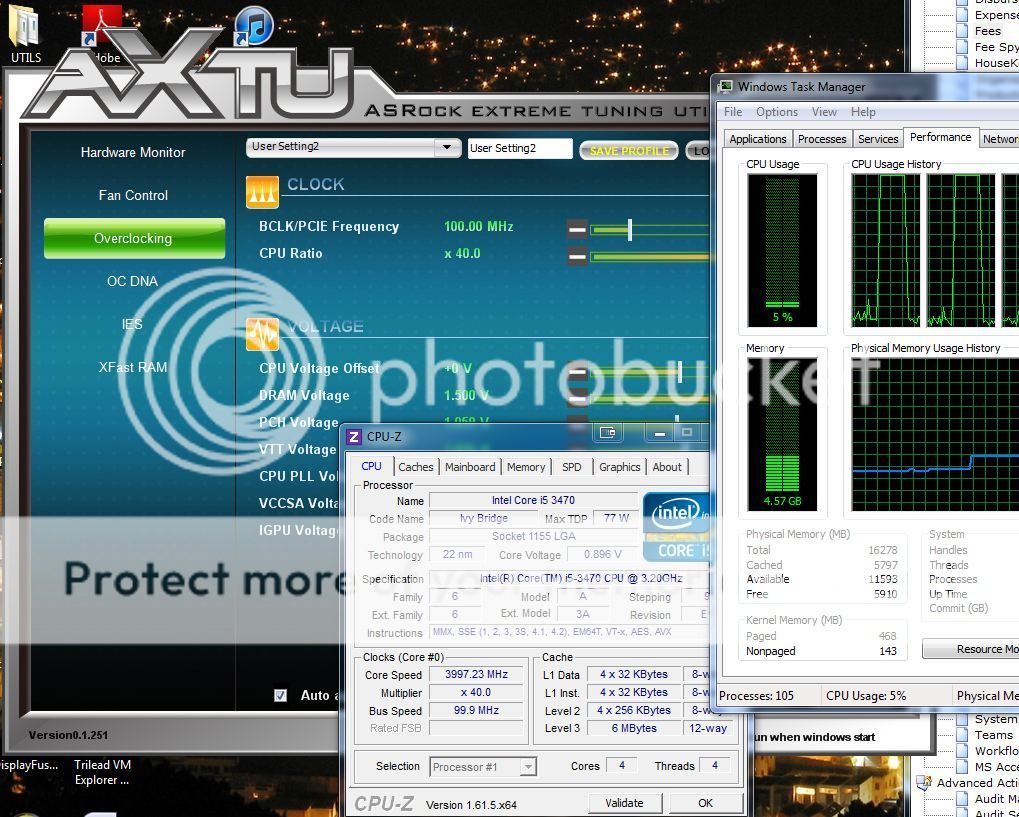
I have the i5 3470 non k in my work PC, now running at 4ghz cores, so thats 800mhz, not 4 x133....? Although when all cores working drops to 3.8ghz
Last edited:

Yuriman
Diamond Member
Hmm well I guess this can't be used for everything. I got an unsupported platform error during install. Not that I need it but was just curious.
I believe IntelEnthusiast linked to an older version of the software, try this one.
I use it to overclock and have had great results.
First thing Asus needs to do if they buy their former subsidiary is to rename it to something less awkward.Assrock. Lol
NickelPlate
Senior member
I believe IntelEnthusiast linked to an older version of the software, try this one.
I use it to overclock and have had great results.
Nice and thanks! Pretty slick little utility for monitoring too. I like it.
Denithor
Diamond Member
I have the i5 3470 non k in my work PC, now running at 4ghz cores, so thats 800mhz, not 4 x133....? Although when all cores working drops to 3.8ghz.
Ok, I was partially correct. Four speed bins is right, 133MHz is wrong - it's actually 100MHz per bin.
Your 3470 for example runs stock 3.2GHz with turbo up to 3.6GHz. You can therefore OC to four speed bins (400MHz) above the highest turbo speed (3.6GHz + 0.4GHz = 4GHz).
🙂

Barfo
Lifer
Yes thanks, however this:maybe this link will help on info
http://www.xbitlabs.com/articles/cpu/display/core-i5-ivy-bridge_11.html#sect0
Although LGA 1155 platform doesnt handle the increase in the base clock generator frequency too well and often loses stability at even 5% frequency increase, it is still possible to overclock non-K Core i5 processors.
doesn't sound very encouraging :hmm:

Phynaz
Lifer
Yes thanks, however this:
doesn't sound very encouraging :hmm:
You should never touch the base clock anyway.
Insert_Nickname
Diamond Member
They had the first board with PCI-E 16x and AGP 8x, it was perfect 😎
Not really. I had a build based on one of those and I went through 3(!) boards before getting one working... 🙁
Needless to say, I have avoided AsRock since... :whiste:
right , it seems even with K model , I was playing around in bios and did try to move the base 34 multiplier up a bit . well it disables speedstep and other parts .You should never touch the base clock anyway.
But with turbo multplier you can asign multipliers how ever you like per core and K models are open way up above 50 (I didn't try any but settings are there ) .
There also a multi-core enhancement setting that works if your in manual/XMP modes , this is a trick by MB manufactures to set all cores to highest single core speed no mater the load in turbo mode . So you have say 1600 idle and 3900 on all cores at load . I don't like that so disabled it .
TRENDING THREADS
-
 Discussion Zen 5 Speculation (EPYC Turin and Strix Point/Granite Ridge - Ryzen 9000)
- Started by DisEnchantment
- Replies: 25K
-
Discussion Intel Meteor, Arrow, Lunar & Panther Lakes + WCL Discussion Threads
- Started by Tigerick
- Replies: 25K
-
 Discussion Intel current and future Lakes & Rapids thread
- Started by TheF34RChannel
- Replies: 24K
-

-
