• We’re currently investigating an issue related to the forum theme and styling that is impacting page layout and visual formatting. The problem has been identified, and we are actively working on a resolution. There is no impact to user data or functionality, this is strictly a front-end display issue. We’ll post an update once the fix has been deployed. Thanks for your patience while we get this sorted.

Overclock HBM on Fury X

tonyfreak215

Senior member
There is a glitch that allows you to overclock the HBM in CCC

Hilarious bug in drivers - every other few reboots you get memory clock slider enabled in catalyst control center.
When such reboot happens, OC the memory and never turn the system off

http://www.overclock.net/t/1547314/...nano-x-x2-fiji-owners-club/1680#post_24104606

http://forums.anandtech.com/showpost.php?p=37519644&postcount=201

Not sure if this is worth a new thread or not, but just in case this gets lost in the huge Fury threads.
 
Does overclocking HBM even matter? The bandwidth is already huge, I'm not sure you'd gain any performance doing it.
 
I think you are wasting your time, memory bandwidth is not a bottleneck for Fury!, it doesnt even use what it has!
 
Does overclocking HBM even matter? The bandwidth is already huge, I'm not sure you'd gain any performance doing it.

I think you are wasting your time, memory bandwidth is not a bottleneck for Fury!, it doesnt even use what it has!

If you guys had actually bothered looking at the second link in the OP you would have seen that the 20% HBM overclock (plus 9% core overclock), resulted in a 20% increase in 3DMark score. Of course it being 3DMark, the usual grain of salt applies.
 
Great find OP.
Fury x runs cool and really needs to be pushed to it's limits. By locking OC, AMD makes the 980TI even more appealable
 
If you guys had actually bothered looking at the second link in the OP you would have seen that the 20% HBM overclock (plus 9% core overclock), resulted in a 20% increase in 3DMark score. Of course it being 3DMark, the usual grain of salt applies.

Yeah, 3Dmark also said fury was quicker than the Ti..

Its already been shown on TR, that Fury doesn't use all its bandwidth.

http://techreport.com/review/28513/amd-radeon-r9-fury-x-graphics-card-reviewed/4

512gb/s > [more]gb/s, its going to do much for ROP starved GPU.
 
Yeah, 3Dmark also said fury was quicker than the Ti..

So? this is not about Fury X being slower/faster than 980 Ti, this is about a memory overclocked Fury X being faster than a stock Fury X.

Besides you should know never to compare different GPU archs using 3DMark.

Its already been shown on TR, that Fury doesn't use all its bandwidth.

http://techreport.com/review/28513/amd-radeon-r9-fury-x-graphics-card-reviewed/4

No it hasn't, TR showed that with one specific test setup they could achieve a bandwidth that was less than peak, but this is not surprising since memory doesn't behave similarly with all loads, and reaching peak bandwidth is quite difficult.

Either way even if TR's benchmark doesn't reach the peak bandwidth of Fury X, it should still be increased by roughly 20%, when the memory is overclocked by 20%.
 
That is interested. I'd like to see someone check for artifacts on a stress test though. Also, I wonder if the 50Mhz OC is a limit in the driver of if that is only how far the RAM will go.

If the 20% performance boost is anything close to that in real world test, i guess they weren't lying when they said it was an overclocker's dream.
 
Neon Lights: I also had the memory bug.

y6VhbH.png


In the "Furry and Tessy" Test (1920x1080, 4xMSAA) in MSI Kombustor 2.5.0 600MHz memory clock (and standard core clock) gives me 57FPS instead of 49FPS.
http://www.overclock.net/t/1547314/...nano-x-x2-fiji-owners-club/1720#post_24106947
 
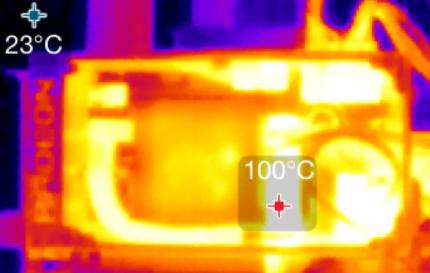
What are your peoples thoughts on the VRMs already hitting 100c? Not sure if this has been discussed here. Overclocking Fury thread?

Fiji_Cooler_Master_Heat_Full_Load_380Watt-pcgh.jpg
 
What are your peoples thoughts on the VRMs already hitting 100c? Not sure if this has been discussed here. Overclocking Fury thread?

We have already seen it as its from a review and seeing as the intensity of the VRM area is no greater than many other parts of the unit then something is wrong with the whole unit or the measuring device, even the PCIE connectors are just as intense.
 
Last edited:
What are your peoples thoughts on the VRMs already hitting 100c? Not sure if this has been discussed here. Overclocking Fury thread?

Fiji_Cooler_Master_Heat_Full_Load_380Watt-pcgh.jpg


retarded french website they run furmark and are always trying to find faulty stuff with amd.
normal use of the card shows around 60c.
 
What are your peoples thoughts on the VRMs already hitting 100c? Not sure if this has been discussed here. Overclocking Fury thread?

Fiji_Cooler_Master_Heat_Full_Load_380Watt-pcgh.jpg

Personally I never play Furmark, I found it a very boring game.

The fun games out there result in far lower VRM temps. PLus the VRM's are rated for 125C anyway.
 
I think you are wasting your time, memory bandwidth is not a bottleneck for Fury!, it doesnt even use what it has!

They said the same thing for Radeon 290/X. I still got decent gains out of overclocking the memory.

May not be from bandwidth, but rather from changed timings, but a gain is still a gain.
 
Yeah, 3Dmark also said fury was quicker than the Ti..

Its already been shown on TR, that Fury doesn't use all its bandwidth.

http://techreport.com/review/28513/amd-radeon-r9-fury-x-graphics-card-reviewed/4

512gb/s > [more]gb/s, its going to do much for ROP starved GPU.

You sure Fiji is ROP starved though? There was a Tech Report podcast (with Kanter and the other guy from TR), saying that Fiji in general does better at higher resolutions. Wouldn't that indicate that Fiji isn't ROP starved (Kanter hinted at that as well)?

I guess we'd find out for sure if there are games benched with overclocked HBM.
 
What are your peoples thoughts on the VRMs already hitting 100c? Not sure if this has been discussed here. Overclocking Fury thread?

Fiji_Cooler_Master_Heat_Full_Load_380Watt-pcgh.jpg

Doesn't seem right that the coolant in the card also seems to be just as hot. Also, isn't that shot from the "top" side, as you can see where it says Radeon?
 
Back
Top