Optimize an older system...

spdfreak

Senior member
Mar 6, 2000
979
76
91
I have a 1075T on a Gigabyte GA970A-UD3 motherboard and 12GB of Mushkin 1333 memory. The vid card is a MSI 6850. I don't game at all anymore so I don't really need that card but I have it already. It just seems like everything runs hot and heat just pours out from under my desk. It is water cooled with a Corsair system. Nothing is overclocked but even the memory is really hot- like almost too hot to touch even when it is just sitting idle. It clocks down to 800 when idle and I would assume the vid card does the same unless it is gaming. But even the vid card core temp is in the mid 50's idle. Since everything runs fine, I don't want to just start buying new hardware, but I would like to optimize it and see if I can eliminate some heat and make it more efficient. Any suggestions?
 

Cerb

Elite Member
Aug 26, 2000
17,484
33
86
Sadly: buy new hardware. You have a hot system, and aside from changing video card and underclocking and undervolting the CPU, there's not much you can do. Doing so to enough of a degree to make a difference will make it much slower.

What your problem is happens to be something that is remedied by newer CPUs (GPUs too, but to a lesser degree). Not directly because if your problem of heat, but Watts are Watts, whether they lead to higher temps for you, more load on the office A/C units, shorter battery life, etc..

The RAM should only be really hot, BTW, because everything else is also hot.
 

alphascout

Member
Dec 25, 2011
39
0
66
I had the same problem untill I moved to Ivy my last system was HOT heated my whole room up. The only way to combat that is to undervolt and make sure you have all of your power saving features enabled.
 

spdfreak

Senior member
Mar 6, 2000
979
76
91
What case are you using?

Lian Li full tower aluminum... I'm actually running it with the side off now since it is under the desk- but with plenty of room and ventilation around it. I don't think the memory being so hot is a result of the case/system. I wonder if the voltages are accurate. If I wanted to under-volt the memory, what is a good starting point?
 

spat55

Senior member
Jul 2, 2013
539
5
76
Lian Li full tower aluminum... I'm actually running it with the side off now since it is under the desk- but with plenty of room and ventilation around it. I don't think the memory being so hot is a result of the case/system. I wonder if the voltages are accurate. If I wanted to under-volt the memory, what is a good starting point?

Your going to make it hotter with all that dust getting inside it, how do you have the case fans setup? Also make sure it isn't already dusty.
 

ShadowVVL

Senior member
May 1, 2010
758
0
71
Memory dont put out much heat so undervolting it would be pointless. The gpu, cpu , psu and monitor usually put out the most heat.

btw what size is the room?
I have a q9550 with gtx 260 no oc and it would increase the temp of my 12x10 comp room from 68f to 82f in about 30 mins.

I have it in my living room now which is 16 x 28 and the room temp never changes.
 
Last edited:

Soulkeeper

Diamond Member
Nov 23, 2001
6,740
156
106
You mentioned the vid card isn't really important, what about the cpu ?
One of the big improvements with the 7000 series video cards over the 6000 was idle power usage. Maybe remove the card and replace it with a budget 7000 series card like 7750, 7790, or 7850 (if you want to game now and then).
Is this a work computer ? office ?
what do you use the computer for ?

cpu wise that 1075t is relatively powerfull
If you want to reduce power usage above all else yet keep that motherboard then you can potentially grab an FX-4xxx or FX-6xxx to shave off a few watts.
The motherboard has the black socket and supports the AM3+ cpus.

Another option is to just sell the whole system (or gift to family/friend), then pick up a low power APU system (they can idle under 60W).
AM3+ isn't known as a low power setup.

Personally I think the majority of your heat issues are related to that highend video card.
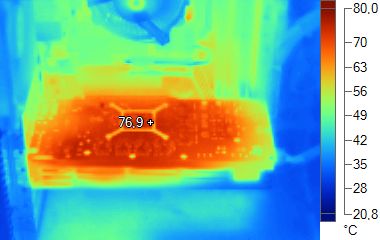
typically you see something like this:
hd6850_infrared_thermal_imaging.jpg

http://www.geeks3d.com/20101025/radeon-hd-6870-and-hd-6850-infrared-pictures-and-power-consumption/
 
Last edited:

NTMBK

Lifer
Nov 14, 2011
10,525
6,050
136
Changing GPU would be step 1, I'm afraid. Those high end ones are just fan heaters. Switching to something like a HD7750 would be a good idea.
 

Nec_V20

Senior member
May 7, 2013
404
0
0
I will admit to being gobsmacked by my new 4770k system. I bought an energy monitor and plugged it into the socket and then plugged my system into that.

The system is bare bones at the moment with just an SSD. However I looked at how much energy the system was drawing when I was just using my browser and it was at 44 Watt! Taking into account the efficiency of my PSU at such low draws the system was actually only using 36.4 Watt.
 

spdfreak

Senior member
Mar 6, 2000
979
76
91
I've built quite a few FM2 systems that we use for NVR's for video surveillance systems and they seem to run extremely cool (an important factor for 24/7 NVR's) so I'm thinking of going in that direction. I still don't understand why the memory runs so hot in this system- actually uncomfortable to touch for more than a few moments. The memory in the FM2 system doesn't even feel warm. I updated the bios last night and it looks like everything is slightly OCed right out of the box. Maybe 1%.

Will the dual graphics on the FM2 boards disable the discreet card when it is not needed? That would be ideal. BTW, I also have a N9600GT card sitting on the shelf if it would be any better heat-wise.
 

sm625

Diamond Member
May 6, 2011
8,172
137
106
HD6850 should idle fairly efficiently. It should be under 50C. There isnt much you can really do that is economical. It is not worth it to spend $500 on new hardware just to save at most 100 watts average power usage. ($10 a year) Just make sure that your idle power is as low as it should be... which is about 90 watts plus whatever your cooling system uses. Perhaps you should revert to stock cooler, and simply underclock your cpu? Since your issue seems to be idle power/heat, you may not be served well by an aftermarket cooler. (Counterintuitive as that may seem.)

What is your power supply's efficiency at 100 watts output?
 

pipm1

Junior Member
Aug 17, 2013
22
0
0
Is there any dust clogging it up? I've seen a Lian Li case that had a big sponge air filter on the intake fan which would get clogged up - maybe there's a clogged up filter hidden away in yours?

CPU & GPU fans & heatsinks can get pretty dusty too & isn't always easy to see without taking them out of the case; have a look between the fins & hoover any out.

Clean & apply some decent thermal paste to the CPU & GPU if possible.

Check the airflow isnt being hindered by things; IDE cables or maybe the HDD in front of the intake fan could be moved lower to improve the flow. Are any other expansion cards right next to the GPU intake? if so move them to another slot.
 
Last edited:

AtenRa

Lifer
Feb 2, 2009
14,003
3,362
136
Have you enable every energy efficient option in the BIOS ?? Also, what OS do you use ??

You could sell the Phenom 1075t plus HD6870 and get an FX6300 + HD7730. You will get a nice power reduction in idle and more than half the power in full mode.
 

spdfreak

Senior member
Mar 6, 2000
979
76
91
HD6850 should idle fairly efficiently. It should be under 50C. There isnt much you can really do that is economical. It is not worth it to spend $500 on new hardware just to save at most 100 watts average power usage. ($10 a year) Just make sure that your idle power is as low as it should be... which is about 90 watts plus whatever your cooling system uses. Perhaps you should revert to stock cooler, and simply underclock your cpu? Since your issue seems to be idle power/heat, you may not be served well by an aftermarket cooler. (Counterintuitive as that may seem.)

What is your power supply's efficiency at 100 watts output?

it's an Antec Eco 620, so probably decent. I'm not trying to save money on the power bill as much as trying to reduce heat load in my office. The cpu already idles down to 800 so I'm not sure underclocking will have much effect but I do think the vid card is a problem- 55 deg at idle. And the dang memory.
 

Schmide

Diamond Member
Mar 7, 2002
5,788
1,093
126
lol

(actually the most serious issue with the card appears to be the lack of 64-bit drivers, which spdfreak needs)

The most serious issue is the lack of effort you put into it.

It's 5 generations ago (2004-2005), no up to date driver, supports DX8.1, PCI not pci-e, ~$50, 150nm so it's hot, etc.

Edit: CRCSUX's card is 40nm so yes it is cooler.
 
Last edited:

Warsam71

Senior member
Jul 29, 2013
287
0
0
Yes, there are 3 120mm fans- 1 in front blowing on the HD cage, 1 top exhaust and 1 on the radiator.

maybe sandwich the radiator with two fans (one on each side), doing the pull/push airflow could help. Also, is the system sitting clear from furniture, walls, etc? Make sure there is enough room around it to allow as much air as possible to circulate in and out and around the rig
 

tynopik

Diamond Member
Aug 10, 2004
5,245
500
126
The most serious issue is the lack of effort you put into it.

It's 5 generations ago (2004-2005), no up to date driver, supports DX8.1, PCI not pci-e, ~$50,

/swoosh


150nm so it's hot, etc.

Edit: CRCSUX's card is 40nm so yes it is cooler.

my 486 is at 600nm so obviously it's hotter than my Sandy

the card is running at half the speed, has 1/8 the number of transistors and has 1/4 the amount of memory

but a quick comparison of the heatsinks is sufficient to show that the overall thermal output is significantly less
 
Last edited: