• We’re currently investigating an issue related to the forum theme and styling that is impacting page layout and visual formatting. The problem has been identified, and we are actively working on a resolution. There is no impact to user data or functionality, this is strictly a front-end display issue. We’ll post an update once the fix has been deployed. Thanks for your patience while we get this sorted.

Onboard sound is horrible

coldhart

Member
I have Gigabyte X58A-UD3R rev 2 Mobo few days ago when i asked customer care about windows 8 driver they told me to update the bios so i did but after updating bios everything is working fine but bass completely overwhelms entire music like im in hall or something

Im using brainwavz M2 earphone

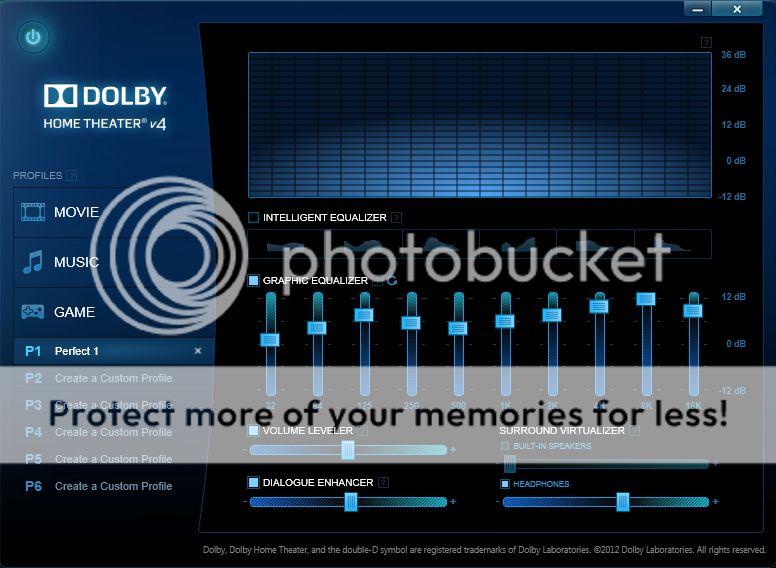
after installing latest audio driver from gigabyte it installed some dolby home theater 4 with realtek audio manager

DLB_zps1423d7d5.jpg


OS - Windows 7 Ultimate SP1 X64 (OS reinstalled after bios update & installed all the latest driver)
 
Last edited:
In your Realtek HD Audio Manager, under Sound Effects tab, make sure Environment and Equalizer are set to <None>.

Then right-click Volume Control, select Playback Devices. Select the default device and click Properties. Under Enhancements tab, make sure everything is unchecked.
 
Yeah, its not the onboard sound itself, its some effects you got going on. Sometimes drivers enable some full retard stuff by default sadly.
 
In your Realtek HD Audio Manager, under Sound Effects tab, make sure Environment and Equalizer are set to <None>.
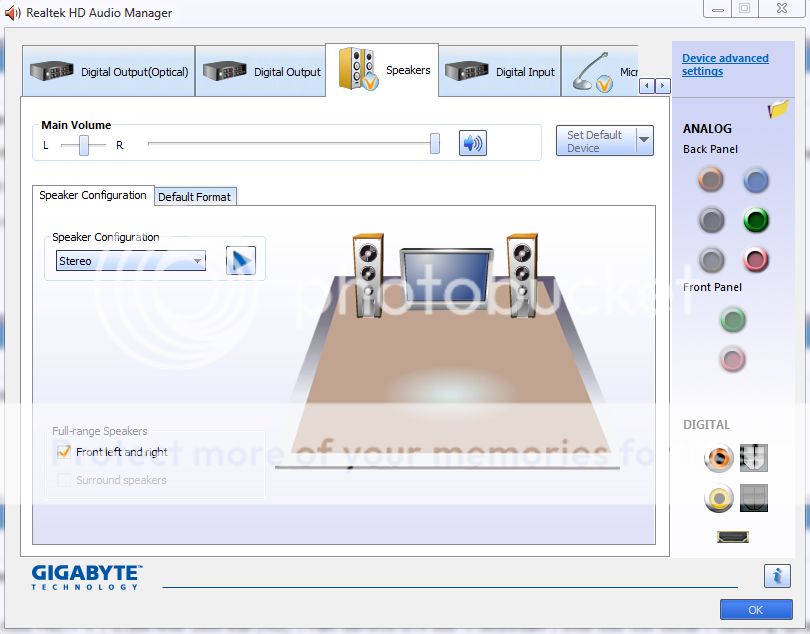
This new device drivers there is no sound effect tab like older ones
RLTK_zpscb7f5ff3.jpg


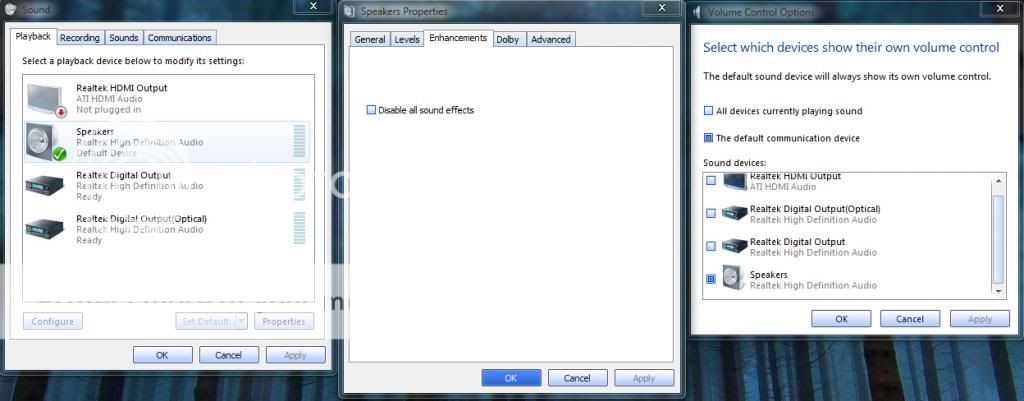
Then right-click Volume Control, select Playback Devices. Select the default device and click Properties. Under Enhancements tab, make sure everything is unchecked.
Like This?
Untitled-1_zps65032a20.jpg


Still not much effective sound
any good equalizer settings for dolby HT 4
 
Does it get any better if you turn off the Intelligent Equalizer? I leave that option turned off on mine.
 
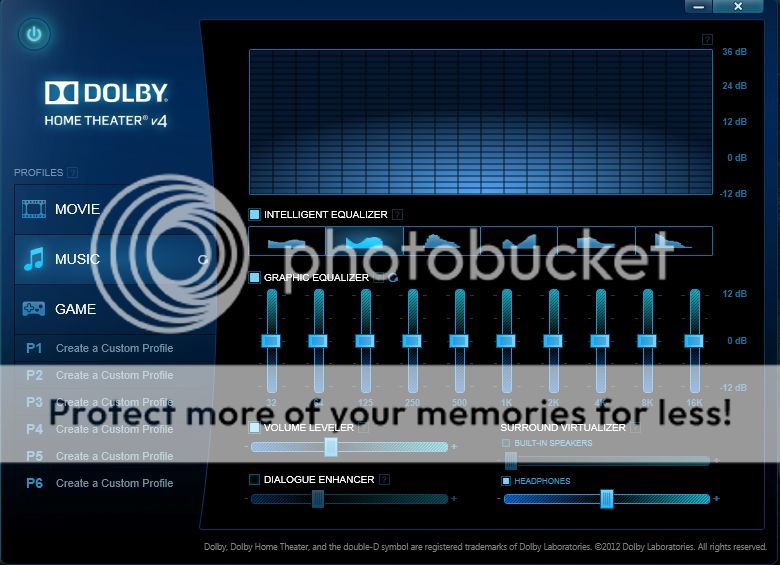
sound became bit dull so i searched for equalizer which is meant for itunes, use those settings in Dolby HT, sound improved alot but bass is not that punchy (even though i like to listen songs but im not pro when it comes to audio knowledge) so tell me what should i do to get punchy bass from dolby
DLB_zps4348b65b.jpg
 
i use brainwavez M2 inear earphone. in reality they have amazing bass (i use same on my mobile & PC) but i need good equalizer setting for dolby HT 4. I usually listen rock ie. Linkin Park & rarely metal but sometimes i watch movies too.
 
Get rid of gigabyte software.

Download RealteK audio chipset drivers and let us know how things sound.

Im guessing its a realtek sound chip. if other,, then go to their website get their driver.
 
I'm not sure how that actually sounds but it seems too way off the charts. I use DHT but with Asus Xonar Xense though but probably you can try something like the one below.


Play with the one in "yellow" box if you want punchy bass... you should go negative (down), else, you will have a "boomy" or "loose" bass if you go positive (up).

Hope this helps... 😉
 
I have to deal with onboard sound too now, as Creative sound cards don't work with solid state drives for who knows what reason (if you run windows off a solid state drive, creative sound cards won't work and can cause constant computer freezing). Creative blows as a company but I miss my X-fi audio. This onboard sound quality ain't too hot. Also if a program starts loading up and the computer has to multitask, the sound just stops for like 5 seconds and then resumes. Damn you onboard sound/realtek!

also, post 7k, booyah!
 
Last edited:
I have to deal with onboard sound too now, as Creative sound cards don't work with solid state drives for who knows what reason (if you run windows off a solid state drive, creative sound cards won't work and can cause constant computer freezing). Creative blows as a company but I miss my X-fi audio. This onboard sound quality ain't too hot. Also if a program starts loading up and the computer has to multitask, the sound just stops for like 5 seconds and then resumes. Damn you onboard sound/realtek!

also, post 7k, booyah!

I've used an X-Fi Titanium Fatal1ty and currently using an X-Fi HD. Zero problems using an SSD. You also say that your onboard sound is giving you problems too. Kinda looks like it's not a sound issue at all. Maybe look into rma'ing your SSD
 
I've used an X-Fi Titanium Fatal1ty and currently using an X-Fi HD. Zero problems using an SSD. You also say that your onboard sound is giving you problems too. Kinda looks like it's not a sound issue at all. Maybe look into rma'ing your SSD

Well I can't remember but it might have only been with SSDs and Win7 x64 bit or maybe only certain creative cards. Here's a big arse thread about it: LINK
 
Well I can't remember but it might have only been with SSDs and Win7 x64 bit or maybe only certain creative cards. Here's a big arse thread about it: LINK

Thats completely BS.

I run a Creative Audigy ZS Platinum sound card and I have no problems whatsoever with Win7 64bit and my Intel SSD. Must be just specific cards I guess.

Why would something that just holds data affect a piece of hardware differently?
 
Thats completely BS.

I run a Creative Audigy ZS Platinum sound card and I have no problems whatsoever with Win7 64bit and my Intel SSD. Must be just specific cards I guess.

Why would something that just holds data affect a piece of hardware differently?

It is hard to believe but it's da troof! You can read the thread I linked. Pages and pages of folks having the same trouble. So I'm stuck with on board sound for a while. I attribute it to Creative's shitty customer support. There are some new beta drives out that attempt to fix the issue but it doesn't look like they have a good success rate. By putting my X-fi back in I'd be risking lots of BSODs and having to reinstall windows if things didn't go well. DAMN I HATE on-board sound.
 
I have to deal with onboard sound too now, as Creative sound cards don't work with solid state drives for who knows what reason (if you run windows off a solid state drive, creative sound cards won't work and can cause constant computer freezing). Creative blows as a company but I miss my X-fi audio. This onboard sound quality ain't too hot. Also if a program starts loading up and the computer has to multitask, the sound just stops for like 5 seconds and then resumes. Damn you onboard sound/realtek!

also, post 7k, booyah!

This is actually the first time I've heard of someone having problems using an SSD and an add in SB audio card. I don't see how an SSD would cause a problem.
 
Back
Top