
• We’re currently investigating an issue related to the forum theme and styling that is impacting page layout and visual formatting. The problem has been identified, and we are actively working on a resolution. There is no impact to user data or functionality, this is strictly a front-end display issue. We’ll post an update once the fix has been deployed. Thanks for your patience while we get this sorted.

nVidia 3090Ti reviews thread

Page 2 - Seeking answers? Join the AnandTech community: where nearly half-a-million members share solutions and discuss the latest tech.

BFG10K

Lifer


$2000 "MSRP" and 400W+ power for barely any performance gain. Time to pucker up your wallet and power supply orifices, folks.

The only good news is prices are dropping overall and the next gen is close.
 
Last edited:
Reviewers are going to need to change how they review GPUs if TDPs keep creeping up. It's one thing to design a cooler that can dissipate 450W+ without exceeding 80C or 40 dB, but it's another to actually enjoy gaming on said card when you're physically in the same room for >3 hours. Reviewers have test rigs with an open chassis and I suspect most don't actually remain in the room the whole time the benchmark suite is run (i.e. scripting), or in the case where they are actually recording gameplay, they aren't there for hours at a time while the graphics card is running full tilt. Said another way, I want reviewers to review these things as if they have lived with them for a few weeks but unfortunately the graphics card supplier doesn't give the reviewer the luxury of time; they get maybe a few days at best and all they can do within that time frame is run through the gamut of typical benchmarks so that their article has enough content. Yeah, the conclusion will be that the card uses a lot of power, but I didn't need a review to tell me that. I can read the spec sheet. What I also want to know from the reviewer is if I would enjoy the long-term ownership of the product, especially when it outputs so much heat or uses so much power. Other products or devices that are used on a frequent basis are often reviewed with the ownership aspect considered, e.g. cars, smartphones, other electronic goods, so why can't graphics cards fall under the same category as well?

- Lets add an ambient room temp delta metric in reviews.

"After 3 hours of using this card, not unreasonable for a session of gaming, our room which started at 72f ended the test at 82f and subjectively felt uncomfortably warm..."
 
- Lets add an ambient room temp delta metric in reviews.

"After 3 hours of using this card, not unreasonable for a session of gaming, our room which started at 72f ended the test at 82f and subjectively felt uncomfortably warm..."
Yeah, something more scientific would be helpful. Of course you'd have to standardize the room size and amount of aircon permitted to be able to do apples-to-apples comparisons.
 
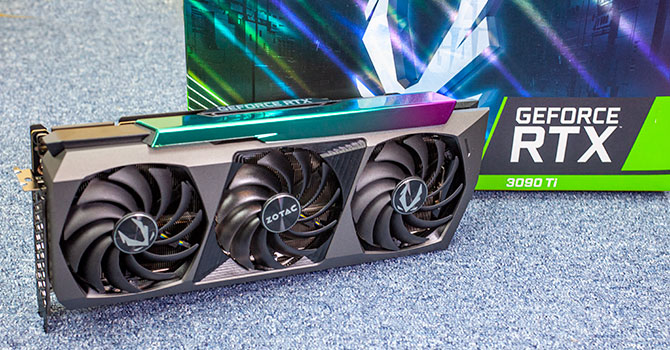
I'm surprised at how level the card sits. Don't even need a support bracket.

XIrltZC.jpg
 
- Lets add an ambient room temp delta metric in reviews.

"After 3 hours of using this card, not unreasonable for a session of gaming, our room which started at 72f ended the test at 82f and subjectively felt uncomfortably warm..."

My buddies 3080 that I helped him source required putting all new fans in his case and then it hot boxed his office (re-purposed bedroom) in the ~2 hour sessions he was playing warzone. But hey, it looked glorious!

Progress 😉

One of my bestest buddies is a bachelor with his own house - he put a split unit in his first level office 😀 So energy costs for the card, then the room cooler, never mind the cost of the unit and the pro install 😀
 
How far does yours boost? The reviews say 1860mhz, but most of the regular 3090s already do that on undervolting with the stock power limit, so I would guess it can go higher.
 
I'm surprised at how level the card sits. Don't even need a support bracket.

XIrltZC.jpg
Looks like they made the bracket a lot more rigid. A cantilever with the proper architecture should be able to hold the card straight, but Evga only used two screws in the back plate and another three small ones in the IO on the 3090 and lower cards.
 
How far does yours boost? The reviews say 1860mhz, but most of the regular 3090s already do that on undervolting with the stock power limit, so I would guess it can go higher.

1860 is the official FE spec. The TUF's spec clock is 1950. You might be able to get 2.1 or 2.2 with OC.
 
The light on the side of the card gets blindingly bright as most new RGB is now. Using blue (of course) with the brightness down to 50 from 255.

VbzA4WP.jpg


*Phone not the best with dark photos.
 
Reviewers are going to need to change how they review GPUs if TDPs keep creeping up. It's one thing to design a cooler that can dissipate 450W+ without exceeding 80C or 40 dB, but it's another to actually enjoy gaming on said card when you're physically in the same room for >3 hours. Reviewers have test rigs with an open chassis and I suspect most don't actually remain in the room the whole time the benchmark suite is run (i.e. scripting), or in the case where they are actually recording gameplay, they aren't there for hours at a time while the graphics card is running full tilt. Said another way, I want reviewers to review these things as if they have lived with them for a few weeks but unfortunately the graphics card supplier doesn't give the reviewer the luxury of time; they get maybe a few days at best and all they can do within that time frame is run through the gamut of typical benchmarks so that their article has enough content. Yeah, the conclusion will be that the card uses a lot of power, but I didn't need a review to tell me that. I can read the spec sheet. What I also want to know from the reviewer is if I would enjoy the long-term ownership of the product, especially when it outputs so much heat or uses so much power. Other products or devices that are used on a frequent basis are often reviewed with the ownership aspect considered, e.g. cars, smartphones, other electronic goods, so why can't graphics cards fall under the same category as well?

I remember my 980Ti SLI rig warming up my room pretty darn good. I was almost relieved when a game didn't support SLU because the I could only run one card. A standardized wattage/room heating test could have some value to give people an idea of what to expect. You could always take your current wattage and just guestimate the difference. It's basically like running SLI in terms of wattage and unless you live in a cold climate, you will need AC or have to game in a huge room.
 
Yes, this has been issue for a while. I turn down the thermostat a bit if I'm going to be gaming for a long period, as the room temperature increase is definitely noticeable.
 
Video cards are getting bigger than Texas...perhaps literally if the trend keeps moving the way it is. We'll need a Dyson Sphere to power it.

I'll stick to my already power hungry 3080 12GB.
 
I have a room on the end of my house devoted to PC gaming with a bit of movie and show watching. I'll have to figure out how to cool it in the summer months.

oiK0S4k.jpg

IyHNIW4.jpg


A small room with a lot of wattage from the 5.2.2 setup, OLED TV (they do use a lot of power), overclocked 12900K, and now the 3090 Ti.
 
Great setup. Mine is similar but without the surround speakers. I find that the OLED TV, speakers/subwoofers and gaming PC will actually trip the fuse if they are all on the same power line, and need to be plugged into different outlets.
 
I tripped the circuit breaker in my old old house with quad original Titans. The house was built in the early 60s. I actually melted one of the connections to a light in another bedroom. It could have been bad. After that I had an electrician put in a dedicated line just for the outlet my PC plugged into.

The new house doesn't have that problem. It also helps that I'm not pulling over 1700W peak from the wall with just the PC. I haven't measured at the wall with my current setup, but I can safely say it's not going to get to 1780W.

You guys complain about power draw and wattage. You haven't seen my old system (2014).

8t8oKTs.jpg


4-Way Titans, 5960X, 32GB DDR4 (then very new memory), and 9 SSDs with 8 of them in RAID-0 on an LSI controller.

Tei0XXL.jpg


Peak up to 1800W while looping 3DMark Firestrike Ultra

M6XxbQI.jpg
 
@AdamK47

How do you get sound out of your PC to the receiver for games and such? I haven’t dabbled in that for quite a while but I remember it being a pain. Maybe W10/W11 made it better…
 
Just watched the JayzTwoCents video of the same EVGA card I bought today. He points out how the card doesn't sag without the bracket or the "eLeash". This is the first thing I noticed after installing the card and standing the case up. Once I noticed that I didn't even contemplate putting on one of the two solutions they've included with the card. EVGA must have spent considerable effort to mitigate sag with the included metal bracket (bare metal, not even painted black, yuck) and the "eLeash". They solved it with the back bracket already on the card. It's almost as if they included the extra bracket and leash simply because they spent the R&D on it.
 
@AdamK47

How do you get sound out of your PC to the receiver for games and such? I haven’t dabbled in that for quite a while but I remember it being a pain. Maybe W10/W11 made it better…
HDMI 2.1 on the 3090 Ti to the HDMI 1 connection on the LG G1. The HDMI 2 connection goes to the input eARC connection on my Denon receiver. Two HDMI cables. One HDMI 2.1 capable and the other ethernet capable. Not a pain to setup (for me).
 
That video never said "400+" watts. To be more specific the Asus was 673watts, and the MSI was 702 watts.
 
I have a room on the end of my house devoted to PC gaming with a bit of movie and show watching. I'll have to figure out how to cool it in the summer months.

oiK0S4k.jpg

IyHNIW4.jpg


A small room with a lot of wattage from the 5.2.2 setup, OLED TV (they do use a lot of power), overclocked 12900K, and now the 3090 Ti.

How big is that room? 9ft x 9ft something like that?
 
@AdamK47

How do you get sound out of your PC to the receiver for games and such? I haven’t dabbled in that for quite a while but I remember it being a pain. Maybe W10/W11 made it better…

My basement HTPC just outputs audio over HDMI plugged into the receiver. Works with Atmos in games and media that support it. The Atmos plug in needs to be purchased, but it was less than 10USD from what I remember.
 
My basement HTPC just outputs audio over HDMI plugged into the receiver. Works with Atmos in games and media that support it. The Atmos plug in needs to be purchased, but it was less than 10USD from what I remember.
That's the way I did it until I got a C9. Have to plug directly to the TV first for GSync to work. Same with the G1. It's also the best route for the least input latency. eARC can also output multichannel PCM 7.1 using passthrough from the TV.
 
I tripped the circuit breaker in my old old house with quad original Titans. The house was built in the early 60s. I actually melted one of the connections to a light in another bedroom. It could have been bad. After that I had an electrician put in a dedicated line just for the outlet my PC plugged into.

The new house doesn't have that problem. It also helps that I'm not pulling over 1700W peak from the wall with just the PC. I haven't measured at the wall with my current setup, but I can safely say it's not going to get to 1780W.

You guys complain about power draw and wattage. You haven't seen my old system (2014).

8t8oKTs.jpg


4-Way Titans, 5960X, 32GB DDR4 (then very new memory), and 9 SSDs with 8 of them in RAID-0 on an LSI controller.

Tei0XXL.jpg


Peak up to 1800W while looping 3DMark Firestrike Ultra

M6XxbQI.jpg
I remember those oven days. Ran 290X in trifire once upon a time. Woot, that was some warm stuff. Also ran quad-sli with two GTX 690's.
 
That's the way I did it until I got a C9. Have to plug directly to the TV first for GSync to work. Same with the G1. It's also the best route for the least input latency. eARC can also output multichannel PCM 7.1 using passthrough from the TV.

I would love to go that route, but my receiver outputs to multiple zones (basement and first floor) so I have to go into it first. I just limit my console and HTPC gaming to 60 Hz @ 4k HDR and deal with the latency. If I need anything more, I jump on my desktop which is in my office.

Had to add an AC window unit in the office. It was fine before I started working from home and the temps would rise up to 90F during the day. I hate running the entire upstairs AC unit just to keep my office cool. Doesn't help that I have two laptops, 6 monitors and a bunch of other electronics in addition to the desktop.
 
Back
Top