• We’re currently investigating an issue related to the forum theme and styling that is impacting page layout and visual formatting. The problem has been identified, and we are actively working on a resolution. There is no impact to user data or functionality, this is strictly a front-end display issue. We’ll post an update once the fix has been deployed. Thanks for your patience while we get this sorted.

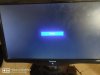
No signal

Yoyotechboy

Junior Member
I recently got an old pc from my father's office it has athlon 2 with basic specs when I connect the pc to monitor through vga it shows no signal I tried everything cleaning the ram I even disassembled the parts and reassembled it but not working I tried asking all my friends but no one had a solution please help me with it
 

Attachments

  • IMG_20201130_131100.jpg
    IMG_20201130_131100.jpg
    655.1 KB · Views: 7
so the pc boots up, beeps and reads the hdd/sdd but you don't get a video signal? have you tried reseating the cable and tighten the thumb screw on both ends?
 
Crazy question: Is it possible that PC was retired because it broke? Is it possible someone had already gone in and mucked things up trying to fix it, or was it known to work the last time it was used and left intact until you received it?

Do you see the entire sequence to boot, something like turn it on, (maybe) get a beep, a few seconds spent on bios and querying HDD, then rapid succession of HDD activity LED blinks like it's trying to boot, then that activity markedly decreases suggesting it has finished booting?

If it seems to do all that, try a different video card. If there was a lot of gunk inside, and it's a separate video card (not integrated video), you might also try pulling the card out and spraying the motherboard slot with contact cleaner, and wiping the card contacts.


If it doesn't do all that, look at where it stops. Have you tried clearing CMOS? Some systems of that era didn't halt-idle right if at all and could be hard on the electrolytic capacitors so I'd examine the board, and then in the PSU for bad ones, or of course if the board looks good, try a different PSU.

In "rare" cases I have come across systems that won't even POST if the battery is drained, so you might try a new battery or at least measure voltage on the one in it. I couldn't tell you the exact threshold of voltage being too low on a CR2032 to cause a problem but if below 2.8V I'd definitely replace it. Considering the age of the system, it's due for a new battery anyway.

 
Last edited:
get a 4-pin beeper speaker attached to the appropriate header on the mobo (should be labeled SPKR, 4-pins or two pins with a space of two in the middle), pull the ram and video card (with power unplugged), plug it in, and attempt to power-on.

If you DONT get any beeps, at all, check that both mobo power connections are connected, and that the CPU fan is spinning.
If they are, then the board or CPU is dead. If the CPU fan isn't spinning, and your cables are connected, the the PSU or the CPU or possibly the board could be shot. Or you need to replace the CMOS battery, in some cases.

You should also inspect the board for traces of corrosion, cap leakage, burn marks, or blown fuses (may have to check with an ohm-meter, if they are chip-fuses).
 
I'd try changing the video cable and trying a different monitor before doing anything else. Video cables (especially cheap ones) go bad, and ports can die on monitors. It would be helpful to know the display is working properly for sure before you go through troubleshooting.
 
Back
Top