• We’re currently investigating an issue related to the forum theme and styling that is impacting page layout and visual formatting. The problem has been identified, and we are actively working on a resolution. There is no impact to user data or functionality, this is strictly a front-end display issue. We’ll post an update once the fix has been deployed. Thanks for your patience while we get this sorted.

Solved! NMV Driver needed?

Rubax

Junior Member
Hello All,

At the moment I am using the standard NVM drivers from Microsoft for Windows 10 Pro.
I have 3 M2 ssd units on the motherboards installed and everything works okay.
Do I NEED the Samsung driver or can I still use the standard NVM driver from Microsoft?
What would you suggest to use as the the best in this matter?

Cheers, Rubax
 
The driver from Microsoft works. The driver from the manufacturer is better, tailored to the specific device.
Next time mention the hardware involved in your question. I can only assume that you use Samsung ssds and I think they have software for your specific drives. Search for them using your hardware model.
 
The driver from Microsoft works. The driver from the manufacturer is better, tailored to the specific device.
Next time mention the hardware involved in your question. I can only assume that you use Samsung ssds and I think they have software for your specific drives. Search for them using your hardware model.

Yes they are Samsung M2 units. Okay, thank you for your answer!!
 
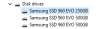
I have installed the latest Samsung (960 Evo) driver, but looking in the Device Manager from Windows the drivers installed are from Microsoft
and NOT from Samsung. Isn't that strange. It should say Samsung driver. Right?
 

Attachments

  • Screenshot (4).png
    Screenshot (4).png
    22.8 KB · Views: 11
  • Screenshot (5).png
    Screenshot (5).png
    4.3 KB · Views: 11
no windows driver will always install first, unless there is no universal windows driver.

You then apply the proper driver after you boot into windows.

Typically all you really need to do is install magician for samsung products.
 
@Rubax:
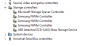
You should expand the "Storage Controllers" section and look for the driver of the listed NVMe Controller!
The MS driver for the "Disk drives" cannot be replaced.
 
Well I have some good news. The problem has been solved. I can see In Samsung Magician that the Samsung driver is installed. It seems to be normal in the device manager from Windows that the driver is a Microsoft driver. I spoke to Samsung EU and they told me that the samsung driver is mandatory for good functionality of the 3 M2 units I have. And the driver should be seen in Samsung Magician,. If that is the case, the samsung driver is successfully installed. Then there was a conflict with the SATA connections. I renewed the old SATA drives today with one big SATA 3 drive (storage only) and connected the drive as nb 1 and the blu-ray writer as the nb 2 in the right connectors. I switched off the computer and power. Press the reset CMOS button on the motherboard. Turned it on and I saw very different settings in the BIOS. I installed again the samsung driver (update) and it came with an option (never has seen before) REPAIR. So I did. Switched off the power and restarted the computer again and saw in Samsung Magician that driver was correctly installed and that the new SATA 3 drive was activated.. Whoopy 🙂 I think that might be the reason that Defrag from O&O did not recognized my M2 units because of the missing samsung driver. Wow what an adventure 🙂
 

Attachments

  • Screenshot (9).png
    Screenshot (9).png
    8.4 KB · Views: 7
  • Screenshot (13).png
    Screenshot (13).png
    154.1 KB · Views: 5
  • Screenshot (14).png
    Screenshot (14).png
    152.8 KB · Views: 3
  • Screenshot (15).png
    Screenshot (15).png
    157.7 KB · Views: 3
Okay I tried O&O Defrag again, but NO. It's crap software. I use defrag from Windows it self.
 
Okay I tried O&O Defrag again, but NO. It's crap software. I use defrag from Windows it self.
That's what I told you in your other thread. 😀

A stand alone defrag program hasn't been needed for a long time now, and just let Windows 10 handle it.
 
Yes you did and I am done with that program. So I considered as problem solved.
I would like to thank you and all others who helped me. This is truly a wonderful forum!
Thanks everyone!!

Cheers, Rubax
 
Last edited:
It seems to be normal in the device manager from Windows that the driver is a Microsoft driver.
This is not true. Did you read my previous post at all?
You are mixing the Disk Controller and the Storage Controller Management of the OS. Neither the generic MS NVMe driver nor the Samsung NVMe driver have any impact on the disk management of your system.
Both NVMe drivers are managing only the function of the NVMe Controller, which is within the chip of the SSD.
 
You said:
You should expand the "Storage Controllers" section and look for the driver of the listed NVMe Controller!
The MS driver for the "Disk drives" cannot be replaced.

So if I understand you correctly the problem is not solved. If that is the case, how do I fix that. See my screenshots in previous message. It shows that the samsung driver is installed. But Windows is still saying Microsoft driver. I am getting an instant headache over here.
 

Attachments

  • Screenshot (17).png
    Screenshot (17).png
    100.8 KB · Views: 6
@Rubax:
There may be a problem with third party tools, but not with your OS. You obviously were searching for the in-use NVMe driver at the wrong location.
So if I understand you correctly the problem is not solved. If that is the case, how do I fix that. See my screenshots in previous message. It shows that the samsung driver is installed. But Windows is still saying Microsoft driver.
Where does Windows say Microsoft driver?
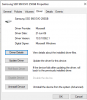
If you want to see the in-use NVMe driver, you should run the Device Manager, expand the "Storage Controllers" section, do a right-click onto any of the 3 listed NVMe Controllers and use the options "Properties" > "Driver".
This is what you will see (in your OS language):
Samsung NVMe driver.png
 
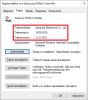
Well there is some progress. Device Manager comes with the right product information. Please watch the screenshot. Still the problem remains with the Microsoft driver. It should say exactly as your screenshot. I also included a screenshot of the driver choice from the
Samsung Driver page. If I am right I chose the right driver. I use 3 SSD 960 Evo. But it say SCSI. Is that right?
 

Attachments

  • Screenshot (20).png
    Screenshot (20).png
    101.5 KB · Views: 7
  • Screenshot (22).png
    Screenshot (22).png
    81.6 KB · Views: 7
Last edited:
Please watch the screenshot. Still the problem remains with the Microsoft driver. It should say exactly as your screenshot.
Please re-read what I had written. You should not look for the drivers of the HDDs/SSDs, which are listed within the "Disk drives" section of the Device Manager. All disk drives (floppies, USB flash drives, HDDs and SSDs) are managed by the in-box MS disk management drivers and cannot be replaced by any other driver. In your case all SSDs are handled by the OS as SCSI devices, which is absolutely ok.
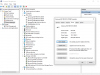
If you want to see a picture like the one I have attached above, you should check the in-use driver of the devices named "Samsung NVMe Controller", which are listed within the "Storage Controllers" section of the Device Manager. To see more details and the name of the in-use driver(s) you should press the "Driver Details" button.
 
Aha now I am awake 🙂 See screenshot. Well it looks okay. Right?
 

Attachments

  • Screenshot (17).png
    Screenshot (17).png
    103.4 KB · Views: 5
Back
Top