• We’re currently investigating an issue related to the forum theme and styling that is impacting page layout and visual formatting. The problem has been identified, and we are actively working on a resolution. There is no impact to user data or functionality, this is strictly a front-end display issue. We’ll post an update once the fix has been deployed. Thanks for your patience while we get this sorted.

New PC Build for Photoshop Purposes on a Budget

IceBoy109

Member
Hey folks,

I'm working on a new PC build for a system that will really only be used for Photoshop/Illustrator CS5. It doesn't need to be great for games, but I'm going with the i7 for the hyperthreading, and just need a graphics card that Photoshop will take advantage of.

Unfortunately, I'm on a bit of a budget and I'm looking to cut costs while still getting solid performance. I think my PSU might be a little overkill, but I tend to prefer too much over too little. Anyway, below are the components I chose and I was hoping to get some feedback on what I should change to cut costs without sacrificing performance for my needs.

The prices are through Amazon because I'm from CA and will have to pay taxes through NewEgg.

I really appreciate your guys' help. Thanks again!


Corsair Enthusiast Series 750-Watt 80 Plus Bronze Certified Power Supply Compatible with Intel Core i3, i5, i7 and AMD platforms - CMPSU-750TXV2 - $104.99

EVGA GeForce GTS 450 FPB (Free Performance Boost) 1204 MB GDDR5 PCI Express 2.0 2DVI/Mini-HDMI SLI Ready Graphics Card, 01G-P3-1450-TR - $129.99

Liteon iHAS324 24X DVD-RW SATA Optical Disk Drive - $18.99

Kingston Technology HyperX 8 GB (2x4 GB Modules) 1600 MHz DDR3 Dual Channel Kit (PC3 12800) 240-Pin SDRAM KHX1600C9D3K2/8​GX - $51.98

Antec Three Hundred Gaming Case External 3 X 5.25; Internal 6 X 3.5 2*Usb2.0 - $59.10

Gigabyte Intel H67 LGA 1155 DDR3 1333 HDMI SATA 6Gb/s USB 3.0 ATX Intel Motherboard (GA-H67A-UD3H-B​3) - $129.99

Western Digital Caviar Black 750 GB SATA III 7200 RPM 64 MB Bulk/OEM Internal Desktop Hard Drive - WD7502AAEX - $64.99

Intel Core i7-2600K Processor 3.4GHz 8 MB Cache Socket LGA1155 - $314.99
 
First, FYI, Photoshop doesn't take advantage of CUDA. Some plugins do; do you have one of those? In any case, Amazon's prices are terrible; consider this card instead - if you still think you need nVIDIA. Can you pick it up at the warehouse and save the shipping?

Next, you've chosen a 2600k with an H67 motherboard, so it won't overclock. You can either choose to get a 2600 with a cheaper H67 motherboard, or a 2600k with a Z68 motherboard of the same price or a little less. If you're near a Micro Center you can get either processor for less there. Or you can try to get the new US NCIX to price match. Either way you'd have to pay sales taxes. (There appears to be an NCIX-LA.) But it should still be less than Amazon.

In any case, at least Amazon has good PSU prices. This 430w PSU is perfect for what you want to do.
 
Yours is one of the few builds where a 2600 might make sense, since it's ~10% faster in PhotoShop:
http://www.anandtech.com/bench/Product/288?vs=287

Since you're buying a H67 motherboard (no overclocking) you could save $15 and get a non-K i7-2600.

FYI, that motherboard is $100 at Newegg. Be sure to check prices there, even with taxes and shipping some items may be cheaper.
 
I doubt a graphics card makes a big difference in Photoshop... I've read that it only takes advantage of OpenGL. For that purpose I'd get some ultra cheap card or just let the CPU handle everything.

The 750W PSU is way more than you need. That would power two HD 6950 cards without breaking a sweat. There's no point in going overkill on a PSU just because you don't know how much you need - why not just figure out how much the components you're getting actually use power?

I assume the parts you listed make up your budget the be around $900. With that in mind, I'm going piece together a quiet system for you, priced from Amazon:

Mobo Asus P8Z68-V $130 (Or asrock z68 pro3 for $25 less but it's not as good IMO)
CPU 2500K $220 (or if you don't want to OC, 2500)
Sink Scythe Mugen 3 $45 or Noctua NH-U12P SE2 $65
RAM Corsair XMS3 1333 2x4GB 1.5V $50
GPU MSI HD5450 512mb $35
HDD Samsung F3 1TB $60
SSD Crucial M4 64GB $100
Case NZXT Gamma $40 + Scythe case fan $14 as front intake
PSU Seasonic S12II 380W or Corsair CX430V2 $60

Total $729 - $774

As for the downgrade to 2500K... 2600K is 10% faster in photoshop for 50% more cash. Really? 2500K is easily a better deal. Spend that extra $100 on a bigger SSD if you must.
 
Last edited:
This is just me, but if it were, I'd put my cash into a) more RAM, as PS loves it (and it's not likely to get any cheaper than it is now), and b) an SSD to boot and run these apps from, and for Photoshop's scratch disk. If you are running these apps even semi-professionally, you'll want all the performance you can get from them.
 
^ Good call on the RAM but I would suggest trying out 8GB first and if it's used up too much in photoshop, then upgrade to 16GB.
 
I doubt a graphics card makes a big difference in Photoshop... I've read that it only takes advantage of OpenGL. For that purpose I'd get some ultra cheap card or just let the CPU handle everything.

The 750W PSU is way more than you need. That would power two HD 6950 cards without breaking a sweat. There's no point in going overkill on a PSU just because you don't know how much you need - why not just figure out how much the components you're getting actually use power?

I assume the parts you listed make up your budget the be around $900. With that in mind, I'm going piece together a quiet system for you, priced from Amazon:

Mobo Asus P8Z68-V $130 (Or asrock z68 pro3 for $25 less but it's not as good)
CPU 2500K $220 (or if you don't want to OC, 2600 $300)
Sink Scythe Mugen 3 $45 or Noctua NH-U12P SE2 $65
RAM Corsair XMS3 1333 2x4GB 1.5V $50
GPU MSI HD5450 512mb $35
HDD Samsung F3 1TB $60
SSD Crucial M4 64GB $100
Case NZXT Gamma $40 + Scythe case fan $14 as front intake
PSU Seasonic S12II 380W or Corsair CX430V2 $60

Total $729 - $774

As for the downgrade to 2500K... 2600K is 10% faster in photoshop for 50% more cash. Really? 2500K is easily a better deal. Spend that extra $100 on a bigger SSD if you must.

If he doesn't wont to OC be could get the ASRock H67M-GE
http://www.amazon.com/ASRock-H67M-GE...7420457&sr=8-1
and 16gb of 1333 ram. As an alternative to the NZXT Gamma case (slow delivery) there is the Factal Design 1000
http://www.newegg.com/Product/Produc...82E16811352009
IIRC the HD 3000 is about as fast as the HD5450 so it's not really needed if he goes for the 2600k, although it will have some benefit over the weaker HD 2000 on the 2600 (non k).

Edit: ops that link is to newegg and amazon don't stock it so never mind.
 
Last edited:
^ I would rather pay the $15 more for a full-size board with more PCI/PCI-e slots, overclockability (might upgrade to an overclockable Ivy Bridge, who knows), and SSD caching option.

IIRC the HD 3000 is about as fast as the HD5450 so it's not really needed if he goes for the 2600k, although it will have some benefit over the weaker HD 2000 on the 2600 (non k)

You're right, the HD 3000 is actually faster than 5450. In that case he should just opt to leave the discrete GPU out. It's not worth the price for just Photoshop.
 
Last edited:
Maybe they changed their prices since you looked but it says $59.00 for the CX430w. Newegg are selling them for $24.99 after rebate.
I think so - I thought they were ~$40. Newegg's still better, though.

It's the end of the month - prices change fast around now.
 
First, FYI, Photoshop doesn't take advantage of CUDA. Some plugins do; do you have one of those?

Well, this build is going to be almost strictly for Photoshop purposes and I'm not entirely sure what plugins the end users has or wants to use, but I'd rather err on the side of caution.

In any case, Amazon's prices are terrible; consider this card instead - if you still think you need nVIDIA. Can you pick it up at the warehouse and save the shipping?

Picking it up at the warehouse really isn't an option. But I haven't taken advantage of that 30-day free trial of free 2-day shipping. Might be worth finally giving it a shot. However, the MIR ends today and I can't order till Monday and at that price point I might as well stick with the one I had. 🙁

Next, you've chosen a 2600k with an H67 motherboard, so it won't overclock. You can either choose to get a 2600 with a cheaper H67 motherboard, or a 2600k with a Z68 motherboard of the same price or a little less. If you're near a Micro Center you can get either processor for less there. Or you can try to get the new US NCIX to price match. Either way you'd have to pay sales taxes. (There appears to be an NCIX-LA.) But it should still be less than Amazon.

Thanks for pointing out my oversight on this. This system is not going to be overclocked so I'm fine with the 2600. I'm having some difficulty finding a good MB to use. Partially because for no particular reason I don't like micro atx boards and I'd prefer a full size. Maybe I prefer more slots or have convinced myself it diminishes cooling efficiency, but maybe it's time for me to change. Any suggestions? I definitely want USB 3.0. MSI H67MA-E35 looks pretty good (for a micro) but I can't order until next week and the September special price might be gone. :/

In any case, at least Amazon has good PSU prices. This 430w PSU is perfect for what you want to do.

Thanks for the suggestion. 430w seems low, but I always go overboard with my psu units so I'll trust you. I'll probably take titan's suggestion and go through Newegg since they have the rebate until the second of October.

My family had a bad experience with MicroCenter in 1994 and ever since then I'd completely put them out of my mind. I've moved on. 🙂 I will be purchasing the processor from them. Thanks for the tip on that one.

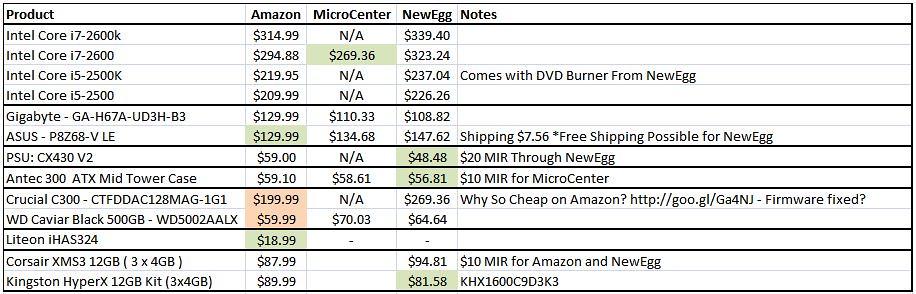
Sooo...after shipping and taxes I think I'm now looking at:
CPU: 269.36
PSU: $24.99
Graphics Card: $129.99
Case: $56.82 (going through NewEgg...turned out 3 bucks cheaper than Amazon even after tax&shipping)
Caviar Black 500GB: $59.99 Amazon
DVD Drive: 18.99
And assuming there was no objection to the RAM: $51.98
MOTHERBOARD: TBD (89.99? - $96.96 after tax)

Previous Total:$875.02
New Total: $709.08


Thanks so much again for all your input. Now to just pick a motherboard and confirm RAM selection and I'll be good to go.
 
Last edited:
Last edited by IceBoy109; Today at 11:04 PM. Reason: While I typed up my response, a boat load of other responses came in that I haven't seen yet... sorry!

Happens to me all the time, lol 😛
 
@lehtv: Holy crap, thank you for coming up with that quiet build priced through Amazon. Above and beyond what I hoped for help. Like you, I prefer a full size mobo.

@jhansman: On my personal PC I am using 12GB of RAM and even with that my scratch disk gets used more than I'd like when running photoshop.

@titan131: You're right about my not wanting to overclock or deal with overclocking. I really want this machine to be a set it, and forget it type of deal and I just don't have the time.

@ALL If I understand this correctly, if I went with the 2600k, I wouldn't need a discrete GPU to take advantage of OpenGL?

For what it's worth, Asus, MSI, Gigabyte...prefer any of them. I really would like to get an SSD drive in there, but the last time I looked at those (which granted, was quite a while ago) there were still lots of bugs, and compatibility issues and the prices were just unrealistic. If they still need to be monitored carefully I'd rather just go with a regular HD.


Seriously, you guys are awesome!
 
@ OP

So if you don't OC, just swap the CPU to i5 2500 would be my recommendation. 2600 won't give you a lot more performance in Photoshop (http://www.anandtech.com/bench/Product/287?vs=288), but it will cost a lot more. Your platform is compatible with Ivy Bridge CPUs, and acknowledging that we don't know yet how they will perform and at what price, you'd probably be better off upgrading the 2500 to an Ivy Bridge next year than buying a 2600 now.
 
@ OP

So if you don't OC, just swap the CPU to i5 2500 would be my recommendation. 2600 won't give you a lot more performance in Photoshop (http://www.anandtech.com/bench/Product/287?vs=288), but it will cost a lot more. Your platform is compatible with Ivy Bridge CPUs, and acknowledging that we don't know yet how they will perform and at what price, you'd probably be better off upgrading the 2500 to an Ivy Bridge next year than buying a 2600 now.

Maybe I misunderstood, but if I went with the 2600 am I able to ditch the graphics card? Seems like if that was the case, I'd benefit from the savings of not getting a graphics card and the small performance increase of the 2600k. If that's not the case, then I'm finding myself more and more inclined to go the route of the 2500 and start funneling the savings into an SSD.
 
Yes, you don't need a discrete GPU with 2600 or 2500. Both come with an integrated GPU. While I don't know if you can use the integrated GPU for Photoshop's OpenGL support, I doubt the performance improvement from using OpenGL is anything to mull over though it'd be interesting to see data on this.
 
Yes, you don't need a discrete GPU with 2600 or 2500. Both come with an integrated GPU. While I don't know if you can use the integrated GPU for Photoshop's OpenGL support, I doubt the performance improvement from using OpenGL is anything to mull over though it'd be interesting to see data on this.

The Intel HD 2000 has decent OpenGL support. It's not incredibly fast, but then again, Photoshop isn't an incredibly heavy OpenGL application. It's much more memory, CPU, and disk bound.

OP, lehtv's Amazon build looks good, but I would drop the HD5450 as has been discussed.
 
I really appreciate all the advice given. I've decided on the most suggested PSU, the ASUS-Z68 mobo for future caching purposes, upped the amount of RAM, ditched the GPU, and now it's just down to Hard Drive and actual CPU. The price of the 2600 is great at MicroCenter, but they don't have the 2500k. I figured that I should just get the 2600 along with the Z68 mobo and be ready for a CPU upgrade in the future.

I'm still really hesitant about the SSD because I remember hearing about firmware issues and reliability is everything to me. But I love that you guys were so helpful in lowering costs that an SSD is even an option.

The only reason I chose the more expensive RAM after MIR is because the MIR offers expires tonight.

6200000538_5eede00d38_b.jpg


Thank you all so much.
 
Last edited:
I figured that I should just get the 2600 along with the Z68 mobo and be ready for a CPU upgrade in the future.
Whatever CPU you get now it will easily last until 2013 when Intel releases the Haswell architecture. It'll probably use a different socket and motherboard chipsets etc, as well as DDR4 memory.

Since apparently you can buy in-store from microcenter, I have a really cost effective suggestion for you. i5-2500K for $150. i5-2500 is costs 40% more from Amazon. i5-2600 costs 80% more from microcenter, but is only 10% faster! There's no contest.

This would make it very easy for you to pick up an SSD. And nothing would stop you from buying that Scythe or Noctua cooler and overclocking your 2500K to 4-4.5GHz, which would make it easily faster in Photoshop than the 80% more expensive 2600K. It's essentially free performance and overclocking has never been easier, so why not do it? 🙂
 
I really appreciate all the advice given. I've decided on the most suggested PSU, the ASUS-Z68 mobo for future caching purposes, upped the amount of RAM, ditched the GPU, and now it's just down to Hard Drive and actual CPU. The price of the 2600 is great at MicroCenter, but they don't have the 2500k. I figured that I should just get the 2600 along with the Z68 mobo and be ready for a CPU upgrade in the future.

I'm still really hesitant about the SSD because I remember hearing about firmware issues and reliability is everything to me. But I love that you guys were so helpful in lowering costs that an SSD is even an option.

The only reason I chose the more expensive RAM after MIR is because the MIR offers expires tonight.

6200000538_5eede00d38_b.jpg


Thank you all so much.

First off, neither of those RAM kits that you have listed are good ideas. You want dual-channel memory for Sandy Bridge, not triple-channel. Unless you know for a fact that you will need more than 8GB, stick with this G.Skill DDR3 1333 8GB kit. If you really need 16GB, just get two of those kits.

Second, you don't want the C300 or WD Black 500GB. The C300 is Crucial's older design, you want the M4 instead. The WD Black 500GB is not a good deal at $60. The Samsung F3 1TB is costs less per GB and is just as fast.

As for the CPU, are you sure that your local MC is out of stock? $150 for an i5 2500K is a ridiculously good deal.
 
@lehtv and @mfenn - I must be losing my mind. Thanks for the link to the 2500k. Last night I could not find it on the MicroCenter page to save my life. I THOUGHT i had seen it earlier in the day yesterday and I was really excited about it, but by the time I got home from work it was gone. I thought maybe I had only seen the 2600's price and assumed the 2500k would offer the same price.

Also, thank you for the correction on the RAM kits as it pertains to dual-channel and the M4. Much appreciated.
 
Back
Top