• We’re currently investigating an issue related to the forum theme and styling that is impacting page layout and visual formatting. The problem has been identified, and we are actively working on a resolution. There is no impact to user data or functionality, this is strictly a front-end display issue. We’ll post an update once the fix has been deployed. Thanks for your patience while we get this sorted.

New Build-Klipsch Surround - no rear speaker volume

DaveU

Member
Thanks for looking,
Finished a new awesome build, using Asus ROG components i7-7700 cpu, Z270E Main Board
Using on board sound... I have a perfectly good Klipsch Quad speaker and sub setup, been working great for years, and I actually had it serviced a couple years back. New Build is Windows 10 and I have the ASUS board Realtek drivers installed.. I get sound from everything during the "test" mode, but when I play music or game, I get nothing from the rear speakers. I've tried just about everything in the setting more than once...
I've even deleted the device and reloaded the drivers. Anyone out there that can guide me to a fix?
I'd really like my surround back!

Thanks!
-DaveÜ
 
Thanks for the replies... Yes, I have the jacks plugged in correctly, Like I mentioned, the sound is fine through the "test" phase, all speakers reporting in the proper order on the proper channel. I've tried all combinations, quadrophonic, 5.1 and 7.1 just trying to shake something loose, but no rear speakers. As far as connections, we're set up analog... using Groove music in win 10 for music, but not getting surround through games either... Thanks for the help..
 
Most music is only Stereo so you'd need software to force sound to come out of all speakers. Groove doesn't do this. Your Realtek control panel should have a surround setting that forces this at the cost of audio quality.

For games you generally have to select your speaker setup in game.
 
Most music is only Stereo so you'd need software to force sound to come out of all speakers. Groove doesn't do this. Your Realtek control panel should have a surround setting that forces this at the cost of audio quality.

For games you generally have to select your speaker setup in game.

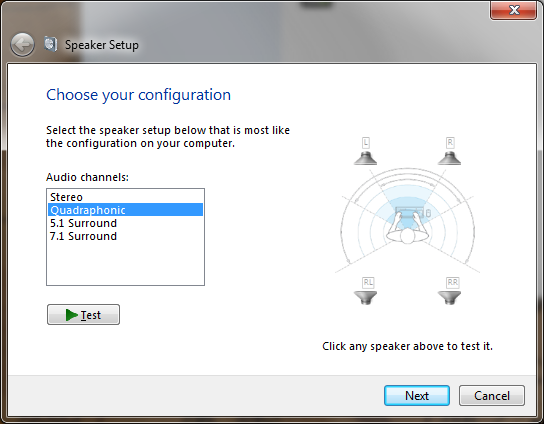
This is very true. However, if you go into Windows Speaker Setup (select your speakers under the Windows Sound window and select configure) then set it to Quadraphonic, it should give you the sound you are looking for OP.

Configure-Surround-Sound-Device-in-Windows-7.png


QqtQD.png
 
Thanks for the suggestion, tried it and still no rear speakers.. at this point I've reverted to splitting the front channel (with a y cable) to the rear speakers from the same output on the mainboard...
Not a perfect solution but I'm at a loss...
 
Considering the only thing you would be doing on normal operating is having both channels do stereo, I agree that the splitting would be the next best thing. I am surprised that the Quadraphonic didn't work, unless the Realtek software is doing something to circumvent that.
 
If the source was not recorded in quad, you won't get quad. You can, as was mentioned, force stereo into 4 speakers, but it is phony.
 
AFAIK, the only way to get stereo content playing over 5.1 is by using an external receiver like Yamaha or Pioneer, which has a "5 Channel Stereo" function...
 
Last edited:
Did you install the sonic studio III software for your board? It has app specific control that may allow you to configure your games and such to utilize the rear speakers.
 
Back
Top