• We’re currently investigating an issue related to the forum theme and styling that is impacting page layout and visual formatting. The problem has been identified, and we are actively working on a resolution. There is no impact to user data or functionality, this is strictly a front-end display issue. We’ll post an update once the fix has been deployed. Thanks for your patience while we get this sorted.

Netflix SuperHD is only available...

Page 2 - Seeking answers? Join the AnandTech community: where nearly half-a-million members share solutions and discuss the latest tech.
OP I think the one rep is probably confusing their SuperHD with 4K/UltraHD.
Yes. HOC season 2 is 4K. I haven't bothered finishing season 1 yet though since I kinda got sick of it 3/4 of the way through. Maybe I'll start watching it again later, I dunno.

SuperHD is available on a lot of other stuff though as mentioned. SuperHD is what their "HD" should have been in the first place, since a lot of their pre-SuperHD stuff didn't look great. Either that or else just give us more control of the HD settings.
 
with netflix normally they stream at 720p for HD movies at something around 2.3Mbps or higher, though sometimes they will do 1080p at 3.8Mbps bitrate.

SuperHD is still 1080p but at a higher bitrate of 5.7Mbps up to 7Mbps

UHD is 4k resolution and requires 15.7Mbps or faster.
That's the first streaming requirement I have seen for UHD. Quite reachable for me and many other people. I imagine if it truly creates a much better viewing experience we will hear a lot of complaints by people who cant' reach UHD's connection speeds.
 
Either that or else just give us more control of the HD settings.


when I watch netflix in the windows 8 app I press

Ctrl+Shift+Alt+S

this gives you the options for current Streaming bit-rate and manual bit-rate selection. This lets me "force" it to buffer the highest bitrate. I can pause for a few minutes to let it buffer, then come back and watch in the highest quality.
 
when I watch netflix in the windows 8 app I press

Ctrl+Shift+Alt+S

this gives you the options for current Streaming bit-rate and manual bit-rate selection. This lets me "force" it to buffer the highest bitrate. I can pause for a few minutes to let it buffer, then come back and watch in the highest quality.

Kewl since right now on Win7 you can only specify the highest setting allowed so you can avoid buffering or bandwith caps.
 
That's the first streaming requirement I have seen for UHD. Quite reachable for me and many other people. I imagine if it truly creates a much better viewing experience we will hear a lot of complaints by people who cant' reach UHD's connection speeds.

I doubt it will and people would need a 4K TV and a device capable of playing that back on the 4K TV . IIRC Netflix 4K is actually going to use a new video encoder that's higher quality but it requires a processor capable of decoding it.

The problem is less the bandwidth (that's still more than I can get, we're currently topped at 10Mbps) and more on if Netflix works a deal with your ISP. There were people on fiber that were having trouble streaming Netflix in normal HD because of that BS.

Plus the lack of content and people probably won't be clamoring for 4K too much yet.
 
So, is UHD actually 4k or just a higher resolution picture that will increase the resolution of SuperHD but be playable on normal TV's?
 
So, is UHD actually 4k or just a higher resolution picture that will increase the resolution of SuperHD but be playable on normal TV's?
??? Video at higher resolution than 1080p won't play on "normal" TVs, regardless if it's 4K or something else.

But yes, it's 4K.

01DSC03342.jpg


Are you confusing resolution with bitrate?
 
Last edited:
What happened to my Netflix?! Here’s why you’re not always getting HD


http://www.digitaltrends.com/home-theater/getting-hd-netflix/#!yTa6W


Given that the bandwidth measurements we took remained constant, and because we were able to reliably stream a 1080p movie from VUDU in a fraction of the time, we’re sure there wasn’t anything choking up our Internet access. And that would seem to imply that Netflix has a problem keeping up with the demand on its services. That could certainly be the case. According to Sandvine, Netflix is responsible for roughly a third of peak downstream Internet traffic in the US on hard-wired Internet connections.
 
So, is UHD actually 4k or just a higher resolution picture that will increase the resolution of SuperHD but be playable on normal TV's?

It will only be viewable on 1440p or higher displays. I believe it will downscale 4k video to 2560x1440 or 2560x1600 if you have a display with those resolutions, or you can play it on a real 4k monitor at 3840x2160. If it's a 1920x1080 monitor it will just play it in 1920x1080.

darkswordsman17 said:
IIRC Netflix 4K is actually going to use a new video encoder that's higher quality but it requires a processor capable of decoding it.

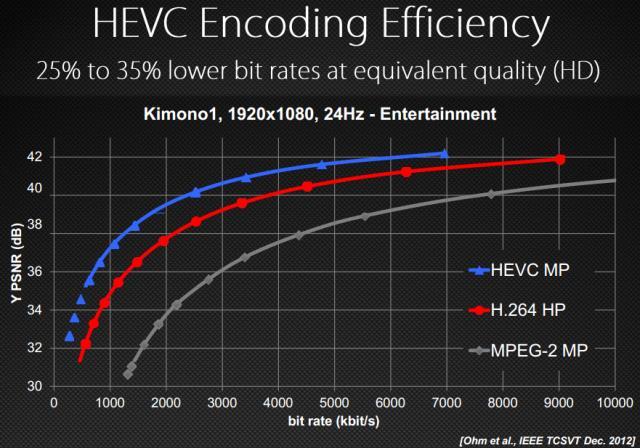
Yes they use h.265 instead of the common older, h.264 compression that is used for most HD content these days.
 
??? Video at higher resolution than 1080p won't play on "normal" TVs, regardless if it's 4K or something else.

But yes, it's 4K.

I'm a bit confused. I thought that the UHD was only 4K source material down converted to 1080p. Just like a bluray can be ripped down to the size of DVD and look much better, I thought that's what they were doing with UHD. Of course you're right if its a true 4k than its time for a new tv.
 
I'm a bit confused. I thought that the UHD was only 4K source material down converted to 1080p. Just like a bluray can be ripped down to the size of DVD and look much better, I thought that's what they were doing with UHD. Of course you're right if its a true 4k than its time for a new tv.
No, it's 4K output, at moderate bitrates.

You'd likely need a new TV anyway even if you already had a 4K TV, since AFAIK the Netflix apps on "older" 4K smart TVs don't support 4K. 😛 However, media streamers will likely be released soon to support 4K.

Personally, I don't give a chit. All my TVs and my projector are 720p.
 
Last edited:
1080p can look awful with a low bit rate (higher compression). What Netflix calls "SuperHD" is just a higher bit rate than their other content. It's all MUCH lower quality than a Blu-Ray movie...which can be over 10x the bit rate.

Thanks for that info!
 
That's the first streaming requirement I have seen for UHD. Quite reachable for me and many other people. I imagine if it truly creates a much better viewing experience we will hear a lot of complaints by people who cant' reach UHD's connection speeds.

Well, that "minimum" bit rate for 4K UHD is just a fraction of the bit rate for a typical 1080p Blu-Ray movie. I don't think a 7 Mbps 4K stream can look better than a 1080p Blu-Ray with 48+ Mbps.
 
Well, that "minimum" bit rate for 4K UHD is just a fraction of the bit rate for a typical 1080p Blu-Ray movie. I don't think a 7 Mbps 4K stream can look better than a 1080p Blu-Ray with 48+ Mbps.

it's 15.7Mbps for 4k, also most blurays are in the 20-30Mbps area, not 48Mbps+
 
It also depends on the content and the encoding scheme of course. Netflix 4k is H.265. Blu-ray is H.264 or VC-1 or even sometimes MPEG-2. Most of the very high bitrate Blu-ray out there is in fact MPEG-2, because to look good, MPEG-2 needs high bitrates.


Personally I'm not really interested in buying a 4K TV, but if it were, I think it's kinda stupid to buy it without integrated fast h.265 decoders, and the current crop of hardware doesn't have that AFAIK. But like I said, I'm not really interested. My next projector (or TV) will likely be 1080p. I just don't see the point beyond that. Diminishing returns.

Where I do want 4K though is on my computer screen since I sit so close to it, reading text. Retina for work machines is great.
 
Last edited:
when I watch netflix in the windows 8 app I press

Ctrl+Shift+Alt+S

this gives you the options for current Streaming bit-rate and manual bit-rate selection. This lets me "force" it to buffer the highest bitrate. I can pause for a few minutes to let it buffer, then come back and watch in the highest quality.

OK, I got a Windows8 machine up and running. I downloaded what appeared to be the Netflix app. There is no way to search the Windows8 store that I can find, so hopefully I have the same app as you when playing Netflix.

I can't get the Ctrl+Shift+Alt+S to anything. I open a Netflix show like House of Cards and wait a bit then try the keyboard combo you list. Is that how to do it? In Windows 7 I found Shift-Alt-Left click brings up a diagnositic screen over the video that's playing.
 
OK, I got a Windows8 machine up and running. I downloaded what appeared to be the Netflix app. There is no way to search the Windows8 store that I can find, so hopefully I have the same app as you when playing Netflix.

I can't get the Ctrl+Shift+Alt+S to anything. I open a Netflix show like House of Cards and wait a bit then try the keyboard combo you list. Is that how to do it? In Windows 7 I found Shift-Alt-Left click brings up a diagnositic screen over the video that's playing.


My netflix app was installed when i installed windows, but that might be because I already used windows 8 with this email address and it remembered i had netflix? Not sure but here it is.
HCKwzAs.png


and the command works for me.
L6GV0U4.png


Also to search the store, move your mouse to the right hand side until the charm window pops up, click on the magnifying glass and that's your search, if you are in netflix it will search through the netflix selection, if you are in the windows 8 store, it will search the store, if you are on the desktop it searches My computer, etc etc.
 
Last edited:
My netflix app was installed when i installed windows, but that might be because I already used windows 8 with this email address and it remembered i had netflix? Not sure but here it is.
HCKwzAs.png


and the command works for me.
L6GV0U4.png


Also to search the store, move your mouse to the right hand side until the charm window pops up, click on the magnifying glass and that's your search, if you are in netflix it will search through the netflix selection, if you are in the windows 8 store, it will search the store, if you are on the desktop it searches My computer, etc etc.

First off, thanks for going to the lengths you have to post screenshots.

Ok, that bitrate option is the same I see when viewing thru a browser and do Shift-Alt-Left click. Just fyi.

Your example seems just to be the ability to degrade the bitrate, if you have a slow connection, for example. Though it does tell you the current bitrate and that would be useful since it would tell you your connection can't stream at the max to get the best picture.
I will try your Ctrl+Shift+Alt+S again when playing thru the Netflix app on Win8 and get back to you.

Once again, thanks
 
Update: Your Ctrl+Shift+Alt+S now works for me. Turns out the keyboard I was using on my Win8 machine had a bad Alt key. Tried the other Alt key and it worked.
Sorry about that. I just threw together a win8 machine and grabbed a keyboard and didn't realize there was a problem.

OH, and Netflix SuperHD is clearly superior to the regular HD. A very nice picture that is clearly not equal to bluray but is what regular Netflix HD should have been.
 
Your example seems just to be the ability to degrade the bitrate, if you have a slow connection, for example. Though it does tell you the current bitrate and that would be useful since it would tell you your connection can't stream at the max to get the best picture.

That was just cause it was an older TV show that wasn't shot in HD so it can't be played back at a higher bitrate.

Had I gone with season 19 or 20 it would have been much higher bitrate as they were shot in HD.

Glad you figured it out!
 
Back
Top