

Question Need help with system crashing system is unuseable.

jamesdsimone

Golden Member
Dec 21, 2015
1,008
287
136
My system has been crashing for the last 4 days. I was playing F.E.A.R 3 and the screen locked and the sound was a constant stutter. The keyboard locked up so I couldn't get into task manager to shut it down so I rebooted. No problem Windows crashes right. Started playing again and same thing. I about 40% through the game and it has run perfectly so far. I decided to put it off and was watching Youtube. After a while maybe half hour or an hour, same crash. Rebooted and running Youtube same crash again. Ok I had changed some advanced boot setting so went back and set them back to default, still another Youtube crash. Same thing system locks, keyboard locks, just stuttering sound. I had installed a game which for some reason installed Direct X. Restored from a restore point prior to that. Still crashing. AMD Radeon software was acting funny with it not starting correctly so booted to safe mode and uninstalled the drivers and reinstalled. I was able to watch Youtube for most of the day so I thought that had fixed it. But today same crash. I has done this about 6 times in the last 4 days. I attached the error message from the latest Youtube crash, exception c0000005. With the AMDxn64.dll being the supposed problem. I couldn't get Memtest to start so I run Windows memory diagnostics and it reported no problems.

This is my P520/w-2145/4x16 PC2666 ECC memory/RX6800XT/Win7 build.

When I reboot I get no errors and it POSTs and boot just fine. I have been running no problems for a couple years I think.
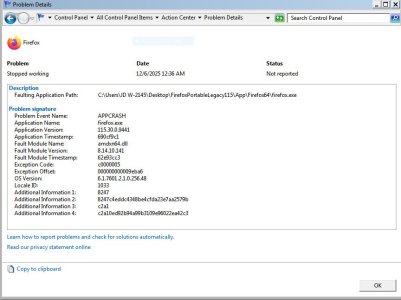
 

Attachments

  • Capture.JPG
    Capture.JPG
    78.8 KB · Views: 10

C1

Platinum Member
Feb 21, 2008
2,425
133
106
Guess is that you got yourself a graphics system issue.
- Turn off the system and reseat the graphics card
- Restart the system and uninstall/re-install the graphics card (system/device mgr)
-If still an issue, then re-install the graphics software for your card
- If still a problem then run sfc /scannow
- If still a problem then run DISM /Online /Cleanup-Image /RestoreHealth

Good luck
 
  • Like
Reactions: jamesdsimone

jamesdsimone

Golden Member
Dec 21, 2015
1,008
287
136
Guess is that you got yourself a graphics system issue.
- Turn off the system and reseat the graphics card
- Restart the system and uninstall/re-install the graphics card (system/device mgr)
-If still an issue, then re-install the graphics software for your card
- If still a problem then run sfc /scannow
- If still a problem then run DISM /Online /Cleanup-Image /RestoreHealth

Good luck
I run it without the side cover because I put an after market CPU cooler and it's too big for me to put the side cover on. I'll pull the GPU and blow everything out and see if that is the problem. I have already done a clean reinstall of the graphics drivers.
 

jamesdsimone

Golden Member
Dec 21, 2015
1,008
287
136
I blew out the dust and Youtube ran the rest of the night with no issues. But this morning it crashed after an about half hour. I pulled the video card and blew out the case again. I broke the retaining clip on the PCIe slot because there was no way to get to it under the card. I checked the card and the PCIe connector looks fine. I cleaned the connector with alcohol and put everything back together. Booted up to safe mode and ran sfc /scannow. It ran but closed without displaying any message. I assume it is supposed to give some kind of message?
 

C1

Platinum Member
Feb 21, 2008
2,425
133
106
If nothing was found then sfc should have left a message something like ""Windows Resource Protection did not find any integrity violations". Make sure that scannow was run from an elevated command prompt (ie, administrative mode).

Sorry you broke the PCIe latch. Gotta be careful with that stuff. There's some plastic repair stuff called "Plastic Surgery" with which you might be able to repair the latch. The stuff is stronger than hell, but make sure it is allowed to fully set-up before using/trying the latch.

(Why I said graphics is because the ".dll" file mentioned is stated to involve the graphics system for AMD.)

A possibility to isolate better what is going on is to try the "Who Crashed" utility.

https://www.resplendence.com/whocrashed

Hopefully others will chime in with their expertise/insight/experience.

Let us know what the problem turns out to be.

Again .....

Good luck
 

jamesdsimone

Golden Member
Dec 21, 2015
1,008
287
136
If nothing was found then sfc should have left a message something like ""Windows Resource Protection did not find any integrity violations". Make sure that scannow was run from an elevated command prompt (ie, administrative mode).

Sorry you broke the PCIe latch. Gotta be careful with that stuff. There's some plastic repair stuff called "Plastic Surgery" with which you might be able to repair the latch. The stuff is stronger than hell, but make sure it is allowed to fully set-up before using/trying the latch.

(Why I said graphics is because the ".dll" file mentioned is stated to involve the graphics system for AMD.)

A possibility to isolate better what is going on is to try the "Who Crashed" utility.

https://www.resplendence.com/whocrashed

Hopefully others will chime in with their expertise/insight/experience.

Let us know what the problem turns out to be.

Again .....

Good luck
I did some searching and other people have had the same AMDxn64.dll crash but didn't find any useful help. The broken PCIe latch is no big deal, not worth worrying about. The problem is that it is a work station and the RX6800XT covers the slot completely so you can put the card in no problem. Once the card is seated you can't get to it. Been watching Netflix all day but it did this yesterday. I reran scannow and no errors were reported. I can't figure out what could have happened since it has been running fine for 2 years with the same drivers. Would reinstalling DirectX be useful?
