
I recently had a hard drive crash and am trying to rebuild my machine, I managed to get my data off my hard drive but have run into an issue. I need to replace my old emails which I have the .pst files for, I have a lot of stuff saved in various folders for my job so I need to keep that structure, also if I log onto my server it just downloads the last 10 years worth of emails....
To avoid this I installed Outlook Express 2007 (yes I know) and placed all my old .pst files into the C:\Users\me\AppData\Local\Microsoft\Outlook folder and fired it up. It loaded all my old emails but there are two problems:
1) Outlook is still creating a NEW account folder (below) and is sucking down all my emails from my service provider (10 years worth.....) I really wanted the OLD folder to remain my active one and get rid of the NEW folder, I also need to not try and sync with my email providers decade worth of old emails.
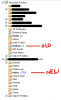
2) The second problem is there are emails with a line through them in the NEW inbox which I don't understand (below) and they can't be deleted. Can anyone offer some advice please?

To avoid this I installed Outlook Express 2007 (yes I know) and placed all my old .pst files into the C:\Users\me\AppData\Local\Microsoft\Outlook folder and fired it up. It loaded all my old emails but there are two problems:
1) Outlook is still creating a NEW account folder (below) and is sucking down all my emails from my service provider (10 years worth.....) I really wanted the OLD folder to remain my active one and get rid of the NEW folder, I also need to not try and sync with my email providers decade worth of old emails.
2) The second problem is there are emails with a line through them in the NEW inbox which I don't understand (below) and they can't be deleted. Can anyone offer some advice please?


