
shakaxl007
Junior Member
Hi everyone,
I'm following up on my previous thread about issues getting four 8GB RAM modules to work for a total of 32GB. The problem persists: I get 5 beeps and an immediate shutdown.
As a troubleshooting step, I tried reducing the frequency from 1600MHz to 1333MHz. I wanted to see if anyone can guide me on whether I'm doing this correctly, as my attempts haven't resolved the issue yet.
Here's the situation:


What I tried:
I went into Advanced Frequency Settings and changed the multiplier to 13.33. I believe this was correct because the change was reflected in the operating system, confirming the frequency dropped to 1333MHz. However, this did not solve the problem.

There are many other options in these menus, and I'm not entirely sure what each one does. Does anyone have experience with these settings? What other adjustments should I try?


Thanks in advance for any help!
I'm following up on my previous thread about issues getting four 8GB RAM modules to work for a total of 32GB. The problem persists: I get 5 beeps and an immediate shutdown.
As a troubleshooting step, I tried reducing the frequency from 1600MHz to 1333MHz. I wanted to see if anyone can guide me on whether I'm doing this correctly, as my attempts haven't resolved the issue yet.
Here's the situation:
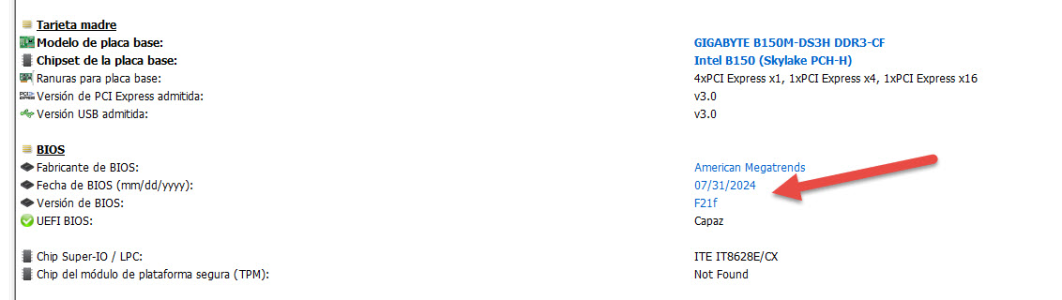
- BIOS Version: The last
- Current Status: The modules work fine in pairs (16GB), but not all four together (32GB).


What I tried:
I went into Advanced Frequency Settings and changed the multiplier to 13.33. I believe this was correct because the change was reflected in the operating system, confirming the frequency dropped to 1333MHz. However, this did not solve the problem.

There are many other options in these menus, and I'm not entirely sure what each one does. Does anyone have experience with these settings? What other adjustments should I try?


Thanks in advance for any help!


