• We’re currently investigating an issue related to the forum theme and styling that is impacting page layout and visual formatting. The problem has been identified, and we are actively working on a resolution. There is no impact to user data or functionality, this is strictly a front-end display issue. We’ll post an update once the fix has been deployed. Thanks for your patience while we get this sorted.

My journey to successfully game under Linux (and overcome Microsoft's Stranglehold)

Page 14 - Seeking answers? Join the AnandTech community: where nearly half-a-million members share solutions and discuss the latest tech.
BTW @biostud.. a few notes..

Don't underestimate Fedora's immutable distros. They basically become debian at that point as they don't change or can revert to original setup with a simple reboot.

I specifically chose Ultramarine because of networking otherwise Bazzite (immutable Fedora with NVIDIA drivers) worked great for gaming for me.

So if the problems with backups continue.. don't write off Fedora all together.. maybe you just need an immutable version.
 
If your OS SSD is separate and small (upto 256GB), you can clone it, test the updates and if they suck, back to the original SSD.

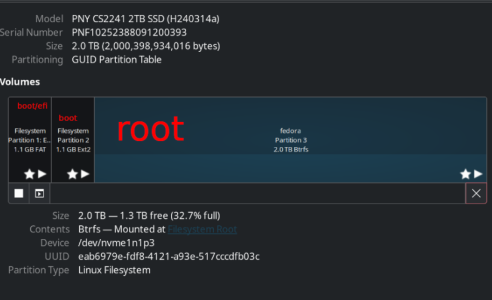
2 TB.

I tried to make individual partitions this time but either it didn't work or it just made a huge partition.

Either way it did install.. I gave it:

1 GB /boot/efi FAT
1 GB /boot EXT2

And I tried 100GB /root with 1.7 TB /var but somehow it combined them. (I also had tried to go with EXT4 but i overrode me and went with BTRFS). But it works so I'm not keen on doing another reformat.

I'm curious what software do you use to clone it within Ultramarine? Since if worse comes to worse.. maybe a clone idea isn't the worst!
 
I'm curious what software do you use to clone it within Ultramarine? Since if worse comes to worse.. maybe a clone idea isn't the worst!
Not from within but boot from CloneZilla. It's excellent.

Though I've only tried exact sector copy. Don't know if it will recognize all file systems etc.
 
Interesting.

Maybe it is worth keeping Windows around after all for fall back methods!

I do have a 2 TB HDD from 2010 or something.. might be worth to use it like that.
I currently have a triple boot setup. It is also nice to have a fallback Linux, when you mess up your fstab so you can't boot. ( or so I've heard 😛)
 
Not from within but boot from CloneZilla. It's excellent.

Though I've only tried exact sector copy. Don't know if it will recognize all file systems etc.
I'm pretty sure it handles Linux-native filesystems quite well. It can shrink NTFS, at least via an "experimental" flag that I've never used.

Now the text-based UI is something "only a mother could love." 😛 There's also RescueZilla if you gotta have a real GUI.

Last time I used Macrium free a couple years ago, it could not automatically grow one of the partitions (rescue or ext4, can't remember now).
 
Interesting.

Maybe it is worth keeping Windows around after all for fall back methods!

I do have a 2 TB HDD from 2010 or something.. might be worth to use it like that.
I also keep mine for some photo work. But yeah, I am not a fanatic so having extra options is in my opinion not a bad thing. I want to see how much I can get done without the need of Microsoft, but if I use them now and then it is not a major problem.

I have enough storage to keep an active Windows partition in my system.
 
Yeah I did that..

made a list of what programs I need.
what commands I put in terminal
made a fonts folder
copied over my saved games/ add ons folder

But apparently I should copy my whole steam library folder?? I haven't quite figured that one out. And I'd need to do the same for Lutris as not all of my games are Steam.

But I honestly haven't used Windows in about 6 weeks now other than to test my video card isn't broken.

If anything I'm liking linux more and more.. what most impresses me is you know how windows can feel laggy if you leave it running for a few days.. well no such lag there with Ultramarine.. but I knew that from my wife's debian too.. she leaves the computer on for months at a time.

Both of us are not updating to latest and greatest as I feel that breaks the system.. or at least it did for me when I updated and then GPU driver stopped working.
That's why I have a separate partition for games/data, although I haven't really figured out how to get steam to use previously downloaded data.

But I don't have that many games, so with 1000/1000 it's not a big deal.
 
although I haven't really figured out how to get steam to use previously downloaded data.
You can use NTFS symlink. Never tried it.

What I've read is that the Steam username accessing the symlink should not change so multiple Steam accounts may not be able to access the same symlink.

It's another one of those, you won't get it until you go through the pain of trial and error.
 
You can use NTFS symlink. Never tried it.

What I've read is that the Steam username accessing the symlink should not change so multiple Steam accounts may not be able to access the same symlink.

It's another one of those, you won't get it until you go through the pain of trial and error.
Yeah, I think I'll pass on that. I don't want to fiddle around with directories anymore 😛

I've got a working solution now. I play 2-3 steam games at a time and my kids 4-5 plus some on heroic so it is a manageable collection to have installed.
 
So I wanted to give my kids a non-admin account (not that they are actually going to sudo anything), but apparently you need to belong to the "wheel" group to be able to use the blueman bluetooth app, as i otherwise keeps prompting for an admin password. We use bluetooth for game controllers.

Anyone has a better solution, which does not involve admin rights?

Also I like UM42, there are always new updates which are really great for my update OCD 😛
 
Happy birthday.


So I wanted to give my kids a non-admin account (not that they are actually going to sudo anything), but apparently you need to belong to the "wheel" group to be able to use the blueman bluetooth app, as i otherwise keeps prompting for an admin password. We use bluetooth for game controllers.

Anyone has a better solution, which does not involve admin rights?
Not ideal, but you added the kid user to wheel ?
 
Happy birthday.


Not ideal, but you added the kid user to wheel ?
Yeah, until I find a better solution.
 
You can use NTFS symlink. Never tried it.

What I've read is that the Steam username accessing the symlink should not change so multiple Steam accounts may not be able to access the same symlink.

It's another one of those, you won't get it until you go through the pain of trial and error.
In my experience Steam on Linux does not play well with it's game library on an NTFS disk.
The method that worked for me was log into Windows installation, use Steams backup game files option to a usb HDD, log into Linux installation and use Steams restore game data option. That worked for pretty much all my games (except for Halo, that had to redownload all the single player campaigns).
 
Happy birthday.


Not ideal, but you added the kid user to wheel ?
I was pointed to this solution and changing wheel to users seems to have fixed it:
 
The linux install without updates has been surprisingly good and stable.

My only hiccups are still BF2 not working and sometimes a steam game refuses to launch.. I just go into system monitor, terminate the process and relaunch it. Works good!


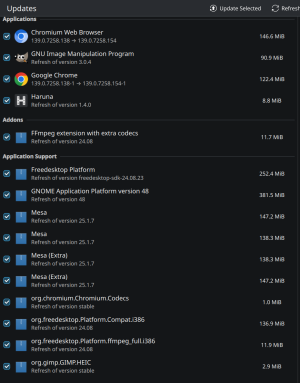
Updates without system upgrades (which includes a new kernel) look like this..

1756567539902.png

Wonder if MESA updates are worth it as they relate to video card drivers.. hmmm
 
BTW I ran into a bit of a problem with backing up the nvme drive in its entirety. I have an old 2 TB Nas disk and thought I'd use it for backup.

Copied it over overnight.. but strange problem.. when I started my computer today.. it was like it booted off FEDORA instead of ultramarine and it felt sluggish.. for some reason it must have booted off the backup drive and fedora is still there, not ultramarine after the install.

So I'm curious.. instead of a full disk backup..

should I only backup the root partition??

Will that be fine??

1756849915290.png
 
Why not just remove the backup drive so it doesn't boot from that?

Also, a sector by sector copy should wipe the backup drive so nothing old should be remaining on that.
 
Back
Top