

My idle temps. ok?
- Thread starter Synomenon
- Start date
You are using an out of date browser. It may not display this or other websites correctly.
You should upgrade or use an alternative browser.
You should upgrade or use an alternative browser.

- Dec 25, 2004
- 10,547
- 6
- 81
Ok, so put together another system. Used the i7-3770T again. This time though, I used a low-profile heatsink:
Thermaltake Slim X3
http://www.thermaltakeusa.com/products-model.aspx?id=C_00001602


I replaced the heatsink's 80mm fan with a 92mm Noctua fan and the fan is sucking air away from the heatsink / blowing air upwards towards the PSU (the system is in a SilverStone SG05).
I'm running SpeedFan, Core Temp and AIDA64. The system has been idling for an hour now and these are the temps. showing in each program:
AIDA64
CPU: 53C
Core1: 43C
Core2: TRIAL
Core3: 43C
Core4: TRIAL
SpeedFan
CPU: 54C
Core 0: 44C
Core 1: 45C
Core 2: 44C
Core 3: 45C
Core Temp
Core 0: 43C
Core 1: 44C
Core 2: 43C
Core 3: 44C
Considering I went from a Corsair H60 to this low-profile air cooler, are my temps. still ok? Core Temp says this under the CPU info., "Tj. Max: 94C".
Also, SpeedFan shows a fire icon next to the CPU's temp. (54C) and one next to "HD1" which I'm not sure if it's my Intel 240GB Cherryville or 240GB Mushkin mSATA SSD. The temp. listed for HD1 is 128C. I touched the mSATA drive and it's just warm. So is the Intel SSD.
The motherboard is an ASRock Z77E-ITX.
Thermaltake Slim X3
http://www.thermaltakeusa.com/products-model.aspx?id=C_00001602
I replaced the heatsink's 80mm fan with a 92mm Noctua fan and the fan is sucking air away from the heatsink / blowing air upwards towards the PSU (the system is in a SilverStone SG05).
I'm running SpeedFan, Core Temp and AIDA64. The system has been idling for an hour now and these are the temps. showing in each program:
AIDA64
CPU: 53C
Core1: 43C
Core2: TRIAL
Core3: 43C
Core4: TRIAL
SpeedFan
CPU: 54C
Core 0: 44C
Core 1: 45C
Core 2: 44C
Core 3: 45C
Core Temp
Core 0: 43C
Core 1: 44C
Core 2: 43C
Core 3: 44C
Considering I went from a Corsair H60 to this low-profile air cooler, are my temps. still ok? Core Temp says this under the CPU info., "Tj. Max: 94C".
Also, SpeedFan shows a fire icon next to the CPU's temp. (54C) and one next to "HD1" which I'm not sure if it's my Intel 240GB Cherryville or 240GB Mushkin mSATA SSD. The temp. listed for HD1 is 128C. I touched the mSATA drive and it's just warm. So is the Intel SSD.
The motherboard is an ASRock Z77E-ITX.

ShintaiDK
Lifer
- Apr 22, 2012
- 20,378
- 146
- 106
What do you mean that it's fine if it doesn't throttle? What does it mean if the CPU throttles?
I did post temps. from Core Temp in my post above.
The core temps are fine idle.
But idle temps are also meaningless as such. What are your load temps?
Intel guarantees it can run at tjmax throughout its estimated lifespan.
ShintaiDK
Lifer
- Apr 22, 2012
- 20,378
- 146
- 106
Ok, I ran the preset Small FFTs test in Prime95 and ran Core Temp. to make sure the cores were at 100% load.
After around 20 minutes of testing, all four cores were hovering around 82C.
Should I let it run longer? Are these temps. way too high?
Perfectly fine temps.

TheReaWarmonger
Member
- Jan 31, 2013
- 108
- 0
- 0
coffeejunkee
Golden Member
- Jul 31, 2010
- 1,153
- 0
- 0
Also, SpeedFan shows a fire icon next to the CPU's temp. (54C) and one next to "HD1" which I'm not sure if it's my Intel 240GB Cherryville or 240GB Mushkin mSATA SSD. The temp. listed for HD1 is 128C. I touched the mSATA drive and it's just warm. So is the Intel SSD.
The fire icons means nothing, except that you haven't adjusted the desired temps in Speedfan (which by default are a bit too aggresive). The 128C on the hdd means nothing either, just that the temp sensor isn't recognized.
Perfectly safe and normal temps, keep in mind Ivy Bridge chips are almost as bad as fermi.
Those temps are indeed perfectly safe and normal, certainly in a sff case. But Ivy is nothing like Fermi, it's only when you overclock to high freq that temps skyrocket, while Fermi temps skyrocket by default.
Last edited:
- Dec 25, 2004
- 10,547
- 6
- 81
So, I've been running the Small FFTs test in Prime95 for over seven hours now and the highest temperature any of the cores reached is 83C.
Core Temp shows this currently (Prime95 still running):
Core 0: 75C (Max 81C)
Core 1: 75C (Max 81C)
Core 2: 79C (Max 83C)
Core 3: 74C (Max 80C)
Ambient temp. in this room is ~24C.
So, everyone think these temps. are ok? Or should I try to find a better low-profile heatsink?
Core Temp shows this currently (Prime95 still running):
Core 0: 75C (Max 81C)
Core 1: 75C (Max 81C)
Core 2: 79C (Max 83C)
Core 3: 74C (Max 80C)
Ambient temp. in this room is ~24C.
So, everyone think these temps. are ok? Or should I try to find a better low-profile heatsink?
Last edited:


- Dec 25, 2004
- 10,547
- 6
- 81
So I was looking at other heatsinks and found the Silverstone NT06 Pro. made by Silverstone.
http://www.silverstonetek.com/product.php?pid=368
Looks like a perfect fit for the SG05 which is the case this build is in:
http://www.silverstonetek.com/product.php?pid=210
Silverstone says a low voltage CPU like mine can be cooled passively with the NT06 Pro..
Anyone think the NT06 Pro. can cool my CPU passively in my case? It looks like a much better heatsink than the Thermaltake Slim X3 currently on my CPU.
Here's a simple diagram of the airflow in the case:

The front 120mm fan is a Silverstone Air Penetrator:
http://www.silverstonetek.com/product.php?pid=257&area=
The fan cools the motherboard and components in the case. The SFX PSU has an 80mm fan which is sitting above the CPU, drawing hot air in and out the back of the case. The heatsink fan on the Slim X3 is 92mm and is blowing air up at the 80mm PSU fan instead of down onto the CPU. I did it that way so the PSU and heatsink fans don't fight for air.
http://www.silverstonetek.com/product.php?pid=368
Looks like a perfect fit for the SG05 which is the case this build is in:
http://www.silverstonetek.com/product.php?pid=210
Silverstone says a low voltage CPU like mine can be cooled passively with the NT06 Pro..
Anyone think the NT06 Pro. can cool my CPU passively in my case? It looks like a much better heatsink than the Thermaltake Slim X3 currently on my CPU.
Here's a simple diagram of the airflow in the case:
The front 120mm fan is a Silverstone Air Penetrator:
http://www.silverstonetek.com/product.php?pid=257&area=
The fan cools the motherboard and components in the case. The SFX PSU has an 80mm fan which is sitting above the CPU, drawing hot air in and out the back of the case. The heatsink fan on the Slim X3 is 92mm and is blowing air up at the 80mm PSU fan instead of down onto the CPU. I did it that way so the PSU and heatsink fans don't fight for air.
While no first hand experience with Silverstone , that HS fan combo looks real good for that type small form factor case . not sure on heatpipe diameter differences but the silverstone looks to be optimum for that caseSo I was looking at other heatsinks and found the Silverstone NT06 Pro. made by Silverstone.
http://www.silverstonetek.com/product.php?pid=368
Looks like a perfect fit for the SG05 which is the case this build is in:
http://www.silverstonetek.com/product.php?pid=210
Silverstone says a low voltage CPU like mine can be cooled passively with the NT06 Pro..
Anyone think the NT06 Pro. can cool my CPU passively in my case? It looks like a much better heatsink than the Thermaltake Slim X3 currently on my CPU.
Here's a simple diagram of the airflow in the case:
The front 120mm fan is a Silverstone Air Penetrator:
http://www.silverstonetek.com/product.php?pid=257&area=
The fan cools the motherboard and components in the case. The SFX PSU has an 80mm fan which is sitting above the CPU, drawing hot air in and out the back of the case. The heatsink fan on the Slim X3 is 92mm and is blowing air up at the 80mm PSU fan instead of down onto the CPU. I did it that way so the PSU and heatsink fans don't fight for air.
- Dec 25, 2004
- 10,547
- 6
- 81
Ok, found a build log of a similar system:
http://www.overclock.net/t/1338999/build-log-air-travel-sg06/0_100
If I use the NT06-Pro. on my board AND put a 120mm fan on the NT06-Pro. will such a large fan on the NT06-Pro. starve the PSU's fan of air if I have the 120mm fan on the NT06-Pro. blowing down onto the CPU / motherboard?
Here's the diagram again of the current airflow in the case (using the Thermaltake Slim X3 heatsink w/ 92mm fan):
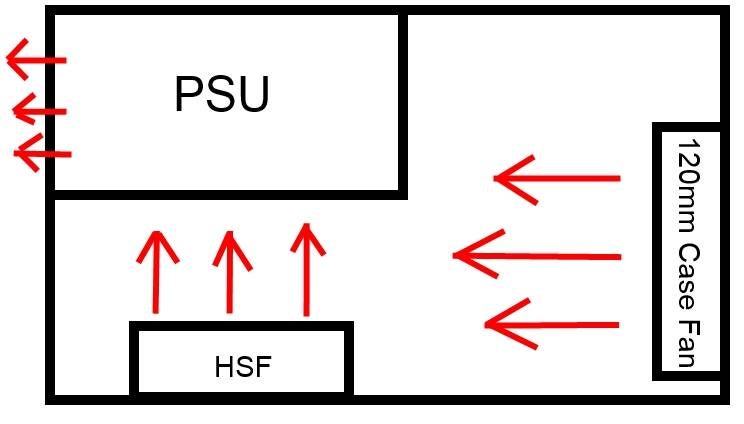
The top of the NT06-Pro. would be right up against the underside of the PSU / its 80mm fan. The 120mm fan mounts to the underside of the NT06-Pro.'s fins.
http://www.overclock.net/t/1338999/build-log-air-travel-sg06/0_100
If I use the NT06-Pro. on my board AND put a 120mm fan on the NT06-Pro. will such a large fan on the NT06-Pro. starve the PSU's fan of air if I have the 120mm fan on the NT06-Pro. blowing down onto the CPU / motherboard?
Here's the diagram again of the current airflow in the case (using the Thermaltake Slim X3 heatsink w/ 92mm fan):
The top of the NT06-Pro. would be right up against the underside of the PSU / its 80mm fan. The 120mm fan mounts to the underside of the NT06-Pro.'s fins.
Just the opposite , if the PS is exhausting out of case and your HS fan pushes up to two will help evacuate the case .Ok, found a build log of a similar system:
http://www.overclock.net/t/1338999/build-log-air-travel-sg06/0_100
If I use the NT06-Pro. on my board AND put a 120mm fan on the NT06-Pro. will such a large fan on the NT06-Pro. starve the PSU's fan of air if I have the 120mm fan on the NT06-Pro. blowing down onto the CPU / motherboard?
Here's the diagram again of the current airflow in the case (using the Thermaltake Slim X3 heatsink w/ 92mm fan):
The top of the NT06-Pro. would be right up against the underside of the PSU / its 80mm fan. The 120mm fan mounts to the underside of the NT06-Pro.'s fins.
For sure you don't want then working against each other (HS fan blowing down) .
I would run a fan with HS, though you might be able to get away with just PS fan passing enough air as it is so close to the HS .
I would try it with and without fan on HS if you rather not have fan . Just test it good under load to make sure temps are not bad, it is small case , they tend to run hotter .
Edit: I should read slower, you don't want HS fan blowing down in this case, that would be bad IMO .
Last edited:
So if I put a fan on the NT06-Pro. in this case, the fan should be blowing up into the PSU, right?
Yes, and remember to the intake fan and vents on side will help, even though the fan is pointing up your MB will still get airflow past it as the air has to get into the intake side of fan . It maybe not as much airflow over MB as fan down but with that case your not going to get good results that way .
Well you could try it but don't think out come would be good . I would go fan blowing up .
- Dec 25, 2004
- 10,547
- 6
- 81
Ok, so I replaced the Thermaltake Slim X3 last night with a SilverStone NT06-Pro.. I installed the NT06-Pro. without a fan. I decided to try it "fanless" since I want a quiet system.
I've been running Prime95 Small FFT for 3 hours and this is what Core Temp is reporting:
Tj. Max: 94C
Power: 44.7 watts
Core 0: 59C (Max 67C)
Core 1: 60C (Max 67C)
Core 2: 64C (Max 70C)
Core 3: 60C (Max 66 C)
So, I'm running a fanless heatsink now and also have lower temps.. Also, not sure why Core 2 has always had higher temps. with every heatsink I've tried.
What does everyone think about the new load temps.?
I've been running Prime95 Small FFT for 3 hours and this is what Core Temp is reporting:
Tj. Max: 94C
Power: 44.7 watts
Core 0: 59C (Max 67C)
Core 1: 60C (Max 67C)
Core 2: 64C (Max 70C)
Core 3: 60C (Max 66 C)
So, I'm running a fanless heatsink now and also have lower temps.. Also, not sure why Core 2 has always had higher temps. with every heatsink I've tried.
What does everyone think about the new load temps.?
TRENDING THREADS
-
 Discussion Zen 5 Speculation (EPYC Turin and Strix Point/Granite Ridge - Ryzen 9000)
- Started by DisEnchantment
- Replies: 25K
-
Discussion Intel Meteor, Arrow, Lunar & Panther Lakes + WCL Discussion Threads
- Started by Tigerick
- Replies: 24K
-
 Discussion Intel current and future Lakes & Rapids thread
- Started by TheF34RChannel
- Replies: 23K
-

-


AnandTech is part of Future plc, an international media group and leading digital publisher. Visit our corporate site.
© Future Publishing Limited Quay House, The Ambury, Bath BA1 1UA. All rights reserved. England and Wales company registration number 2008885.
 Facebook
 Twitter