

ch33zw1z
Lifer
Beginning of 2022, I moved to a role that's very admin workload oriented with MS Excel as a tool I'm using daily.
Over time, I started using tables for most of my spreadsheets.
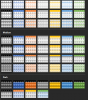
However, something I noticed and can't really figure out why quite yet....The color options under "format as a table" sometimes show up as Pastels (at least that's what I call them).
The color options are almost always regular, but once in a while the pastels appears.
See attached snips.
Anyone have an idea why this is happening. My excel google-fu isn't taking me very far.
Regular:
Pastels:
Over time, I started using tables for most of my spreadsheets.
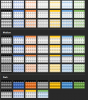
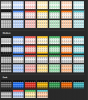
However, something I noticed and can't really figure out why quite yet....The color options under "format as a table" sometimes show up as Pastels (at least that's what I call them).
The color options are almost always regular, but once in a while the pastels appears.
See attached snips.
Anyone have an idea why this is happening. My excel google-fu isn't taking me very far.
Regular:
Pastels:
Attachments
Last edited:


