• We’re currently investigating an issue related to the forum theme and styling that is impacting page layout and visual formatting. The problem has been identified, and we are actively working on a resolution. There is no impact to user data or functionality, this is strictly a front-end display issue. We’ll post an update once the fix has been deployed. Thanks for your patience while we get this sorted.

Moving to a mini-PC, feels... liberating!

VirtualLarry

No Lifer
I don't know why, either. I mean, my Gigabyte Brix J1900 desktop Atom quad-core 2.0Ghz rig, isn't especially fast. My Skylake G4400, even non-overclocked, was REALLY "snappy", especially with the PCI-E SM951 128GB M.2 SSD (well, before I secure-erased it, that is).

But, I can't help but have a certain amount of ... uhm, "disgust" (?), for my big ol' ATX tower.

Am I turning into a millennial? (I really hope not. I'm much older than that.)

I expect that I would be even more impressed with an i3 Skylake NUC, with an M.2 PCI-E SSD. It would be as "snappy" as my ATX desktop, and probably pretty-much just as fast.

Yeah, it would have cost quite a bit more $$$ though, and would have been a PITA to install Windows 7 on a Skylake NUC without a DVD drive.

Anyone else switch to using a mini-PC, and feel this way?

Interestingly, I bought a "Wintel W8 Pro" mini-PC "TV box", with a Cherry Trail quad-core Atom, and pre-installed Win10, and have been using that as a HTPC. I did NOT feel "liberated" after installing that, although I marvelled at the small size and low power.

Reliability of the "W8 Pro" has been a bit spotty though, and the limited RAM and storage (2GB / 32GB) and the 32-bit OS has been a bit disappointing.

With the Gigabyte Brix J1900, I can have 8GB RAM (installed), and a 2.5" SSD of my choosing installed. (Put in a used Intel 320 SSD bought off of ebay, relatively cheap.)

Edit: Perhaps RossMAN would like to comment, on his recent Skylake i3 NUC purchase? (I assume that you partook of your own Hot Deal.)
 
Last edited:
Switching from a big ol' ATX tower and triple monitor setup to a single monitor and an ITX shoebox freed up a lot of room. Definitely more WAF.
 
A small machine is nice. My tower in my home office blends in nicely with my decor, so it's not a problem. For machines in living areas, shared spaces, etc, then small form factors rule.
 
I don't mind nuc/mini pc as long as they are not atom. I generally prefer i5 but i3 or pentinum can work - esp for web browsing. The problem is when I want to play graphic intensive games. Currently the only decent small graphic card is the fury and while I do have an itx system with an r290 (soon to be 1070) (the fury price/performance is awful and linux is having trouble with amd drivers in 16.04).
-
As for the window 7 issue - for the small pc I mostly use linux; I do have an atx system at home with window 7 and it will be my last atx system - not sure if the replacement will be itx or min - depends what is available when I need to upgrade it - probably in 4 years which oddly will also be about time to junk window 7 (I normally upgrade my hardware every 3 to 5 years for window and 7 to 12 years for linux).
 
You need to start using mobile i3's, they're so much better than the J1900 and whatever other Atoms there are. I recently picked up a X5 Z8300 PC stick and ended up returning it a few days later, it was awful for HTPC purposes and so I decided to just place my i3 4010U NUC for HTPC since I got my wife a new i3 6100U BRIX (she plays Facebook games on it all the time and it has no problems with that). For me I need a full system because I play games on it, but I would use a NUC or mini PC otherwise for my office work and surfing (but I have a business laptop for that).

(I normally upgrade my hardware every 3 to 5 years for window and 7 to 12 years for linux).
My dual Pentium Pro 200MHz system went 12+ years on Debian, it held up over the years.
 
Last edited:
Replacing my tower with a mini PC freed up an entire 0.08% more living room space. I feel so liberated.
 
Moving to a mini-PC, feels... liberating!

I don't know why, either.

Replacing my tower with a mini PC freed up an entire 0.08% more living room space. I feel so liberated.

Yeah, I dunno why either. There's the cool factor, of course. Tiny things are just neat, especially if they're cubes! But it doesn't really free up any room space & you end up with a TON of wires all over the place if you really need to hook anything up 😀
 
Edit: Perhaps RossMAN would like to comment, on his recent Skylake i3 NUC purchase? (I assume that you partook of your own Hot Deal.)

Yep I definitely jumped on that deal and that reminds me need to mail the $20 rebate. I have a few SSD's lying around, recently ordered Crucial 16GB SODIMM which should arrive tomorrow, last step will be a Windows clean install. Who knows how long that will take me. Hopefully I'll have the Brix up and running in a few weeks (cough September cough).

I'm going to miss surfing the net from my couch laptop but having a fast system with SSD (laptop using a slow mechanical hard drive, I know, I know), 16GB RAM and beautiful 24" LED (1920 x 1200) will be a nice upgrade. Yes I'll probably upgrade the laptop using one of the SSD's lying around then will gift or sell it.
 
With the Gigabyte Brix J1900, I can have 8GB RAM (installed), and a 2.5" SSD of my choosing installed. (Put in a used Intel 320 SSD bought off of ebay, relatively cheap.)

Edit: Perhaps RossMAN would like to comment, on his recent Skylake i3 NUC purchase? (I assume that you partook of your own Hot Deal.)

I thought this thin Mini-ITX looked pretty interesting.

Basically, in between the cost of that Brix J1900 and the Brix Skylake ULV Core i3, but capable of supporting a much higher TDP.

And the size seems quite manageable yet still allowing for a good amount of power.
 
I can definitely see the appeal of systems that are compact enough to present the appearance of AIO type systems without the actuality of being an AIO system. Minimalist dreams -> only see the screen.

I however, will continue to run Mid Tower ATX on my dual screen setup. I feel like it is the best balance between size, cooling capacity, and upgradability.
 
I dunno if an "ITX tower" constitutes a mini-PC, but I certainly appreciate the noise reduction and space savings. I think it was around 2 years go, I sold my midtowers and downsized, for no performance loss.

With a slow-spinning 120mm in the back and an added 80mm fan on the side, these cases will effectively cool any card that will fit, which means up to a GTX970. They take an ATX power supply, have mSATA SSDs (picked up for a song on eBay) and bays for either 2x 2.5" + 1x 3.5" drive, or 2x 3.5", all of which are empty, and mini-PCIe WiFi (Intel 7260).

ikmhwhz.jpg
 
Replacing my tower with a mini PC freed up an entire 0.08% more living room space. I feel so liberated.

Exactly. I just dont get the appeal of the small form factors. A lot of the disadvantages of a laptop (limited space, thermal headroon, cooling), but not truly portable and still require wires and a separate monitor.
 
Exactly. I just dont get the appeal of the small form factors. A lot of the disadvantages of a laptop (limited space, thermal headroon, cooling), but not truly portable and still require wires and a separate monitor.

Depends on how small you go. For an ITX "tower", you can cut the footprint by half and the total volume by about 80%, and only give up the ability to take 4 sticks of RAM and a video card faster than a GTX 970.
 
I can definitely see the appeal of systems that are compact enough to present the appearance of AIO type systems without the actuality of being an AIO system. Minimalist dreams -> only see the screen.

I however, will continue to run Mid Tower ATX on my dual screen setup. I feel like it is the best balance between size, cooling capacity, and upgradability.

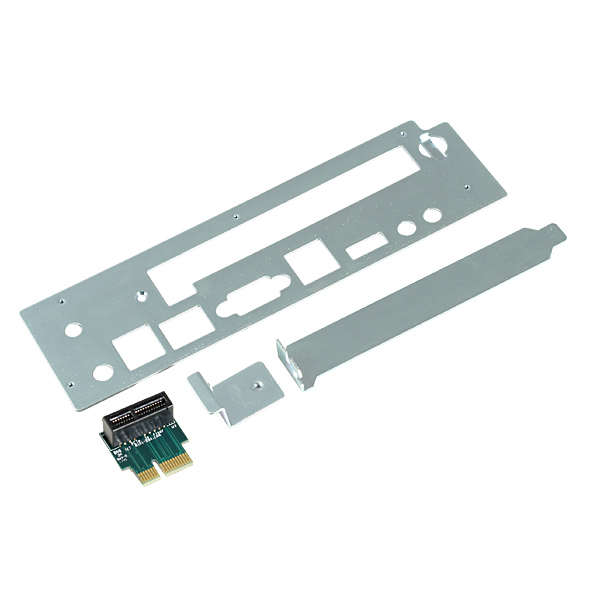
At one time MiniBox offered a custom I/O shield (that included a PCI-E x1 riser) for $5 that fit a certain Mitac thin mini-itx atom board.

IMO, it was a great idea as a person could use a full width add-in-board in a small Mini-ITX case (like the M350) that couldn't normally accommodate a PCIe card.

Unfortunately, thin mini-itx is very rare now (at least with the newest chipsets), but I think with the type of Riser and I/O shield I described above it was a good compromise between small size and upgradeability.

Mini-Box-PCIe-1x-Riser-b.jpg


Mini-Box-PCIe-1x-Riser-adapter-b1.jpg


Mini-Box-PCIe-1x-Riser-adapter-b2.jpg


Mini-Box-PCIe-1x-Riser-adapter-b4.jpg
 
Last edited:
I dunno if an "ITX tower" constitutes a mini-PC, but I certainly appreciate the noise reduction and space savings. I think it was around 2 years go, I sold my midtowers and downsized, for no performance loss.

With a slow-spinning 120mm in the back and an added 80mm fan on the side, these cases will effectively cool any card that will fit, which means up to a GTX970. They take an ATX power supply, have mSATA SSDs (picked up for a song on eBay) and bays for either 2x 2.5" + 1x 3.5" drive, or 2x 3.5", all of which are empty, and mini-PCIe WiFi (Intel 7260).

ikmhwhz.jpg

Have you tried using the included 120mm fan as intake rather than exhaust (without adding the 80mm fan)? In this review (of the Raijintek Metis) they noticed lower temps with GTX 970 using the 120mm fan in that configuration.

P.S. In addition to the Raijintek Metis, the RAIDMAX atomic ITX-107WB also shares the same chassis as the DIY HTPC cube cases you are using.
 
Last edited:
Have you tried using the included 120mm fan as intake rather than exhaust (without adding the 80mm fan)? In this review (of the Raijintek Metis) they noticed lower temps with GTX 970 using the 120mm fan in that configuration.

P.S. In addition to the Raijintek Metis, the RAIDMAX atomic ITX-107WB also shares the same chassis as the DIY HTPC cube cases you are using.

I haven't tried it, no. The power supply has a 120mm fan exhausting, I'm skeptical about having 2x 120mm exhausts with no intake fans (aside from the 80mm I added to provide fresh air directly to the video card).
 
Have you tried using the included 120mm fan as intake rather than exhaust (without adding the 80mm fan)? In this review (of the Raijintek Metis) they noticed lower temps with GTX 970 using the 120mm fan in that configuration.

P.S. In addition to the Raijintek Metis, the RAIDMAX atomic ITX-107WB also shares the same chassis as the DIY HTPC cube cases you are using.

I haven't tried it, no. The power supply has a 120mm fan exhausting, I'm skeptical about having 2x 120mm exhausts with no intake fans (aside from the 80mm I added to provide fresh air directly to the video card).

Yuriman, it appears you have misread my post.
 
Yuriman, it appears you have misread my post.


My apologies.

Have you tried using the included 120mm fan as intake rather than exhaust (without adding the 80mm fan)? In this review (of the Raijintek Metis) they noticed lower temps with GTX 970 using the 120mm fan in that configuration.

P.S. In addition to the Raijintek Metis, the RAIDMAX atomic ITX-107WB also shares the same chassis as the DIY HTPC cube cases you are using.


I have the existing 120mm fan configured as an intake - it actually shipped that way, and it made sense to me, since the power supply has a 120mm exhausting. One in, one out.

My HD7850's cooler is not a blower, and I found that it was recycling a lot of hot air. I imagine a card with a blower would be fine, but adding a small fan or some vents to supply the video card area with a bit of fresh air dropped temps 20-30c, while reducing noise.
 
I have the existing 120mm fan configured as an intake - it actually shipped that way, and it made sense to me, since the power supply has a 120mm exhausting. One in, one out.

My HD7850's cooler is not a blower, and I found that it was recycling a lot of hot air. I imagine a card with a blower would be fine, but adding a small fan or some vents to supply the video card area with a bit of fresh air dropped temps 20-30c, while reducing noise.

Just looking at my RAIDMAX Atomic ITX (which hasn't been built up yet) I was just thinking how nice it would be if the PSU instead hung from the top of the case with the exhaust blowing up out the top of case (instead of the PSU projecting from the floor and blowing hot air downward into the small space below the case--as shown in the pictures below). Of course, this would limit the video card to one of those Mini-ITX style ones though.

3.jpg


maxresdefault.jpg
 
XFX's double dissipation cooling setup does the same thing, blows warm air onto the motherboard and around the case. I had a couple XFX's but I'm probably not going to bother with them anymore.
 
I use a Haswell i3 NUC for my kitchen HTPC. It attaches to the back of an Acer touchscreen monitor. It works fairly well, but it's definitely not nearly as fast as my desktop. As for my desktop, I just built a machine in a normal ATX case, which is fine for me. I used to have what would be referred to as a "super tower" (Corsair 900D), which was rather tall at around 30" and it was just as deep.

Would I be willing to permanently swap? Probably not. I might be okay with it if I could do something like use a Thunderbolt 3-connected external GPU.
 
A little reflection. After my initial enthusiasm for my Gigabyte Brix J1900 Atom quad-core Celeron units, a few days later, I received my ASRock H110-ITX board. I transferred my i3-6100 into it, and replaced the guts of a very compact ITX case with the H110-ITX / i3-6100, along with the same SSD that had been in my Asus H110M-A / i3-6100 rig before it.

After booting up, and having it detect the drivers, and then installing the Intel LAN driver via a USB DVD-RW drive off of the disc that came with the motherboard, I was ready to go.

So, I've got several computer desks, two that I mainly use, and switch between. I've found that I'm gravitating towards the i3-6100 ITX rig, rather than the Brix J1900 rig(s). (Although, I bought a third for my HTPC, and for that, it's working wonderfully.)

I don't know whether it's the difference in SSDs (the two J1900 units I'm using as desktops have Intel 320 Series 300GB SATAII SSDs, and the i3-6100 has a SATA6G Silicon Power 240GB SSD), or just the CPU speed difference, but the i3-6100 (3.7Ghz dual-core with HyperThreading) definitely has more "snap" to it. (As I guess it should, the CPU alone cost more than the Brix unit did.)

I don't know which I prefer more. I still haven't felt the urge to re-connect my big ol' ATX desktop up though, which is a good thing. I can even do some small gaming on the i3-6100, since it has the HD 530 GPU in it. (I played some Skyrim @ 1080P low on it, not too bad, really.)

Part of it may be too, I'm doing Folding@Home on 3 cores on one of my J1900 units, which bogs it down even more for web browsing, a little bit.

Edit: I wish I was able to get Linux Mint 17.3 stable on the Brix units, they worked pretty well under Linux. (Well, except for the part where they freeze up solid, LOL.)
 
Last edited:
Back
Top