• We’re currently investigating an issue related to the forum theme and styling that is impacting page layout and visual formatting. The problem has been identified, and we are actively working on a resolution. There is no impact to user data or functionality, this is strictly a front-end display issue. We’ll post an update once the fix has been deployed. Thanks for your patience while we get this sorted.

Memory Compatibility , Advice pls !

Emanuel95

Junior Member
I would also like to install this configuration 6GB RAM. There have only 2GB as shown. Do you think it would be ok? Domestic issues like BSOD or compatibility between ram?I will leave here my configuration and offers that we have found, can not install its 6GB RAM without any problems? Thank you! ( http://www.okazii.ro/componente-com...a-800mhz-pc2-6400-cl6-single-sided-a176265308 ,
memorie-ram-2gb-ddr2-800mhz-nanya-6400-ID4VurY.html
)
image.png
222weas.png
444.png
1111.png
 
Hi,

Welcome to the forums. 🙂

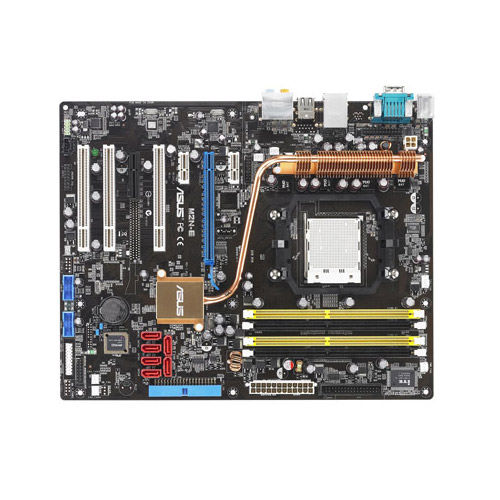
Your CPU-Z pics show this Asus M2N is your motherboard:

P_500.jpg

Asus' specifications for your board state:

4 x DIMM, Max. 8 GB, DDR2 800/667/533 ECC,Non-ECC,Un-buffered Memory
Dual Channel memory architecture

The answer to your basic question is, yes, it should work (and much better) with more than 2 GB of RAM, but ONLY if you are running a 64 bit version of Windows.

The board has only two RAM slots, and it uses dual channel memory so you'd be better off buying 4 GB (2 x 2 GB) or 8 GB (2 x 4 GB) of RAM because your system won't operate in dual channel mode with 6 GB (1 x 2 GB and 1 x 4 GB).

If you are running a 32 bit version of Windows, the most RAM the system can access is a little more than 3 GB of RAM, and the best you could do would be to change one of the 1 GB sticks to 2 GB. You'll have more RAM, but you will lose the benefit of the dual channel operation.

Hope that helps. 🙂
 
Back
Top