
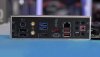
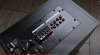
I'm looking to get a decent 5.1 setup for my PC...I settled on the Logitech Z606 but I'm totally confused as to how to hook this up to my PC...apparently you need to connect it a certain way to get true 5.1 surround involving RCA cables but the box only comes with one 3.5mm to RCA cable...apparently you need three of those cables...I attached a pic of the I/O on the back of my motherboard case as well as a picture of the Z606 connections on the subwoofer...I also included a Hardware Canucks video where he explains how to set it up on a PC but I'm still confused
1) so I need to buy 2 additional 3.5mm to RCA cables like this one from Amazon?
2) so I connect the 2 parts of the RCA cable into the Front Right/Left of the subwoofer?...same with Rear Right/Left and connect it to my PC (Line-Out, RS Out)
3) so then the final RCA cable connects to the Subwoofer/Center connections on the sub and into the CS-Out port on my PC?...so that 1 cable connecting both Center and Sub goes into the CS-Out connection on my PC?
1) so I need to buy 2 additional 3.5mm to RCA cables like this one from Amazon?
2) so I connect the 2 parts of the RCA cable into the Front Right/Left of the subwoofer?...same with Rear Right/Left and connect it to my PC (Line-Out, RS Out)
3) so then the final RCA cable connects to the Subwoofer/Center connections on the sub and into the CS-Out port on my PC?...so that 1 cable connecting both Center and Sub goes into the CS-Out connection on my PC?
Attachments
Last edited:


