Linux desktop environment opinions

Zepp

Senior member
May 18, 2019
309
279
136
As I've used linux on and off over the years I've tried to develop a longer term feel for various desktop environments to really know what works for me and what doesn't. It can take a while of regular use before you discover things that may annoy you and make you want to look at switching.

So linux users tell me about your favorite DE, why you like it and what you don't like about it.

Also give me some likes and dislikes of other DE's you've used enough to get a good feel of.


I currently favor Budgie for it's gnome like polish sane defaults(everything works like I'd expect without changing much in settings) and cohesive settings menus. The biggest gripe I have is the app menu options on the panel. I don't know why any modern DE would not have a menu that you can pin favorite apps to like Cinnamon or Whisker menu. It's also apparently not as light as I would have thought, being close to cinnamon in terms of RAM footprint.

I like most things about Cinnamon's design but I have had a lot of small stability issues with nemo and quirks with suspend not working and lock screen never putting panels to sleep. though the machine I used it on was setup a little janky so it could be because of that.

Xfce is pretty solid if not a little clunky with panel customization and theming. It still has an ancient bug where windows borders have a resize trigger of like 1 pixel and if it isnt setup with whisker menu by default it's clunky to get the super key to work right with it.

I can't really figure out what anyone would prefer about MATE over Xfce. There seem to be a lot of functionality and appearance overlap with those DE's and most people say Xfce is more feature rich, polished and supported than MATE. Xfce seems to capture the Gnome 2 look and feel pretty well. So to me MATE seems kinda superfluous.

With KDE I never liked the default setup and I really hate the settings overload. I would often have to google where a setting is. It's the same reason I stopped using vivaldi browser.

I gave up on GNOME also somewhat because I got tired of spending so much time setting up the tweaks and extensions to bring back all the options and functionality that the gnome foundation decided we don't need.
 

mikeymikec

Lifer
May 19, 2011
21,553
16,801
136
LXDE (Lubuntu 18.04), I think it later became LXQT.

KDE (Kubuntu and Debian)

Mint Cinnamon 21.x - currently here.

Probably not the response you're looking for, but I got along with all of these desktop environments, I can meet a reasonably customisable DE halfway basically. What let me down with most of the ones I've tried since 2018 is down to how well-polished the distro is (e.g. lack of bugs, particularly in the software that it ships with), rather than the UI being just so for my tastes (the only exception I can think of is that I think the default Ubuntu interface looks dumb. Like MacOS but not quite).

Lubuntu 18.04 LTS was fine, but reached the end of support so I tried Lubuntu and Kubuntu 20.04, then tried KDE on Debian, and three issues stand out in my albeit vague memory:

simple-scan - a GNOME app to scan paperwork. It's a very simple design and workflow, perfect for scanning single or multiple sheets into one or multiple files, worked flawlessly on LB18.04 and Mint Cinnamon 21.x, but on *ubuntu 20 LTS and Debian it would do interesting things like hang for 45 seconds while doing more than one sheet.

LibreOffice Calc - the 'Sort...' UI would hang for about 15 seconds for no good reason. Perfect on LB18 / MC 21.x.

Debian and LSB support (so I could get a fully-featured printer driver for my Epson printer). Debian IIRC was like "no, we don't do that, because we're special", and after a series of such incidents on Debian I had truly had enough of it, things like having to arse around to get sudo working properly on a new install: "oh, you want the first user you set up on this computer to be able to sudo? How weird and completely unexpected!".

Other annoyances like one distro-supplied app comes with weird and not easy-to-use/see scrollbars that don't match the other apps (IIRC LibreOffice was the problem here, and/or Firefox), looking up solutions like "oh, you should uninstall the libreoffice-qt package" or something similar that just made me think, "why didn't the distro devs do this?", it shouldn't be a job for the end user to make the interface consistent.

I've been using MC 21.x just just over 3 years according to my notes, and I have a grand total of one bug that I had to find a solution for (VLC audio stuttering after system resume). Other than that it has "just worked" on both my Haswell build and my AMD7000 build. I have the feeling that when I do my first MC install for a customer, I'm only going to be doing basic setup stuff (e.g. set up printer/scanner access) and then make aesthetic changes according to the customer's preferences. That's the way it should be!

My only interface consistency beef with MC21 is XnViewMP, which sometimes matches the general UI settings/theme and sometimes not. However, it's not a default app and its lack of consistency doesn't create a usability issue for me.
 
Last edited:
  • Like
Reactions: Steltek and Zepp

Zepp

Senior member
May 18, 2019
309
279
136
I kinda liked LXDE but it's the only DE i've tried that not only doesnt have a whisker like menu with pinnable favorite apps, but doesnt even have a search bar in the app menu.

I havent used LXDE/LXQt for any extended period but I never liked the openbox window manager. It's too minimalist and usually doesn't play well with modern theming. But Im a pretty novice 'ricer' I did find out you can get KDE's window manager to integrate with lxqt which looked really slick in youtube videos. I tried to set it up myself but it didnt work right so it seems to require more tinkering.

My only interface consistency beef with MC21 is XnViewMP, which sometimes matches the general UI settings/theme and sometimes not. However, it's not a default app and its lack of consistency doesn't create a usability issue for me.
are you using the native installed version of xnview or the flatpak? IIRC I tried to install the native on deb13 but got a dependency error and just went with the flatpak version.
 

lxskllr

No Lifer
Nov 30, 2004
60,849
11,189
126
I use xfce and plasma. I like both. My main requirement is that I can set up a desktop to be similar to gnome2 with a panel on top, and a panel on bottom. I don't like desktops like gnome3+, and don't want to put in effort with 3rd party tools to force it into being what I want. If I can't do what I want with builtin tools, I'm not interested in using it.
 
  • Like
Reactions: Zepp

Indus

Lifer
May 11, 2002
16,601
11,410
136
KDE Plasma and Debian is my most liked one.

I can use cinnamon.. and LMDE is my 2nd most liked one. It also happens to be easy enough for my wife to use it.
 

WelshBloke

Lifer
Jan 12, 2005
33,551
11,698
136
Gnome. Dash to panel. Set the task bar and left boxes to monitor centre, set bar transparency to 40%, set panel hight to 48, set panel to auto hide. Install Conky.

I've tried everything else and it's just not right!
 
  • Like
Reactions: Rigg

Indus

Lifer
May 11, 2002
16,601
11,410
136
Gnome. Dash to panel. Set the task bar and left boxes to monitor centre, set bar transparency to 40%, set panel hight to 48, set panel to auto hide. Install Conky.

I've tried everything else and it's just not right!

So the KDE experiment failed??
 

Zepp

Senior member
May 18, 2019
309
279
136
Gnome. Dash to panel. Set the task bar and left boxes to monitor centre, set bar transparency to 40%, set panel hight to 48, set panel to auto hide. Install Conky.
48 pixel panel, is your monitor res is higher than 1080p. on my 1080p 48 pixels seems obtrusively tall.

Indus said:
KDE Plasma
So Indus, is there anything you do not like about Plasma?

lxskllr said:
My main requirement is that I can set up a desktop to be similar to gnome2 with a panel on top, and a panel on bottom.
Have you tried MATE desktop?
 

WelshBloke

Lifer
Jan 12, 2005
33,551
11,698
136
48 pixel panel, is your monitor res is higher than 1080p. on my 1080p 48 pixels seems obtrusively tall.
3440x1440. It's set to auto hide as well so that keeps it out of the way.

Now I think of it I need to set the auto hide to not show in full screen apps.
 
  • Like
Reactions: Zepp

WelshBloke

Lifer
Jan 12, 2005
33,551
11,698
136
No one tried Cosmic recently? Last time I tried it seemed to be very "touch" centric.
 

lxskllr

No Lifer
Nov 30, 2004
60,849
11,189
126
Have you tried MATE desktop?
I haven't. When it came out, I suspected they wouldn't be able to keep it up, and I opted for xfce. As it turns out, they did a good job with it, but I was already using xfce, and I like it fine, so I never went back to try it.

I don't experiment with software much anymore. Waaay back, I'd collect software that did the same thing, but a little differently between them. Ended up being too much mind clutter, as well as drive clutter, so I just pick something that works, and stick with it. I need to run into a problem before I look into a solution. The reason I tried plasma, is I wanted a potential offramp from gtk. I haven't been thrilled with the gnome's been handling things, so I wanted get some familiarity with qt. Xfce is still fine, and plasma is also fine. Maybe I'll always run both. I'm more inclined to switch my xfce machine to plasma than the other way around, but I like xfce's simplicity.
 
  • Like
Reactions: Zepp

Indus

Lifer
May 11, 2002
16,601
11,410
136
Not so much failed. It's fine I just don't like how it looks. It was also CachyOS and I hate their package manager with the heat of a thousand suns!

Yeah Cahcy took me about 15 minutes to say no to.. I lasted longer with Ultramarine/ Fedora.. but Debian suits me the best.

APT is just better imo even though it's longer to do things.. they should condense commands
 

Zepp

Senior member
May 18, 2019
309
279
136
I haven't. When it came out, I suspected they wouldn't be able to keep it up, and I opted for xfce. As it turns out, they did a good job with it, but I was already using xfce, and I like it fine, so I never went back to try it.

I don't experiment with software much anymore. Waaay back, I'd collect software that did the same thing, but a little differently between them.
The reason I tried plasma, is I wanted a potential offramp from gtk. I haven't been thrilled with the gnome's been handling things, so I wanted get some familiarity with qt. Xfce is still fine, and plasma is also fine. Maybe I'll always run both. I'm more inclined to switch my xfce machine to plasma than the other way around, but I like xfce's simplicity.
I see

Well if you like xfce and want a Qt alternative it might be worth it to try out Lxqt. It feels closer to gnome2 than plasma. You can even install and use the the Kwin window manager with it for a fancier polished look over the default openbox.
 
  • Like
Reactions: lxskllr

lxskllr

No Lifer
Nov 30, 2004
60,849
11,189
126
I tried lxqt years ago in the form of lubuntu, and I thought the performance was pretty bad for being a "light" desktop. Kubuntu ended up outperforming it, and provided more features.

This was years ago, and I didn't try to track down who's fault it was, as this was an install for the boss's computer, and I just wanted something that worked well. I wouldn't apply my experience to anything today. Too many years have passed, and a lot can change. I'd consider giving lxqt another try if I wanted a xfce but with qt.
 
  • Like
Reactions: Zepp

WelshBloke

Lifer
Jan 12, 2005
33,551
11,698
136
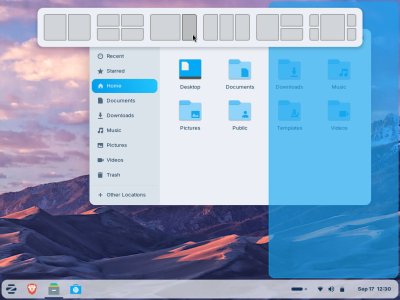
I guess this is tangentially related to DEs.

Is there an easy way to have this windows management? I have an ultrawide monitor and this was something I missed from Windows and am going to find hard to give up if I do move off Zorin. (drag a window to the top of the screen and you can snap it to one of those "virtual windows")

Zorin-Tiling.jpg
 

lxskllr

No Lifer
Nov 30, 2004
60,849
11,189
126
XFCE has rudimentary window snapping. Dunno if it would be sufficient for your purposes. Not in front of plasma to check. Looks like you want something with good tiling features. That's not something I really use. XFCE remembers my last window positions, and that's good enough for the couple of programs where I care. Otherwise, windows can go anywhere, and I put them where I want on an ad hoc basis.
 

WelshBloke

Lifer
Jan 12, 2005
33,551
11,698
136
XFCE has rudimentary window snapping. Dunno if it would be sufficient for your purposes. Not in front of plasma to check. Looks like you want something with good tiling features. That's not something I really use. XFCE remembers my last window positions, and that's good enough for the couple of programs where I care. Otherwise, windows can go anywhere, and I put them where I want on an ad hoc basis.
It just makes it a bit easier to manage a bunch of open windows at the same time.
 

lxskllr

No Lifer
Nov 30, 2004
60,849
11,189
126
I just did a search, and found this script for kwin...


There may be others for plasma, and other desktops.
 
  • Like
Reactions: WelshBloke

Zepp

Senior member
May 18, 2019
309
279
136
I can't really figure out what anyone would prefer about MATE over Xfce... to to me MATE seems kinda superfluous.

Well I now have a better understanding of these 2 in day to day use.

In another thread I mentioned buying a cheap 'carry around the house' laptop. dual core zen1 apu, 3.19GB usable ram after igpu takes it's cut, 64GB eMMc drive. I wanted a fully featured desktop so I initially went with Xfce. After a week of use, I wanted to find a different DE.

Xfce just seems to always have little bugs or quirks when I've tried to use it. besides the old bug of window resizing, it was giving me authentication popups after waking from suspend(about suspending) It wouldn't keep volume settings, every wake from suspend it was back to default. Thunar browser doesn't have open as root/admin in context menu and when I tried typing admin:// in location bar it would ask for password but not work anyway. I had to open a terminal and sudo thunar to do any file management as root.

So I eventually got fed up and went looking for a replacement. MATE is a little heavier RAM footprint but still in the light category. In the past I didnt like how you arrange the main panel applets, it's similar to xfce but clunkier. But after switching to MATE it pretty much solved all my irritation, and surprisingly the battery drain is much slower on MATE.
It really gets a lot of polish inherited from GNOME, as I understand it's really just an updated gnome2 codebase.

So now I see why one would go with MATE, it's very complete and polished while keeping a lighter footprint than any of the other GNOME derived desktops.
 
Last edited:
  • Like
Reactions: lxskllr

biostud

Lifer
Feb 27, 2003
20,181
7,305
136
I just went with Debian + KDE, as it seemed like one of the major DE and I don't need to do anything fancy.
 
  • Like
Reactions: Zepp

mv2devnull

Golden Member
Apr 13, 2010
1,537
168
106
It really gets a lot of polish inherited from GNOME, as I understand it's really just an updated gnome2 codebase.
AFAIK, gnome3 was so radically different from gnome2 that a group of users (happy about gnome2 and not at all happy about the direction that gnome devs had chosen) did create a fork (the MATE) to be able to continue the use of gnome2-like DE.

Most (all?) DEs do now face question on how to cope with Wayland, because some distros try to drop Xorg.
 
  • Like
Reactions: Ken g6 and Zepp