
-
We’re currently investigating an issue related to the forum theme and styling that is impacting page layout and visual formatting. The problem has been identified, and we are actively working on a resolution. There is no impact to user data or functionality, this is strictly a front-end display issue. We’ll post an update once the fix has been deployed. Thanks for your patience while we get this sorted.
You are using an out of date browser. It may not display this or other websites correctly.
You should upgrade or use an alternative browser.
You should upgrade or use an alternative browser.
Is this SSD benchmark any good ?
- Thread starter Mfusick
- Start date
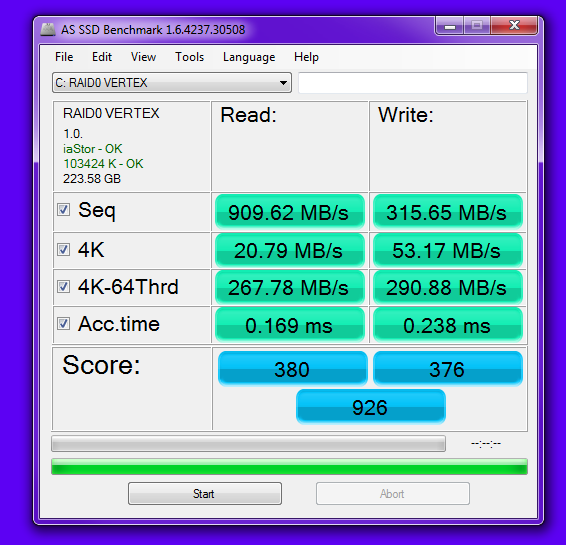
I ran this one next.
It appears to suck.
Something is funny with this new install I have and I can't figure out what it is.
My old SSD (120GB MAX IOPS) Felt way faster than this VERTEX3 Array. (120GB x2)
I did this once before it felt wayyyyy faster.
Wondering if I messed something up or a driver is wrong ???
Advice?
Write caching is disabled by default with the Intel RST driver.
Open the IAstor utility and enable write caching on the array. You need to disable the Windows caching first under disk drives in Device manager (check the 2nd box under policies) then open the IAstor utility. That will improve the 4K's. Overall your benchmarks look fine, save the 4K in AS-SSD.
Open the IAstor utility and enable write caching on the array. You need to disable the Windows caching first under disk drives in Device manager (check the 2nd box under policies) then open the IAstor utility. That will improve the 4K's. Overall your benchmarks look fine, save the 4K in AS-SSD.
Write caching is disabled by default with the Intel RST driver.
Open the IAstor utility and enable write caching on the array. You need to disable the Windows caching first under disk drives in Device manager (check the 2nd box under policies) then open the IAstor utility. That will improve the 4K's. Overall your benchmarks look fine, save the 4K in AS-SSD.
It feels slower than my Vertex3 MAX IOPS.
Thanks for the help.
So if I do that you think I am fine?
This is two VERTEX3's in RAID0 on a Asus Z68 board on the intel SATA 3 ports.
I changed bios mode from ACHI to RAID. As that is what you do on this board to build a RAID0 array.
Any help and advice is appreciated. I think it could be faster.

groberts101
Golden Member
Ok ill try that.
What exactly does that do ?
just leverages the system ram to greater extent.
just leverages the system ram to greater extent.
thanks. I have 16GB RAM. Im not overclocked or anything right now. 2600k CPU is on "auto" and default everything. I don't even have the software overclock stuff installed. It's a clean install of W7 x64.
Programs for sure load slower than my 120GB MAX OPS.
Something is amiss

Coup27
Platinum Member
How much of a gain is this supposed to yield? I run a single SSD in AHCI and I ran a CDM with it on vs a CDM with it off and there was no difference at all outside the normal tolerance of benchmarks on the same setup. 😕just leverages the system ram to greater extent.
I ran this one next.
It appears to suck.
Something is funny with this new install I have and I can't figure out what it is.
My old SSD (120GB MAX IOPS) Felt way faster than this VERTEX3 Array. (120GB x2)
I did this once before it felt wayyyyy faster.
Wondering if I messed something up or a driver is wrong ???
Advice?
You guys don't think this is slower than a 120GB X2 in RAID0 should be ????
This is a two fresh drives too.
groberts101
Golden Member
I believe that you're misunderstanding how SF compression works. The benchmark you're using there uses random/incompressible data and those numbers are about right for 2 x 120GB drives. Also keep in mind that he MI version uses faster nand and has better writes than the regular version.
as for the use of write caching. If you do what Ryder already mentioned above?.. things will definately improve. But.. the use of that setting will only cause pronounced advantage with raids though.
@Coup. Some single drives that have internal ram will also leverage that ram to greater extent.. though it will never be as notceable as a raid will give. Others will show no perceivable difference one way or the other. Is completely reversible and best to test before and after to get an idea as to whether it's worth monkeying around with.
And not to disagree with Ryder for the method used to activate it.. but the simplest way I've found to activate it for raids is to uncheck the FIRST box>click ok>RECHECK it once more>click ok and then retest. The Windows glitch is that the first checkbox is always checked by defaulkt.. but is a false positive and needs to be unchecked/rechecked with an "ok" in between to actually activate it. It is off by default on al Intel raids and you need to either use that method.. or the IRST mgmt ustilities "enable write-back caching" for it to be activated.
as for the use of write caching. If you do what Ryder already mentioned above?.. things will definately improve. But.. the use of that setting will only cause pronounced advantage with raids though.
@Coup. Some single drives that have internal ram will also leverage that ram to greater extent.. though it will never be as notceable as a raid will give. Others will show no perceivable difference one way or the other. Is completely reversible and best to test before and after to get an idea as to whether it's worth monkeying around with.
And not to disagree with Ryder for the method used to activate it.. but the simplest way I've found to activate it for raids is to uncheck the FIRST box>click ok>RECHECK it once more>click ok and then retest. The Windows glitch is that the first checkbox is always checked by defaulkt.. but is a false positive and needs to be unchecked/rechecked with an "ok" in between to actually activate it. It is off by default on al Intel raids and you need to either use that method.. or the IRST mgmt ustilities "enable write-back caching" for it to be activated.
Last edited:
Mfusick,
Did you enable write caching in the IAstor utility?
Did the benchmark for 4k's go up? That is all that will really change. What kinds of numbers are you expecting from AS-SSD with 2 in RAID0? and what part of the benchmark do you think is slow?
You mean what you posted above? Or something else ?


postmortemIA
Diamond Member
4Ks match my 3yrs old single intel G2 drive. access time is awful.
4Ks match my 3yrs old single intel G2 drive. access time is awful.
That's what I first thought.
-128 kb stripe size ? -my old 120 g2 R0 intel suggested 16 kb
"2600k CPU is on "auto" and default everything"
-does your 2600k idle @ x16?
if so there's a good chance you ran as ssd @ x16 ,not x34 if you did not run something in the back ground to kick up the clock's in as ssd
-and that could knock down the 4k's.
-open up cpu-z and run as ssd again.
-if it runs at x16 during the bench turn off the down clocking .
"2600k CPU is on "auto" and default everything"
-does your 2600k idle @ x16?
if so there's a good chance you ran as ssd @ x16 ,not x34 if you did not run something in the back ground to kick up the clock's in as ssd
-and that could knock down the 4k's.
-open up cpu-z and run as ssd again.
-if it runs at x16 during the bench turn off the down clocking .
-128 kb stripe size ? -my old 120 g2 R0 intel suggested 16 kb
"2600k CPU is on "auto" and default everything"
-does your 2600k idle @ x16?
if so there's a good chance you ran as ssd @ x16 ,not x34 if you did not run something in the back ground to kick up the clock's in as ssd
-and that could knock down the 4k's.
-open up cpu-z and run as ssd again.
-if it runs at x16 during the bench turn off the down clocking .
Ok thanks.
I'll post back later
Keep us up to dateI'll post back later
TRENDING THREADS
-
 Discussion Zen 5 Speculation (EPYC Turin and Strix Point/Granite Ridge - Ryzen 9000)
- Started by DisEnchantment
- Replies: 25K
-
Discussion Intel Meteor, Arrow, Lunar & Panther Lakes + WCL Discussion Threads
- Started by Tigerick
- Replies: 25K
-
 Discussion Intel current and future Lakes & Rapids thread
- Started by TheF34RChannel
- Replies: 24K
-

-
