• We’re currently investigating an issue related to the forum theme and styling that is impacting page layout and visual formatting. The problem has been identified, and we are actively working on a resolution. There is no impact to user data or functionality, this is strictly a front-end display issue. We’ll post an update once the fix has been deployed. Thanks for your patience while we get this sorted.

Is there a reasonable drop-in upgrade solution to an AMD 5800k?

CuriousMike

Diamond Member
My son's system runs an A10-5800k with a discrete R9-270.
He's a gamer.

The motherboard is some MSI that doesn't OC well, so it's running stock.

I've considered getting a 6800k, 7850k and now see the 86/7/80k processors without GPU might make sense.

But... all the benchmarks I've looked at are confounding... often times showing the 5800k "close enough" to any of the processors I'm looking at where "upgrading" wouldn't make sense. Yet other benchmarks show 50% improvement.

a) Is there any drop-in, ~$100-$125 processor that'll drop in his system and make a difference?
b) Would spending that money on a different motherboard that would OC be a better bang for the buck?
c) Have him save a few more bucks and convert to an Intel based dual-core system?
 
7850K Kaveri chip would be faster, have much better graphics than the 6800, and be DX12 ready.

But if you have the discrete graphics card, then I don't see much of a jump for you with any of the FM2 chips.
 
Last edited:
a) Is there any drop-in, ~$100-$125 processor that'll drop in his system and make a difference?
b) Would spending that money on a different motherboard that would OC be a better bang for the buck?
c) Have him save a few more bucks and convert to an Intel based dual-core system?
Easy steps for better performance:

  1. Don't spend any money just yet. Jump to step 2 when summer arrives.
  2. It's summer, and at least some of the new gen GPUs have launched (Polaris from AMD, Pascal from Nvidia). Pick a new gen card that is within your budget and is significantly stronger than your current card.
  3. Enjoy a bigger jump in performance than what would have been possible by upgrading CPU and/or MB.
  4. Start saving money for a CPU upgrade next year.
 
Easy steps for better performance:

  1. Don't spend any money just yet. Jump to step 2 when summer arrives.
  2. It's summer, and at least some of the new gen GPUs have launched (Polaris from AMD, Pascal from Nvidia). Pick a new gen card that is within your budget and is significantly stronger than your current card.
  3. Enjoy a bigger jump in performance than what would have been possible by upgrading CPU and/or MB.
  4. Start saving money for a CPU upgrade next year.

+1
 
What resolution? What settings? What games? What motherboard? You've quite honestly given nearly zero usable information so far in this thread.

edit: What CPU cooling?
edit #2: 3.8 Ghz base CPU clock, or 4.2 Ghz turbo frequency? Did you turn turbo off, before raising the multiplier? That one is easy to forget to do, if you don't overclock much.
 
Last edited:
There is no upgrade with the current platform that would make any sense.

Save up for an Intel I5 system for a long term investment.
 
You could max out your socket with the fastest clocking AMD chip you can find but you won't see a huge improvement. Arguably, it won't be worth the money.
 
just replace the whole platform, if you want any decent improvements.


This. Any $100 is better saved for a complete upgrade.


Easy steps for better performance:

  1. Don't spend any money just yet. Jump to step 2 when summer arrives.
  2. It's summer, and at least some of the new gen GPUs have launched (Polaris from AMD, Pascal from Nvidia). Pick a new gen card that is within your budget and is significantly stronger than your current card.
  3. Enjoy a bigger jump in performance than what would have been possible by upgrading CPU and/or MB.
  4. Start saving money for a CPU upgrade next year.

I disagree. If the card is a big improvement he will be CPU limited most of them time but then again it depends on the games and resolution he plays it which we don't know.
 
I disagree. If the card is a big improvement he will be CPU limited most of them time but then again it depends on the games and resolution he plays it which we don't know.

But the better card will still give an improvement IMHO,and even then the platform can be upgraded at a later date.

Its more likely that changing the platform first and keeping the current card will yield a lower performance improvement,if any with an R9 270.

The vast majority of people are GPU limited and that is why all reviews are using the highest end card they have or a pair of them.
 
The board is MSI FM2-A75MA-E35 FM2 and he games at 1080p.

I've gotten enough information here that says upgrading the CPU isn't going to deliver a big enough bang for the buck.

Upgrading to a newer GPU could be a possibility later this year, but then I might be CPU bound.

Seems like the answer is new CPU+GPU and that ain't happening.

Maybe his system is as balanced as it's going to get.
 
AMD gpus have lots of driver overhead and don't perform at their best unless they are run with a powerful cpu. That cpu isn't so powerful, so performance overall suffers.

I say sell the R9 270 and get an Nvidia card. Nvidia cards don't need as much cpu power to perform pretty well. A GTX 950 or 960 would be a good choice. A 2GB is fine for now, but if you can swing a 960 4GB of course that would be better. Anything more would be overkill.

This is something I have a bit of experience in. I like to tinker and have one computer with an A8-7650K. For gaming I put in an R9 290 and tried Rise of the Tomb Raider. It was choppy and had times when the frame rate was a slide show. I removed that card and put in a GTX 960 2GB. It is smoother at the same High settings. Yes, it's a weaker card by far, and average frame rate is probably lower, but there are no huge dips and slide shows. Geforce cards are just more forgiving when it comes to weaker cpus.
 
Interestingly,Tombraider just got a DX12 update which improves performance on slower CPUs. The OP has a GTX950 it appears too,so could test it in the computer as it is similar in performance to an R9 270 AFAIK.
 
What inspired the upgrade? Performance sub-par in a new game? Or tanking in games already owned?

At least 8GB of ram? Latest bios and drivers? If there has been a performance drop: Have you eliminated broken fan/s, overheating, and throttling?

You can use the OC Genie to see if the CPU has some headroom.

If he does not know how to tweak graphics settings to find the best blend of performance and visuals; he needs to learn. Sometimes just a setting or two that is auto-detected and set too high, can tank performance.

And the 270 is not a good 1080p gamer in 2016. Setting compromises have to be made.
 
What inspired upgrade: He games a lot ( Battlefront, MW3 etc ) and is at the 25-65fps mark on medium graphics in most games. He's was asking for a more consistent 50-60 at medium details. The little I've looked, his GPU should handle medium @ 60 for most of his games... so we surmised the CPU is the hold up.

He has 8GB of ram, a 240GB SSD with a 1TB spare disk. His most commonly played games sit on the SSD.
 
What inspired upgrade: He games a lot ( Battlefront, MW3 etc ) and is at the 25-65fps mark on medium graphics in most games. He's was asking for a more consistent 50-60 at medium details. The little I've looked, his GPU should handle medium @ 60 for most of his games... so we surmised the CPU is the hold up.
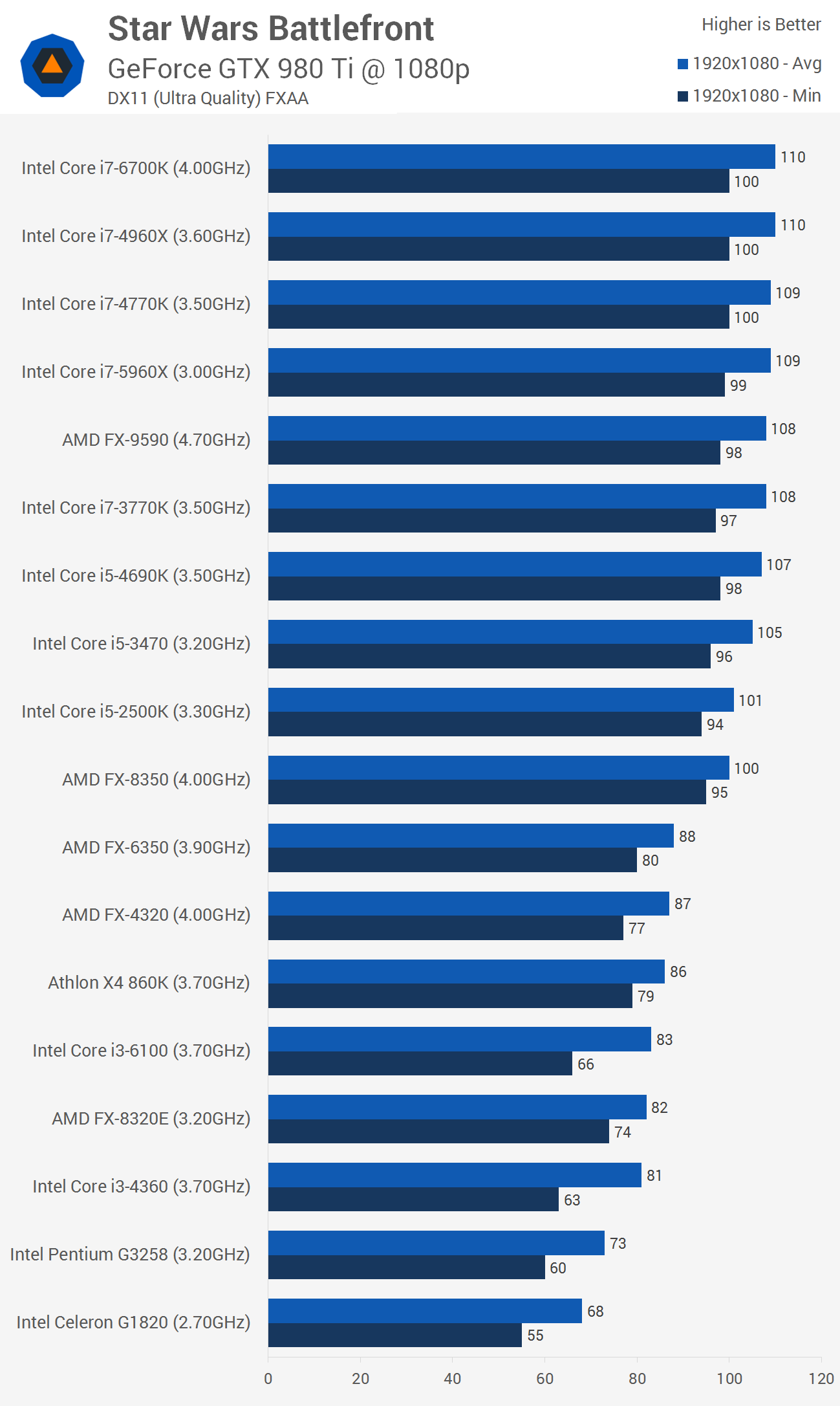
Battlefront CPU scaling on a high end video card.

CPU_01.png


Don't know how multiplayer affects CPU load in this game (gamersnexus says little impact), but it sure looks like 5800K at 4Ghz can handle 60FPS minimums in this game. (benchmark puts it at 75+ min FPS). Even with bigger CPU overhead from your AMD GPU driver you shouldn't experience 25FPS minimums due to CPU weakness.

Another test at gamersnexus shows A10 7870K doing 80+ FPS minimums at 1080p / Medium.

battlefront-cpu-bench-1080-medium.png


[Later Edit] Maybe you should do a little test of your own: drop the clocks on your CPU to ~3Ghz, see if minimum FPS changes accordingly.
 
Last edited:
Battlefront CPU scaling on a high end video card.
.

Interesting ... I'm assuming the x4 860 is similar to our 5800k.
If that's the case, then these graphs are showing a more powerful GPU can boost FPS.

He just got the GPU for xmas, so we're not likely to help him replace it so soon.

I think my question was answered long ago - I'm going to have him just sit on his current rig and we'll see if something better comes along later this year.
 
Interesting ... I'm assuming the x4 860 is similar to our 5800k.
If that's the case, then these graphs are showing a more powerful GPU can boost FPS.

He just got the GPU for xmas, so we're not likely to help him replace it so soon.

I think my question was answered long ago - I'm going to have him just sit on his current rig and we'll see if something better comes along later this year.
My son switched from console to PC as primary gamer when he was 12. He used congregate on PC before that, but most was console. To the point: I taught him how to search settings, drivers, patches, etc. Now, at 15 he no longer needs me for anything. teach a man to fish and all that.

As I stated weak 1080p card in 2016. But if you and he investigate each title he spends a lot of time on, you can find the optimal blend of settings to reach the target FPS. It will still look as good as console at minimum, and more often, better on most titles.
 
Best wait for Spring pass 1080 GTX will pown a 980 Ti in SLI.

Imagine a TR SLI 3 , 1080x gpus wow HD 4k ... fun,
 
Last edited:
Back
Top