
Hey my specs are
AMD Ryzen 3 2200G(iGPU is diabled) on ASUS Ex 320 Gaming motherboard, with 8GB Gskill RAM and Zotac Geforce GTX 1050Ti
So i quite concerned about overheating since my temp are
1) CINEBENCHR15- Temp 70-75C ,
2) Prime95 (version 26.6)- Temp 88-92C, tested for not more than 3-4 minutes
3) OCCT - Max Temp 89C, tested for a solid 10min 10 sec.
4) Idle Temp- 41-54C
5) Browsing- 41-61C(occasionally it reaches 61)
Did not run any game so far as this a new PC setup
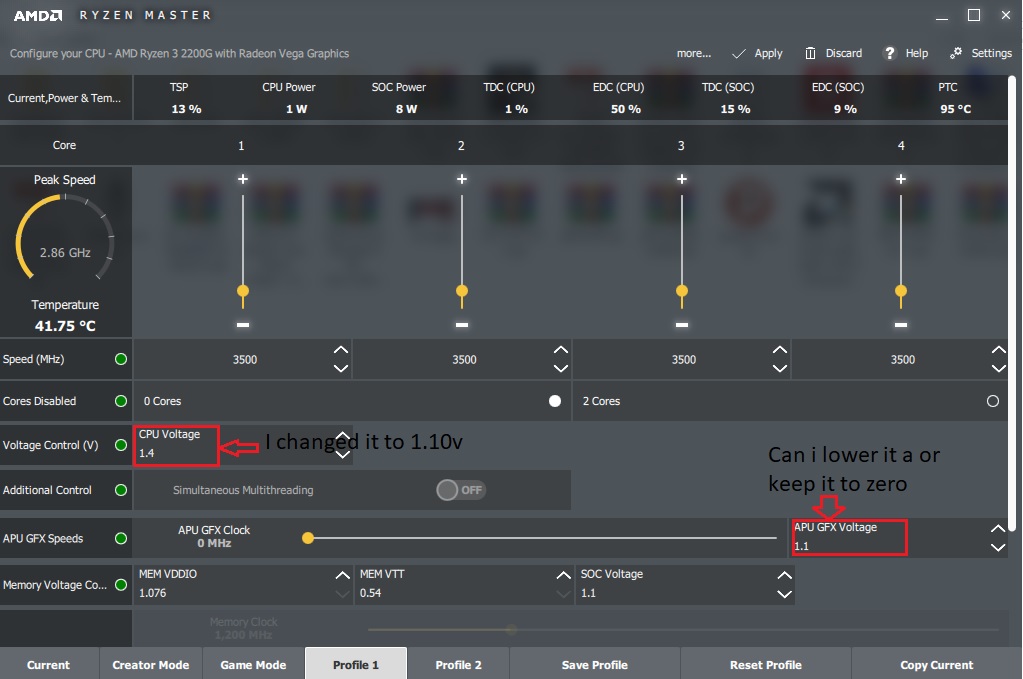
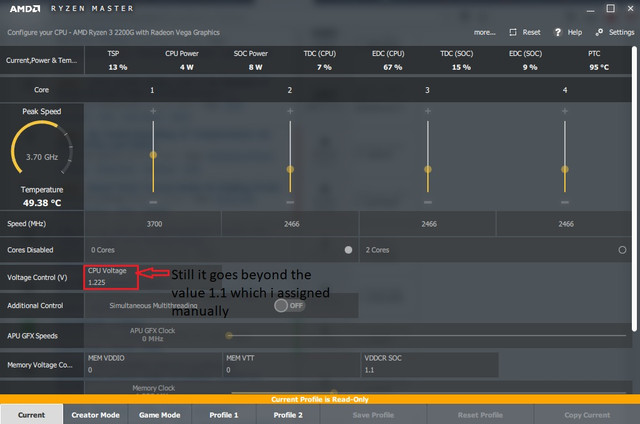
So I tried to reduce the voltage my CPU uses by manually reducing it to 1.10V in ryzen master and applied the new VOLT Windows restarted still while monitoring i find the CPU volts are going above the volts I assigned( it reached 1.35v ) , so is Ryzen master is really working??
And i heard from this video @5.50-@5.58(He says it exactly at 5.58) that "SOC voltage and APU GFX voltage are the same thing, so i though since i am using a dedicated GPU(GTX 1050Ti) i thought of keeping it zero or reducing it a bit, So can I do that or would it cause some problem???
AMD Ryzen 3 2200G(iGPU is diabled) on ASUS Ex 320 Gaming motherboard, with 8GB Gskill RAM and Zotac Geforce GTX 1050Ti
So i quite concerned about overheating since my temp are
1) CINEBENCHR15- Temp 70-75C ,
2) Prime95 (version 26.6)- Temp 88-92C, tested for not more than 3-4 minutes
3) OCCT - Max Temp 89C, tested for a solid 10min 10 sec.
4) Idle Temp- 41-54C
5) Browsing- 41-61C(occasionally it reaches 61)
Did not run any game so far as this a new PC setup
So I tried to reduce the voltage my CPU uses by manually reducing it to 1.10V in ryzen master and applied the new VOLT Windows restarted still while monitoring i find the CPU volts are going above the volts I assigned( it reached 1.35v ) , so is Ryzen master is really working??
And i heard from this video @5.50-@5.58(He says it exactly at 5.58) that "SOC voltage and APU GFX voltage are the same thing, so i though since i am using a dedicated GPU(GTX 1050Ti) i thought of keeping it zero or reducing it a bit, So can I do that or would it cause some problem???


