Is it supposed to be this hard?

TammiHearts

Member
Mar 10, 2013
31
0
0
Heyyy guys I was wondering about instaling the processor.

You know when you push the lever down to close it? Is it supposed to be so hard? Like I swear I was hearing cracks or something when coming down. When I lifted it up look at what it did to the sides of the CPU. The motherboard is a Asus Rampage Formula V Z77

Its kind of hard to see so I circled it. Thats what happened when closing the lever. It like chipped it or something.

2e0jjt1.jpg

I took it out and closed it back down but same thing. So I opened it and looked to see if the pins were bent but they seemed fine. So again I closed it with the same effect. Really hard to close and what seems like cracking sounds. Im afraid I screwed something up.

Its inserted correctly I dont get why its like this.

PS: On the cover of the socket it says that I should install the cpu first then after remove it. Well I took its advice but when coming back down with the level that little plastic thing popped off. Uhhh...Im afraid I ruined something.

See. It says "install first then remove"

And the picture shows the CPU installed and then the thing being removed. But it wouldnt work like that.

6olvo0.jpg


Why is this so much more complicated then the computers we built in class lol.
 
Last edited:

JimPhreak

Senior member
Dec 31, 2012
374
0
76
That should not happen to the heatspreader at all. Have you inspected the bracket itself to see if it's possibly concave? Something is wrong there.
 

Wall Street

Senior member
Mar 28, 2012
691
44
91
"PS: On the cover of the socket it says that I should install the cpu first then after remove it."

What does this mean? This sentence is unparseable. Try to replace every instance of "it" in that sentence with a noun so I can figure out what you are talking about.

My socket also makes marks on the heatspreader, but it is hard to tell how hard your socket is to close. What little plastic thing popped off?

Please try to make a more detailed description.
 

TammiHearts

Member
Mar 10, 2013
31
0
0
Im sorry english isnt my first language. I updated my post with a picture I hope that helps. Im soo sorry

That should not happen to the heatspreader at all. Have you inspected the bracket itself to see if it's possibly concave? Something is wrong there.

Are you sure? :< Tracer says his/hers does that to. Yeah the bracket seems to have a concave. A small bit.
 

Torn Mind

Lifer
Nov 25, 2012
12,078
2,772
136
That cover text was probably copied and pasted through Google Translate, and of course, machines can't figure out foreign grammar and sentence structure that well.

Cover should be removed first, and the CPU should be dropped in where it fits with the notches. Seems like you did that. Hmm...
 

TammiHearts

Member
Mar 10, 2013
31
0
0
That cover text was probably copied and pasted through Google Translate, and of course, machines can't figure out foreign grammar and sentence structure that well.

So did I ruin something? :< Even with the cover off it makes the same sound when the lever is coming down and really presses on those sides marking them.

I took a computer class to learn how to build my own computer. I shouldve just bought one :/ Wallstreet and Tracer said theres has those marks to but Jim said that shouldnt happen.
 

Torn Mind

Lifer
Nov 25, 2012
12,078
2,772
136
So did I ruin something? :< Even with the cover off it makes the same sound when the lever is coming down and really presses on those sides marking them.

I took a computer class to learn how to build my own computer. I shouldve just bought one :/ Wallstreet and Tracer said theres has those marks to but Jim said that shouldnt happen.

Unlikely you did anything. Something is screwed up with the socket. Some force is required, but nothing extreme so that it punctures the CPU IHS.

Can you take a pic with just the pins? No cover or CPU.
 

TammiHearts

Member
Mar 10, 2013
31
0
0
Unlikely you did anything. Something is screwed up with the socket. Some force is required, but nothing extreme so that it punctures the CPU IHS.

Can you take a pic with just the pins? No cover or CPU.

I was just taking a couple different ones. Im like in panic mode >.<

vkrp2.jpg


2gxi49z.jpg


34q7060.jpg


I say run it. If there is damage, it's done, if not, no biggie. :p

If theres damage Im so gonna hate myself. I shouldve just bought a computer :/ Spent 3 months in a boring class learning how to put it together so I can make a good gaming computer. Bleh didnt work out as planned!
 

Maximilian

Lifer
Feb 8, 2004
12,604
15
81
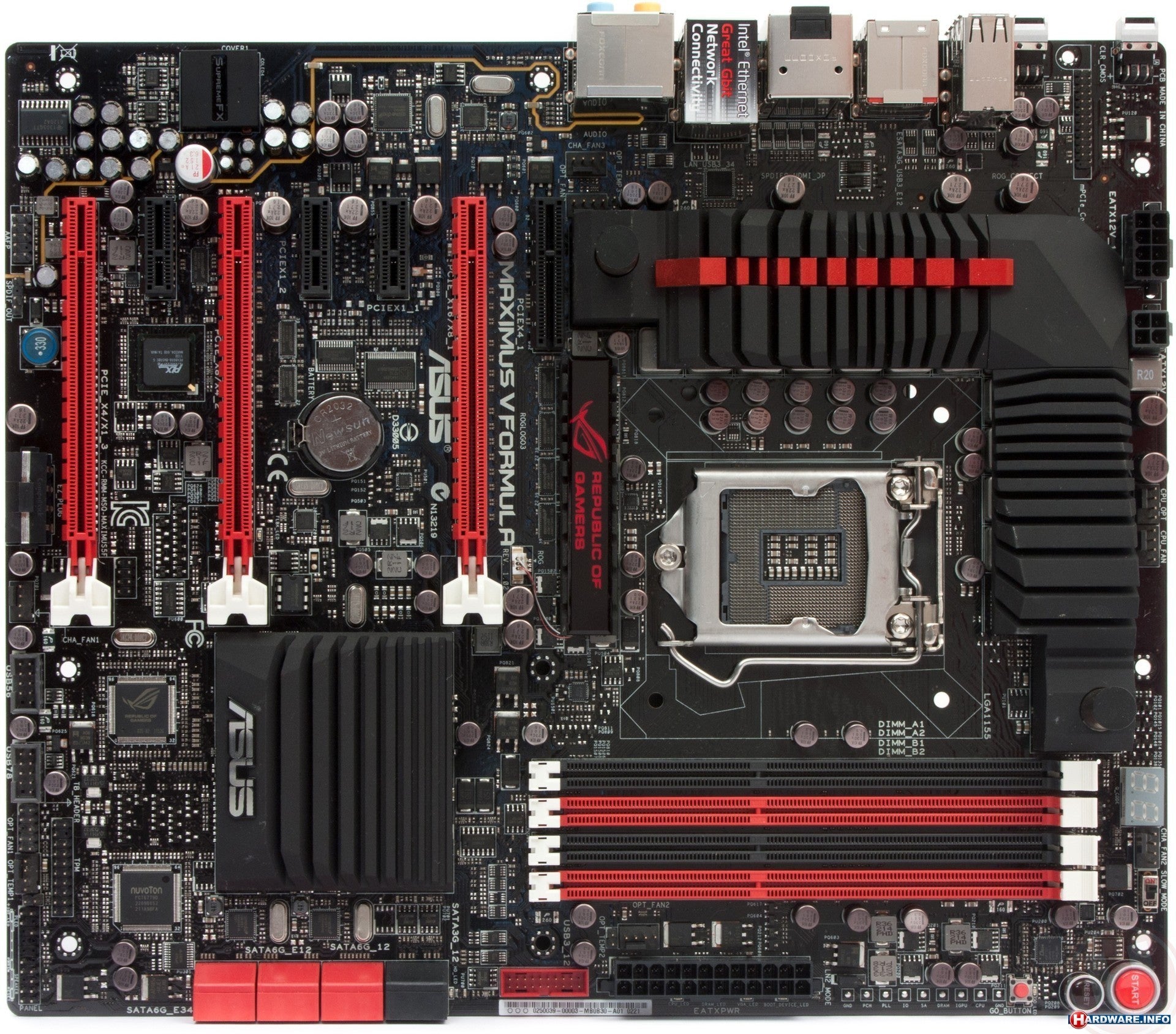
Should run fine. I was going to suggest its weird how theres those two dents in the socket bit, its clearly that which has marked the CPU. But this pic of the board also has those same dents so i guess its meant to be that way:

43ebf32b_asus_maximus_v_formulathunderfx.jpeg
 

TammiHearts

Member
Mar 10, 2013
31
0
0
Okay. And trying to install it with the cover on like in that pic and having it pop out the way it did while I was pressing it down didnt do anything bad right? I was just following instructions on that stupid picture lol

Sorry iam really, really ocd to the point where I have to check my car 5 times to make sure i left the windows up and locked it. So you can imagine how iam here. Dont mean to sound like a spas! :/
 

Maximilian

Lifer
Feb 8, 2004
12,604
15
81
Okay. And trying to install it with the cover on like in that pic and having it pop out the way it did while I was pressing it down didnt do anything bad right? I was just following instructions on that stupid picture lol

Sorry iam really, really ocd to the point where I have to check my car 5 times to make sure i left the windows up and locked it. So you can imagine how iam here. Dont mean to sound like a spas! :/

Probably not, should be okay :\

The cover? If you mean the plastic cover its not meant to be installed at all, the CPU replaces the plastic cover, the note in the picture just means keep the plastic cover safe somewhere in case your board is gubbed and you need to RMA it, manufacturers prefer you to use the cover to protect the pins when shipping. Its not meant to be there when a CPU is installed.
 

Muyoso

Senior member
Dec 6, 2005
310
0
0
The instructions on the cover are all wrong. You remove the cover first, THEN install the CPU.
 

TammiHearts

Member
Mar 10, 2013
31
0
0
The instructions on the cover are all wrong. You remove the cover first, THEN install the CPU.

Yeh they need to fix that lol. The cover just popped out when I did it their way. As long as nothing happened no bigie. Sorry for replying late all had to help my sis with her math hw. As soon as im done with the pc ill show u all how it turned out. Youve all been so awesome!
 

jcniest5

Senior member
Jun 2, 2005
368
0
76
The instructions on the cover are all wrong. You remove the cover first, THEN install the CPU.

Believe it or not, my Biostar TZ77XE4 has the same issue. But I found that it's possible to just lift the CPU socket cover by the lever, keep the cover intact, install the CPU, then lower the retentioner, the CPU socket cover will come off. I also found that the two contact points on the retentioner are sharp! All the CPU I've ever installed, there are two marks on each side where the sharp points press against the CPU's IHS. I've tried to unsharpen them a little, but without actually taking off the whole thing and do it outside, I'm afraid I might just damage the pins.
 

TammiHearts

Member
Mar 10, 2013
31
0
0
Oh I have one more question if thats ok.

When you screw the motherboard to those things that hold up the motherboard from the case (whatever theyr called lol) the screw like scratches off the paint of the motherboard.

Is that ok?
 

dma0991

Platinum Member
Mar 17, 2011
2,723
2
0
How deep is the dent created on the IHS? I do recall a creaking and a feeling that I'm gonna break it when I installed a SB on a Asus P8P67 Pro. However, it worked just fine. Never had such problems with Lotes sockets or sockets found on MSI or ASRock boards that I've installed.

The motherboard might scuff a little from tightening the screw but it shouldn't be too tight that it damages the motherboard.
 

jcniest5

Senior member
Jun 2, 2005
368
0
76
Oh I have one more question if thats ok.

When you screw the motherboard to those things that hold up the motherboard from the case (whatever theyr called lol) the screw like scratches off the paint of the motherboard.

Is that ok?

It's okay as long as you don't over-tighten them to a point where they actually dig into the PCB, crushing it.

How deep is the dent created on the IHS? I do recall a creaking and a feeling that I'm gonna break it when I installed a SB on a Asus P8P67 Pro. However, it worked just fine. Never had such problems with Lotes sockets or sockets found on MSI or ASRock boards that I've installed.

The motherboard might scuff a little from tightening the screw but it shouldn't be too tight that it damages the motherboard.

You can see it's like a scratch, but not deep enough to actually cut through the IHS.
 

Puppies04

Diamond Member
Apr 25, 2011
5,909
17
76
The instructions on the cover are all wrong. You remove the cover first, THEN install the CPU.


Yep, I have had several mobos with that exact instruction on them. I have no freaking idea how more people don't end up in the same situation as the OP.

OP. You should be fine, just remember to take the cover off before you close the retainer down in the future. Your best bet is to run the machine, it should be immediately obvious if something is broken but with any luck you will be fine.
 

Puppies04

Diamond Member
Apr 25, 2011
5,909
17
76
Oh I have one more question if thats ok.

When you screw the motherboard to those things that hold up the motherboard from the case (whatever theyr called lol) the screw like scratches off the paint of the motherboard.

Is that ok?

It will be fine, just remember those screws are only to hold the mobo in place. You really don't need to be applying any major force when you tighten them.
 

TammiHearts

Member
Mar 10, 2013
31
0
0
Here I took a pic. They all dont look as bad as this lol.

I didnt like force it. I just kept turning until it stopped you know? You would think they would give you washers or something. But no they didnt crack or anything just the paint peeled off. There isnt any circuitry around those screw holes right? Theyre just empty?

2ur5q9d.jpg


PS: You dont know how grateful Iam to everyones help and how quickly you all respond. Seriously thank u sooooooooooooooooooooo much
 

mikeymikec

Lifer
May 19, 2011
21,273
16,510
136
I use ASUS boards normally. I hate the sound that is made when locking the processor in place because it sounds like something is about to be broken, but I haven't had any problems with it. The plastic cover is supposed to pop off once you've got the lever into the lock position.

I haven't seen those dents before though.

I'm with some other people on this, just run it and see.


Re: the question about tightening screws that secure the board to the case - I tighten them and then immediately stop as soon as I encounter significantly more resistance to the screwing action. One thing to look out for though is if you're using the wrong type of screw then the screw will keep turning forever. Take it out and use a different screw.

I wouldn't expect a screw to scratch the board. I assume you're using one with some sort of serrated underside to the cap of the screw, so I would use a different type. Usually when you receive a new case you get about four different types of screw to use.
 
Last edited:

TammiHearts

Member
Mar 10, 2013
31
0
0
I use ASUS boards normally. I hate the sound that is made when locking the processor in place because it sounds like something is about to be broken, but I haven't had any problems with it. The plastic cover is supposed to pop off once you've got the lever into the lock position.

I haven't seen those dents before though.

I'm with some other people on this, just run it and see.


Re: the question about tightening screws that secure the board to the case - I tighten them and then immediately stop as soon as I encounter significantly more resistance to the screwing action. One thing to look out for though is if you're using the wrong type of screw then the screw will keep turning forever. Take it out and use a different screw.

Yeah I was like pointed out that the actual cover for the cpu has these...ugh I dont know the word my english sucks. But heres that pic again. Those two things on the sides. Looks like thats what kind of digs into it.

2gxi49z.jpg


Im using the screws the case tells me to use and yeah theyre like scratchy underneath? those are all I have available. Manual says to use those.