
• We’re currently investigating an issue related to the forum theme and styling that is impacting page layout and visual formatting. The problem has been identified, and we are actively working on a resolution. There is no impact to user data or functionality, this is strictly a front-end display issue. We’ll post an update once the fix has been deployed. Thanks for your patience while we get this sorted.

Is Asus P5W DH sata 2 holding back SSD

Hi all

Just fitted my first SSD (Samsung evo 250) and new to all this read write speed info etc. I realise that my Asus P5W DH is only sata 2 so holding performance back in that respect but are these performance figures shown in Samsung Magician to be expected.

I cloned my old h/d using the Samsung software, which was a breeze, but would it make a difference if I reinstalled a totally fresh O/S, which is awkward at the moment as I am away from home for a while and don’t have the disc with me.
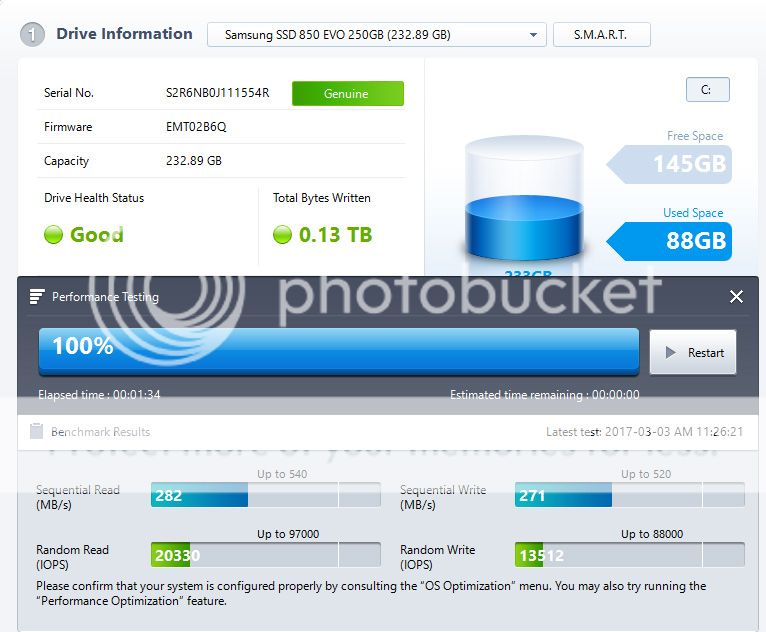

2nd%20reading_zpsgrl7p8bv.jpg
a>
 
Last edited:
Are you on AHCI mode or IDE mode?
 
Does SATA 2 limit your performance? Most definitely. SATA 3 tops out at around 550MB/s, SATA 2 at around 280. Random performance is also somewhat improved on SATA 3, although not by as much. Will you notice this in day-to-day use? Not unless you're already acclimated to a system running off SATA 3.

As @Shmee said, check if you're in AHCI mode, as IDE mode would reduce performance. If you're cloned off of a non-4k-aligned HDD that might also affect performance noticeably. A clean OS install is definitely a good idea. If you're running Windows 10 and have an 8GB+ flash drive around, you can download the Windows Media Creation Tool from Microsoft which automatically downloads an official W10 ISO and creates a bootable USB installer for you. Easy peasy.
 
Hi tcsenter

Thank you for your reply.

I do have TRIM support but can you explain how I can update the Intel AHCI option ROM on the bios or does this mean I have to flash/update the bios, please excuse my lack of knowledge.
 
I do have TRIM support but can you explain how I can update the Intel AHCI option ROM on the bios or does this mean I have to flash/update the bios, please excuse my lack of knowledge.
If you have the latest BIOS from ASUS, then the only way to get newer option ROM is through a modded BIOS. The latest BIOS from ASUS might have a new-enough Intel option ROM. I'm not familiar with it, only remember the discussions from ~5 years ago about needing newer option ROM to support TRIM and better performance on SSD. But that particular board may have received a recent-enough option ROM already in the latest BIOS.
 
Last edited:
Back
Top