Discussion Intel Meteor, Arrow, Lunar & Panther Lakes + WCL Discussion Threads

Page 950 - Seeking answers? Join the AnandTech community: where nearly half-a-million members share solutions and discuss the latest tech.

Tigerick

Senior member
Apr 1, 2022
939
851
106
Wildcat Lake (WCL) Specs

Intel Wildcat Lake (WCL) is upcoming mobile SoC replacing Raptor Lake-U. WCL consists of 2 tiles: compute tile and PCD tile. It is true single die consists of CPU, GPU and NPU that is fabbed by 18-A process. Last time I checked, PCD tile is fabbed by TSMC N6 process. They are connected through UCIe, not D2D; a first from Intel. Expecting launching in Q1 2026.
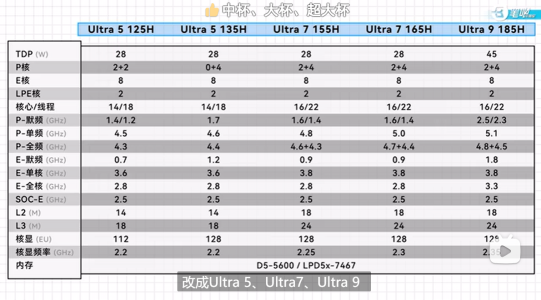
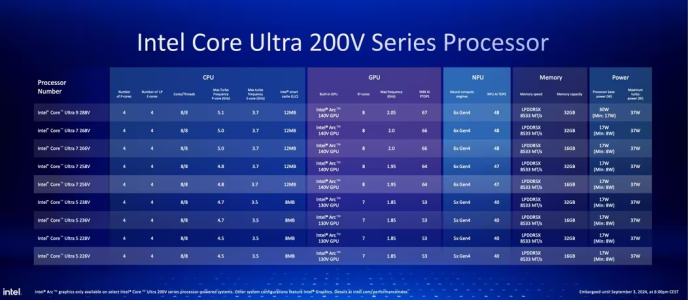
Intel Raptor Lake UIntel Wildcat Lake 15W?Intel Lunar LakeIntel Panther Lake 4+4+4
Launch DateQ1-2024Q2-2026Q3-2024Q1-2026
ModelIntel 150UIntel Core 7Core Ultra 7 268VCore Ultra 7 365
Dies2223
NodeIntel 7 + ?Intel 18-A + TSMC N6TSMC N3B + N6Intel 18-A + Intel 3 + TSMC N6
CPU2 P-core + 8 E-cores2 P-core + 4 LP E-cores4 P-core + 4 LP E-cores4 P-core + 4 LP E-cores
Threads12688
Max Clock5.4 GHz?5 GHz4.8 GHz
L3 Cache12 MB12 MB12 MB
TDP15 - 55 W15 W ?17 - 37 W25 - 55 W
Memory128-bit LPDDR5-520064-bit LPDDR5128-bit LPDDR5x-8533128-bit LPDDR5x-7467
Size96 GB32 GB128 GB
Bandwidth136 GB/s
GPUIntel GraphicsIntel GraphicsArc 140VIntel Graphics
RTNoNoYESYES
EU / Xe96 EU2 Xe8 Xe4 Xe
Max Clock1.3 GHz?2 GHz2.5 GHz
NPUGNA 3.018 TOPS48 TOPS49 TOPS


PPT1.jpg
PPT2.jpg
PPT3.jpg


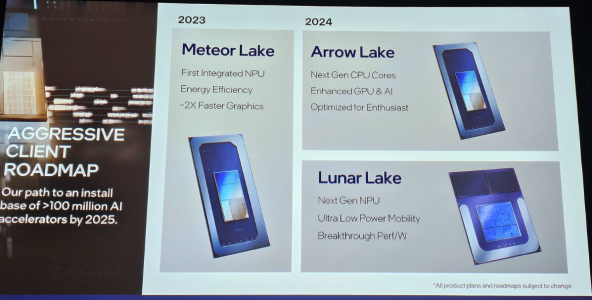
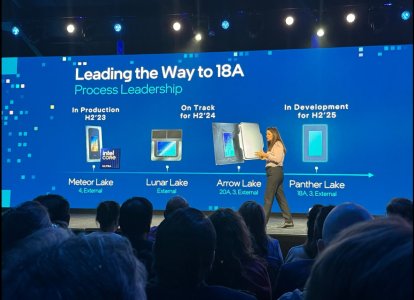
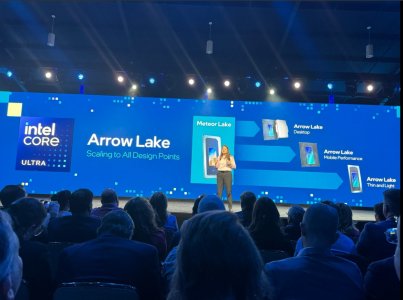
As Hot Chips 34 starting this week, Intel will unveil technical information of upcoming Meteor Lake (MTL) and Arrow Lake (ARL), new generation platform after Raptor Lake. Both MTL and ARL represent new direction which Intel will move to multiple chiplets and combine as one SoC platform.

MTL also represents new compute tile that based on Intel 4 process which is based on EUV lithography, a first from Intel. Intel expects to ship MTL mobile SoC in 2023.

ARL will come after MTL so Intel should be shipping it in 2024, that is what Intel roadmap is telling us. ARL compute tile will be manufactured by Intel 20A process, a first from Intel to use GAA transistors called RibbonFET.


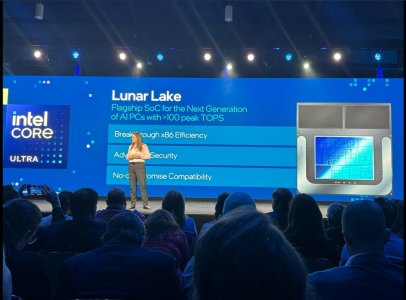
LNL-MX.png
 

Attachments

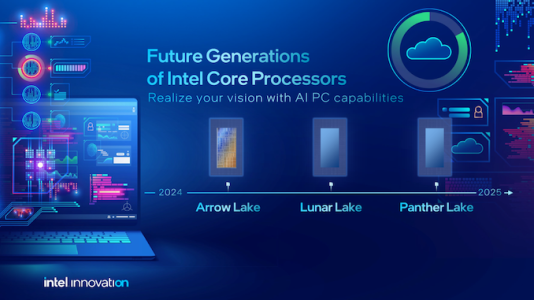
  • PantherLake.png
    PantherLake.png
    283.5 KB · Views: 24,041
  • LNL.png
    LNL.png
    881.8 KB · Views: 25,529
  • INTEL-CORE-100-ULTRA-METEOR-LAKE-OFFCIAL-SLIDE-2.jpg
    INTEL-CORE-100-ULTRA-METEOR-LAKE-OFFCIAL-SLIDE-2.jpg
    181.4 KB · Views: 72,437
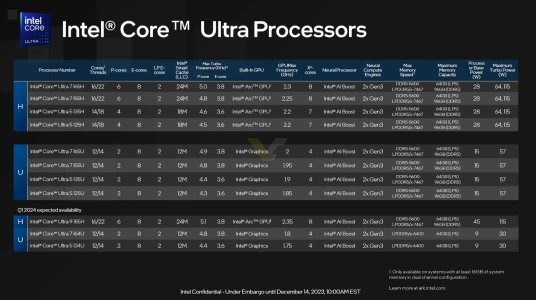
  • Clockspeed.png
    Clockspeed.png
    611.8 KB · Views: 72,324
Last edited:

Hulk

Diamond Member
Oct 9, 1999
5,313
3,995
136
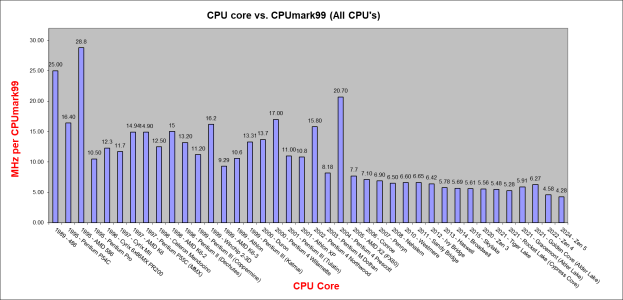
I bring this out every now and then. Been updating this for (don't laugh) over 30 years.

I am missing some cores. Namely Lion Cove, Redwood Cove, Crestmont and Skymont.

The P's are easy to test, just shut off the E's in the bios. The E's not so easy, I forget how I isolated Gracemont when I had Raptor Coves. I may have shut down all P's but one and then run multiple instances of CPUmark99 so each one would grab a thread, scores would group to 2 different numbers, Golden Cove and Gracemont.
Or I might have set affinity or used that app that I can't remember the name of to shut down threads.

Anyway if anyone wants to give it a go just let me know the frequency during the run and the score.

1768582716064.png
 

ondma

Diamond Member
Mar 18, 2018
3,319
1,708
136
I bring this out every now and then. Been updating this for (don't laugh) over 30 years.

I am missing some cores. Namely Lion Cove, Redwood Cove, Crestmont and Skymont.

The P's are easy to test, just shut off the E's in the bios. The E's not so easy, I forget how I isolated Gracemont when I had Raptor Coves. I may have shut down all P's but one and then run multiple instances of CPUmark99 so each one would grab a thread, scores would group to 2 different numbers, Golden Cove and Gracemont.
Or I might have set affinity or used that app that I can't remember the name of to shut down threads.

Anyway if anyone wants to give it a go just let me know the frequency during the run and the score.

View attachment 136811
Those numbers make no sense, if I am reading the chart correctly. Skylake and Gracemont have better IPC in this test than Golden Cove??
 

MoistOintment

Member
Jul 31, 2024
143
219
76
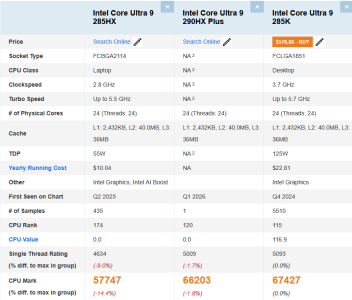
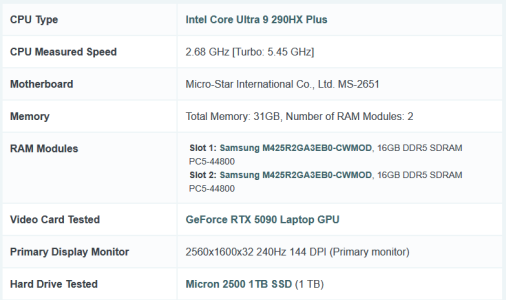
322 is PTL though?
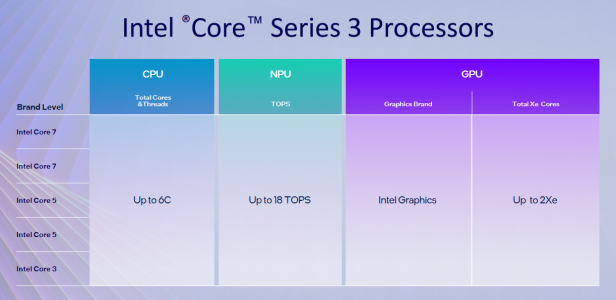
Looking at it now, it looks like a downbinned PTL-U, but still the same 2+0+4 config as WCL. Should be functionally the same performance, minus whatever slight impact single channel memory would have.

Either way this 2+0+4 PTL chip is slightly outperforming 165U MTL-U in nT (and 25% higher ST), so the 4+0+4 config should be quite popular / powerful for corporate fleet laptops
 

Hulk

Diamond Member
Oct 9, 1999
5,313
3,995
136
Those numbers make no sense, if I am reading the chart correctly. Skylake and Gracemont have better IPC in this test than Golden Cove??
First chart is MHz required for one CPUmark99point so lower is better.

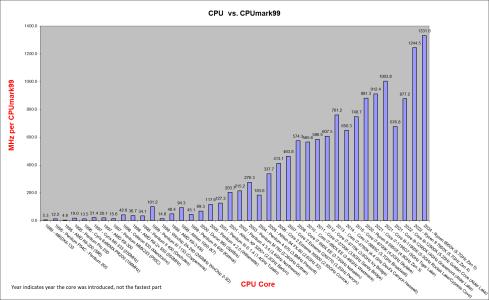
Second chart is overall performance for fastest version of a core.
 
  • Like
Reactions: igor_kavinski

ondma

Diamond Member
Mar 18, 2018
3,319
1,708
136
First chart is MHz required for one CPUmark99point so lower is better.

Second chart is overall performance for fastest version of a core.
Yeah, I am looking at the first chart. The scores are: Skylake 5.61
Gracemont 5.91
Golden Cove 6.27
I mean overall, the chart seems to make sense, but the Golden Cove score just looks way off. Seems like it should be around 5.0 or so.
 

Hulk

Diamond Member
Oct 9, 1999
5,313
3,995
136
Yeah, I am looking at the first chart. The scores are: Skylake 5.61
Gracemont 5.91
Golden Cove 6.27
I mean overall, the chart seems to make sense, but the Golden Cove score just looks way off. Seems like it should be around 5.0 or so.
I hear you. I tested my 12700K numerous times and got the same result. Perhaps I was doing the same (wrong) thing each time. I don't have an Aldler Lake or Raptor Lake anymore but if would be great if someone who did could substantiate. The test is easy to run and since it's 1 thread the cpu will just boost to it's max frequency, which you can spot quite easily in HWinfo even though it will move to different cores while it's running.
 

ondma

Diamond Member
Mar 18, 2018
3,319
1,708
136
I hear you. I tested my 12700K numerous times and got the same result. Perhaps I was doing the same (wrong) thing each time. I don't have an Aldler Lake or Raptor Lake anymore but if would be great if someone who did could substantiate. The test is easy to run and since it's 1 thread the cpu will just boost to it's max frequency, which you can spot quite easily in HWinfo even though it will move to different cores while it's running.
Maybe it is some quirk or the GC architecture, like using the E cores instead of the P cores, or not boosting properly or something? The "multi threaded" (chart 2) test looks even worse. A quad core 6700k beats the 12900k stock.
 

Hulk

Diamond Member
Oct 9, 1999
5,313
3,995
136
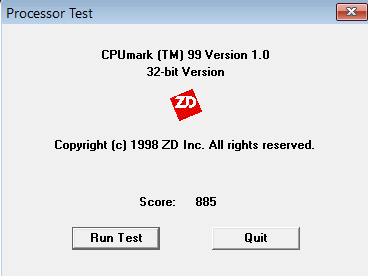
I appreciate the effort but unfortunately that is not the right benchmark. This is an ooooooooooldie. CPUmark99

You can download it from my Dropbox here: https://www.dropbox.com/scl/fi/67wq...ey=74h4y5sgm4ba3547dxpjokb64&st=3nm9rjij&dl=0

When you click the link it shows the extracted file, I zipped it. Download it from the download icon in the upper right portion of the screen. It is only 199KB!

It is does, no install, just runs from the *.exe. You will have to right-click "compatibility" mode and run it in XP compatibility since it is 32bit.
 

Kepler_L2

Golden Member
Sep 6, 2020
1,065
4,577
136
Yes, it's strange. Whatever changed since Rocket Lake (Cypress) Cove made performance in this (outdated and silly) benchmark go down. Rocket was 5.28pts/GHz and now this Lion Cove is 6.3, about what I've seen for Golden Cove and Raptor Cove as well.

Let me ask Chatgpt because it of course will know...

But seriously, does its explanation make sense?

1️⃣ CPUMark99 is a very specific workload​


CPUMark99 is:


  • 32-bit
  • Mostly integer
  • Small working sets
  • Branch-heavy
  • Very sensitive to front-end behavior, legacy x86 decode paths, and low-latency execution
  • Completely blind to:
    • Wide SIMD
    • AVX/AVX-512
    • Large reorder buffers
    • Massive OoO depth
    • ML-oriented predictors

In other words, it rewards short pipelines, low decode latency, and “classic” x86 throughput.


2️⃣ Why Cypress Cove looks “better” per GHz​


Cypress Cove (Rocket Lake) is a special case:


  • It’s a backport of Sunny Cove (10 nm → 14 nm)
  • Has:
    • Wide decode
    • Large ROB
    • Strong branch prediction
  • But crucially:
    • Still very latency-oriented
    • No E-core coexistence
    • No heavy power-management indirection
    • No frequency class juggling

So for a benchmark like CPUMark99:


  • Instructions stay on one fast P-core
  • Minimal scheduler interference
  • Very short critical paths
  • Result: Excellent points/GHz

That’s why ~5.3 points/GHz for Cypress Cove looks so strong.


3️⃣ Why Golden / Raptor / Lion Cove score lower per GHz​


Starting with Golden Cove, Intel changed priorities:


🔹 A. Front-end is optimized for width, not latency​


  • More aggressive:
    • Instruction fusion
    • Decode caching
    • Deep speculation
  • These help modern, wide workloads
  • But add latency and indirection that CPUMark99 hates

CPUMark99 does not feed enough ILP to benefit from:


  • 6-wide decode
  • Huge OoO windows

So the added complexity becomes overhead.


🔹 B. Hybrid scheduling penalties (even on P-cores)​


From Alder Lake onward:


  • Threads exist in a heterogeneous scheduling world
  • Even if CPUMark99 runs on a P-core:
    • Thread Director metadata
    • Migration heuristics
    • Power-state gating
    • Frequency class negotiation

These don’t show up in Cinebench — but they absolutely hurt ultra-short benchmarks.


🔹 C. Branch predictor evolution favors longer histories


Golden → Raptor → Lion Cove:


  • Branch predictors became:
    • Deeper
    • More context-aware
    • More history-based

This improves:


  • SPEC
  • Games
  • Compilers
  • Servers

But CPUMark99:


  • Has short, repetitive loops
  • Little global history benefit
  • Suffers from longer predictor warm-up

Result: worse IPC for this benchmark only.


🔹 D. Intel traded latency for frequency headroom​


Modern cores are tuned to:


  • Sustain very high clocks
  • With deep pipelines
  • Aggressive clock gating

CPUMark99 benefits more from:


  • “Fast at 3 GHz”
    than:
  • “Brilliant at 5.5 GHz”

So when you normalize to GHz, newer cores look worse.


4️⃣ Why your ~6.3 → ~5.3 pts/GHz shift makes sense​


Your numbers imply:


  • Cypress Cove: lean, latency-focused
  • Golden / Raptor / Lion: throughput-focused, speculative

CPUMark99 rewards:


Modern Intel cores are optimized for:


Those goals are not aligned.


5️⃣ The key takeaway (important)​


This is not an IPC regression in any real sense.


It’s:


  • A benchmark-specific artifact
  • Exposing how Intel moved away from:
    • Low-latency scalar dominance
  • Toward:
    • High-throughput, wide, speculative execution

If CPUMark99 mattered today, Intel would design differently — but it doesn’t.


6️⃣ Why AMD often looks “weirdly strong” in CPUMark99​


As a side note:


  • Zen cores tend to retain:
    • Lower front-end latency
    • Simpler decode paths
  • Which is why Zen 3/4 often punch above their weight in CPUMark99-style tests

Not because they’re “faster overall” — but because they didn’t abandon legacy friendliness as aggressively.
Can you not fill the forum with AI slop?