• We’re currently investigating an issue related to the forum theme and styling that is impacting page layout and visual formatting. The problem has been identified, and we are actively working on a resolution. There is no impact to user data or functionality, this is strictly a front-end display issue. We’ll post an update once the fix has been deployed. Thanks for your patience while we get this sorted.

Intel "Coffee Lake" Builders Thread

Page 56 - Seeking answers? Join the AnandTech community: where nearly half-a-million members share solutions and discuss the latest tech.
So finally received my 8700K yesterday and fired it up. First impressions are that these things are beasts - I was coming from my old faithful 2500k - so view my enthusiasm with that in mind!!

I had a couple of "do'h" moments - a build wouldn't be fun with out them! Had msconfig set to 6 processors which limited it to 3c/6t.. that head me head scratching for a while 🙂 And testing it in BF1 the temps were actually rising when tabbing out..... yes.. SETI@Home will max all cores when you tab out of an app!!

But I have one question - what sort of aggregated memory bandwidth score (in Sisandra) should I be getting for Corsair Vengeance 16gb DDR4 3200? Think (from memory) I am getting about 32GB/s but Sisandra is warning me that is a low score and I should be getting about 50GB/s. I am running the XMP profile and seeing 4000mhz NB frequency and DRAM freq of 1600MHz
 
But I have one question - what sort of aggregated memory bandwidth score (in Sisandra) should I be getting for Corsair Vengeance 16gb DDR4 3200? Think (from memory) I am getting about 32GB/s but Sisandra is warning me that is a low score and I should be getting about 50GB/s. I am running the XMP profile and seeing 4000mhz NB frequency and DRAM freq of 1600MHz
Just to make sure, did you install the 2 DIMMs in A2 and B2 slots?
C8J00CV.png
 
So, what do you guys consider a safe daily usage max voltage on an overclocked and delidded 8700k? 1.3 V? 1.4 V?

I got my 8700k back from Silicon Lottery and they binned it at 5.1 Ghz with 1.41 volts and -2 AVX offset (IIRC). I'm hoping I can adjust some additional parameters to get that voltage down but keep it at 5 Ghz.
 
Last edited:
I have a fixed voltage on my 8700k cpu of 1.32 which seems to be staying fine in HWInfo. My VID though reached a maximum of 1.434V. Is this okay? If I understand, VID is not an actual voltage being supplied, it's just what the CPU "requests" or thinks it wants? Just want to make sure my OC is going to remain safe.
 
problem. Ok I finished build but system will not start up. Can you guys offer me suggestions of what to check? the board lights up, Maximus Hero. but the start button does nothing, no fans come on no beep. thanks
ok i fiddled with connections and now when I press start button one of my fans comes on but nothing else. I guess I'm going to check and reseat the cpu and ram
 
Last edited:
PSU cables (main and aux) not fully seated, case headers on mobo and RAM are the first that come to mind.

Do you have a GPU installed? Is so pull it out and boot off the IGP.
 
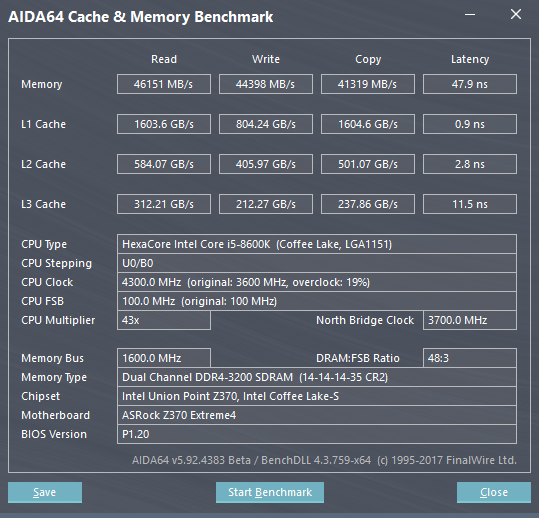
Just for reference, here are mine on a stock 8600k with multicore enhancement., on gskill 3200 14-14-14-35, tightened from 15-15-15-35.


Looks like the P1.20 UEFI update improved latency slightly versus my previous result:


Now 42.4ns. Disregard the CPU clock. AIDA64 is reporting incorrectly. It is still running stock settings with MCE turned off.
 
I'm a little underwhelmed by the Memory Latency. I wonder how low it can be tweaked. People really hated on x299's memory latency but it can be tweaked to ~52ns or even better.
 
I'm a little underwhelmed by the Memory Latency. I wonder how low it can be tweaked. People really hated on x299's memory latency but it can be tweaked to ~52ns or even better.

I haven't played around much but I got mine down to 41ns without too much trouble at 4.7ghz. I bet under 38ns is doable on decent mobos with a high OC and some fast RAM.
 
Last edited:
Wow...It looks like the 8700k is binning out pretty nicely. Silicon Lottery binning results and prices including deliding...

4.9 GHz @ 1.387v: 100% - $449
5.0 GHz @ 1.400v: 81% - $479
5.1 GHz @ 1.412v: 58% - $539
5.2 GHz @ 1.425v: 30% - $659
5.3 GHz @ 1.437v: 6% - $999
 
.
PSU cables (main and aux) not fully seated, case headers on mobo and RAM are the first that come to mind.

Do you have a GPU installed? Is so pull it out and boot off the IGP.
No gpu but thanks ozzy. You were on track with the first suggestion the PSU cables! I think I'm getting this and I'll report back in a bit if it works 🙂
yes thank you. You know, this is a little embarrasing, but remember this is the first system I've built in 7 years! I had failed to install the 4x4 cpu cable from the power supply to the motherboard!
between your recomendation and this youtube where the guy showed he had installed it backwards, it dawned on me. Looked in the corsair box and there it was.

I'm up and running going to install windows next.
Dave
 
I'm seeing a lot of sub 4000 memory here. Anyone doing something like this yet?

BtyEZyr.png


I'm sure it's very much possible. I'm just not sure why it isn't more common.
 
I'm seeing a lot of sub 4000 memory here. Anyone doing something like this yet?

BtyEZyr.png


I'm sure it's very much possible. I'm just not sure why it isn't more common.
That's screaming. I was sure the memory controller would be up to the task. Is that yours?
 
That's mine. Not 8700K, but 7740X on X299. I'm considering getting the 8700K tomorrow along with a Z370 MSI Gaming Carbon Pro AC. I was just hoping to see more high speed memory results on the Z370.
 
Wow...It looks like the 8700k is binning out pretty nicely. Silicon Lottery binning results and prices including deliding...

4.9 GHz @ 1.387v: 100% - $449
5.0 GHz @ 1.400v: 81% - $479
5.1 GHz @ 1.412v: 58% - $539
5.2 GHz @ 1.425v: 30% - $659
5.3 GHz @ 1.437v: 6% - $999

They delidded and binned mine at 5.1 Ghz. Wondering if 1.412 V is too much for a daily driver. 🙂
 
Back
Top