| My PC: LENOVO IdeaCentre 14ARE05 I have a 128 GB SSD PCIe to run my OS windows 11. The Hard Drive for data is SATA 3.5. The board have a one slot for PCIe 16x Gen 3.0. I want to install another SSD PCIe Gen 3.0 4x 2TB. Question is: can I use the above mentioned PCIe Gen 3.0 16x slot to install a PCIe Gen 3.0 adapter for SSD PCIe Gen 3.0 4x 2TB? I have in my mind an idea that the PCIe 16x Gen 3.0 is only for graphic cards. Is this true? |


Question INSTALL SSD PCIe TO UPGRADE MY DESKTOP
- Thread starter waghela
- Start date
You are using an out of date browser. It may not display this or other websites correctly.
You should upgrade or use an alternative browser.
You should upgrade or use an alternative browser.
Tech Junky
Diamond Member
- Jan 27, 2022
- 3,825
- 1,343
- 106
You can put whatever you want in the slot. Most as in 99% of people would put a GPU into it though. There's nothing about any slot that requires using a specific type of card in them.PCIe 16x Gen 3.0 is only for graphic cards. Is this true?

Another Question: the Desktop have a two slot for DDR-4 3200 memory ram. One of the slot have 8 GB of Memory RAM preinstalled. Another slot is free. I wonder if is possible to install 16 GB of Memory RAM in available slot. Or the both a slot have to be same amount of memory and I only can upgrade with equal memory RAM that was preinstalled, that is 8 GB.
Tech Junky
Diamond Member
- Jan 27, 2022
- 3,825
- 1,343
- 106
You can install a 16GB for a total of 24GB. The performance won't be quite as optimal as 2x16 or 2x8 but, it will work just fine. A lot of people run into a similar issue with PC's that have a soldered RAM module and an open slot.
Tech Junky
Diamond Member
- Jan 27, 2022
- 3,825
- 1,343
- 106
It's not going to affect anything in a huge manner.
Personally ram is cheap for 32gb under $100 and I would just upgrade the pair at the same time.
Personally ram is cheap for 32gb under $100 and I would just upgrade the pair at the same time.

BoomerD
No Lifer
- Feb 26, 2006
- 66,590
- 14,992
- 146
Although I realized is that I should not opt for the 16 GB RAM which, despite totaling the 24 GB (16+8), is not as effective as the total of 16 GB (8+8). It sounds strange, but that's exactly how I realized it, isn't it?
Not at all strange. If you have your RAM installed in the motherboard correctly and paired up, 2 sticks can indeed run faster than 4. Mixing pairs of RAM of different speeds will cause the faster RAM to default to the slower speed.
Thank you for your invaluable clarifications.
Wishes for a Happy New Year.
Wishes for a Happy New Year.
I installed the PCIe SSD 2TB NVMe M.2 Disk with the PCIe adapter 4x in the Mainboard PCIe 16x slot.
I deleted the partition of the 128 GB SSD disk preinstalled where the original OS was and installed the OS on the new SSD disk.
However, on startup after the LENOVO logo appears, the screen displays the following message:
">>Checking Media Presence......
>>Media Present....."
This happens when the Ethernet network cable is disconnected. When I turn on the network cable a third message line appears:
" Start PXE over IPv4 on MAC: 1C-69-7A-C3-79-D6"
This time the PC only starts after I press 4 times on the key "ESC"
I updated the firmware of the BIOS and the problem remains.
What should I do to resolve this issue?
I deleted the partition of the 128 GB SSD disk preinstalled where the original OS was and installed the OS on the new SSD disk.
However, on startup after the LENOVO logo appears, the screen displays the following message:
">>Checking Media Presence......
>>Media Present....."
This happens when the Ethernet network cable is disconnected. When I turn on the network cable a third message line appears:
" Start PXE over IPv4 on MAC: 1C-69-7A-C3-79-D6"
This time the PC only starts after I press 4 times on the key "ESC"
I updated the firmware of the BIOS and the problem remains.
What should I do to resolve this issue?
igor_kavinski
Lifer
- Jul 27, 2020
- 28,173
- 19,208
- 146
Check the BIOS to see if the 2TB SSD is being detected. Then set it as the primary boot device and disable PXE boot option.
Check the BIOS to see if the 2TB SSD is being detected. Then set it as the primary boot device and disable PXE boot option.
The 2TB SSD is not detected by the BIOS

fralexandr
Platinum Member
It might not be possible to boot the 2TB drive while it's in a pci-e x16 slot. you might want to use the m.2 slot for the boot drive and the pci-e slot as a secondary drive.
As the lenovo uses a custom motherboard, it's not easy to find out whether it's actually possible to boot from the pci-e slot.
Lenovo's site lists the board as a Lenovo BDPLANAR AMD Vermeer Pro 565 with model number AM4P19ME
As the lenovo uses a custom motherboard, it's not easy to find out whether it's actually possible to boot from the pci-e slot.
Lenovo's site lists the board as a Lenovo BDPLANAR AMD Vermeer Pro 565 with model number AM4P19ME
igor_kavinski
Lifer
- Jul 27, 2020
- 28,173
- 19,208
- 146
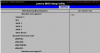
Lenovo has a nifty BIOS simulator under How To's >>> BIOS/UEFI.
So it shows that there's Other Device in Boot Sequence. Move Other Device to top with +/- keys, Save and Exit.
If that doesn't boot from the 2TB SSD, take out the old SSD from M2 slot and put the 2 TB one there and then move your old M2 to the NVMe adapter in the PCIe 16x slot. Go back to BIOS and move M2 back to very top in Boot Sequence. It should boot from 2TB now.
Tech Junky
Diamond Member
- Jan 27, 2022
- 3,825
- 1,343
- 106
Double check and make sure Intel RST is disabled. By default it gets turned back on when you flash new firmware and will cause your system to not boot.updated the firmware of the BIOS
TRENDING THREADS
-
 Discussion Zen 5 Speculation (EPYC Turin and Strix Point/Granite Ridge - Ryzen 9000)
- Started by DisEnchantment
- Replies: 25K
-
Discussion Intel Meteor, Arrow, Lunar & Panther Lakes + WCL Discussion Threads
- Started by Tigerick
- Replies: 24K
-
 Discussion Intel current and future Lakes & Rapids thread
- Started by TheF34RChannel
- Replies: 23K
-

-


AnandTech is part of Future plc, an international media group and leading digital publisher. Visit our corporate site.
© Future Publishing Limited Quay House, The Ambury, Bath BA1 1UA. All rights reserved. England and Wales company registration number 2008885.
 Facebook
 Twitter