• We’re currently investigating an issue related to the forum theme and styling that is impacting page layout and visual formatting. The problem has been identified, and we are actively working on a resolution. There is no impact to user data or functionality, this is strictly a front-end display issue. We’ll post an update once the fix has been deployed. Thanks for your patience while we get this sorted.

Identifying bad memory module.

mxnerd

Diamond Member
I assembled a new build with ASROCK Z68 Extreme4 with Avexir 4X4GB 1600 memory (running at 1333).

For the past 3 weeks the machine BSOD or freeze randomly, not everyday, but about every other day. I updated the motherboard to newest v1.7, adjust Core i5 2400 voltage to 1.2v fixed according to some web forum postings. But it still happens.

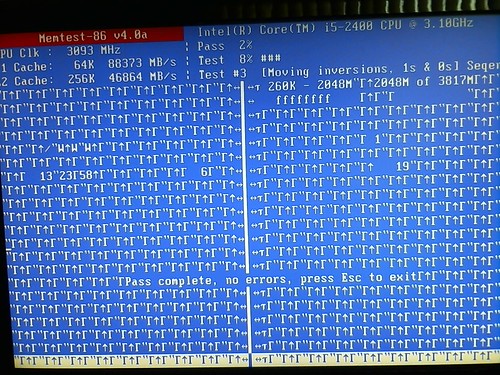
Today I ran the memtest86 4.0a to test all 4 modules, all modules passed the test. But I notice one module display random characters on the screen. Does that mean this module is actually bad? Picture attached. Thanks.

6313851250_7023619f93.jpg
 
Last edited:
I shutdown the computer and then re-run the test for another 2 passes, this time it does not exhibit the problem, so what's the deal?
 
After prolonged testing, 3 out of 4 modules had same problem!

The vendor is really inexcusable!
 
Last edited:
Have you tried the latest version 4.2? It has support for sandy bridge cpus and has a safe mode option you can try if the standard mode does not work.
 
Last edited:
My experience has been that Memtes86 has been nothing but buggy. I use Memtest86+, the plus is important. Try that version, and see what it says.

From the screenshots, it looks like bad VRAM or overheating to me. Are you using the IGP, or a seperate video card. If it's the IGP, then perhaps the RAM is indeed bad.
 
Thanks guys. I'm using Core i5's IGP.

I did not notice there is memtest86+ 4.2, will try that.

Best,
 
I did not realize the RAM is still running at 1.65v even speed is only 1333.

After switching to memtest86+ 4.20 and lower voltage from 1.65 to 1.50, there is no BSOD/freeze/sudden shutdwon.

My question is, why the motherboard won't run at lower 1.5 voltage automatically while running at lower speed? I had to lower the voltage in the BIOS manually.

After searching DDR3-1600 4GB RAM module, found that almost all modules come with heat spreaders. Guess most DDR3-1600 4GM modules are overclocked. Yet Avexir did a very poor QC job.
 
If you want to completely rule out the RAM then try to use each stick individually in the board and see if one of the sticks fails to boot the system, or further-more run each stick in the board (singularly) and run memtest86+ on it. instead of running it with all the sticks inserted.
 
Back
Top