• We’re currently investigating an issue related to the forum theme and styling that is impacting page layout and visual formatting. The problem has been identified, and we are actively working on a resolution. There is no impact to user data or functionality, this is strictly a front-end display issue. We’ll post an update once the fix has been deployed. Thanks for your patience while we get this sorted.

I just realised what the 'new' Windows 11 Start menu looks like

The lower half of the list, the 'all apps' list:

Windows-11-new-Start-menu-look.jpg


f272d5f8012ff2d08d3ad43ff080dbd9.png
 
Is this the return of the windows 8 start menu? I dont like the near full screen menu but I actually do like the design of the win11 menu.
When I've used gnome I install Arc Menu and the style I choose is called modern A.Z. but it's pretty much the win11 start menu style
 
How does the search work? There's some very minimalist android launchers that are text based. You start typing, and suggestions popup right away. Iit's pretty easy selecting the right program. I'm dubious about requiring keyboard use on a phone, but I see the appeal. Does windows search work well?
 
See the second image 🙂

Honestly and in fully seriousness though, I'm pretty sure that's the reason why. MS has been imitating Apple for a while now.
it makes sense on a small phone screen....but your right...and i hate it..thankfully there's many ways to get rid of that
 
How does the search work? There's some very minimalist android launchers that are text based. You start typing, and suggestions popup right away. Iit's pretty easy selecting the right program. I'm dubious about requiring keyboard use on a phone, but I see the appeal. Does windows search work well?

(re first image) That's a desktop screenshot btw. Search on the start menu has for ages worked by opening the start menu and just start typing.

Windows search works as well/badly as ever 🙂
 
thankfully there's many ways to get rid of that

The main way I can think of is to install a third party Start menu app. Admittedly the all apps list can be altered in its formatting but they clearly didn't think about what would best utilise the available space (e.g. the list view leaves a tonne of space next to a single column view).
 
There, I fixed that for you. 😉
Imitating poorly is one problem but the other problem is Microsoft puts ads and service upsells in the start menu regardless.

Sadly, Apple actually copied a bit from Microsoft. For iDrive notices in settings and unending update notifications for Tahoe.

I suspect they're converging on maximally garbage user interfaces based on telemetry and service sells.
 
Imitating poorly is one problem but the other problem is Microsoft puts ads and service upsells in the start menu regardless.

Sadly, Apple actually copied a bit from Microsoft. For iDrive notices in settings and unending update notifications for Tahoe.

I suspect they're converging on maximally garbage user interfaces based on telemetry and service sells.

Yeah, I guess the need to reach the maximization point of user misery is a universal dream for all the MBA bean counters.....
 
I suspect they're converging on maximally garbage user interfaces based on telemetry and service sells.

I guess ensh*ttifaction comes to all products eventually, it just seems weird that if one compares say YouTube to Windows, the fact that YouTube obviously has to find a revenue stream because it isn't built into the delivery system would mean the potential for ensh*ttifaction is far higher for YT, and the fact that an operating system must (from a usage perspective) first and foremost aid productivity and/or consumption rather than hinder it, I'm just surprised I guess that the death knell for Windows had to toll eventually.

I mean, how hard would it have been for Microsoft to evolve Windows 7, resist trying to force a desktop OS square block into a touch-screen interface's round hole, resist cloud integration, AI integration, and maintain a disciplined approach with regard to what has to be patched via auto Windows updates and what gets patched/improved in service packs. Being a dev in that Windows development environment is probably comparatively boring work, but I'm also fairly sure that Windows is the keystone to Microsoft's well-being as a whole.

(I'm not commenting on Apple's operating systems' well-being as I don't get enough exposure to them)
 
The main way I can think of is to install a third party Start menu app. Admittedly the all apps list can be altered in its formatting but they clearly didn't think about what would best utilise the available space (e.g. the list view leaves a tonne of space next to a single column view).
The grid view isn't too bad. It uses the screen space better, and at least it's still in alphabetical order, so faster to find what you need if you know the name of the app you're seeking.
 
The grid view isn't too bad. It uses the screen space better, and at least it's still in alphabetical order, so faster to find what you need if you know the name of the app you're seeking.

It makes the whole format counter-intuitive / work against itself: Surely the point of the 'all apps' list is for the user to find an app that they don't use very often (so therefore icons + labels are far more helpful), yet the apps that the user has pinned to the Start menu has labels (even though the user is a lot more likely to know the icon art for their pinned items).

Furthermore, I like to think that I know every app that comes with Windows, but rather like me occasionally deciding to deep-clean my keyboard and removing every key in order to clean all the nooks and crannies, and I'd like to think that I know where they all go without thinking, I take a picture of the intact keyboard first because I know from experience that I'm not as familiar as I'd like to think (and yes I do touch-type), and that's just aside from the fact that Microsoft has been helpfully "updating" icon art lately. Yes, one can hover the pointer over each icon for a second to get a tooltip, but imagine how much longer that would take to find the app one is looking for vs. having labels! After ten hovers I'd bet the user would give up and find some other way.
 
Last edited:
It makes the whole format counter-intuitive / work against itself: Surely the point of the 'all apps' list is for the user to find an app that they don't use very often (so therefore icons + labels are far more helpful), yet the apps that the user has pinned to the Start menu has labels (even though the user is a lot more likely to know the icon art for their pinned items).

Furthermore, I like to think that I know every app that comes with Windows, but rather like me occasionally deciding to deep-clean my keyboard and removing every key in order to clean all the nooks and crannies, and I'd like to think that I know where they all go without thinking, I take a picture of the intact keyboard first because I know from experience that I'm not as familiar as I'd like to think (and yes I do touch-type), and that's just aside from the fact that Microsoft has been helpfully "updating" icon art lately. Yes, one can hover the pointer over each icon for a second to get a tooltip, but imagine how much longer that would take to find the app one is looking for vs. having labels! After ten hovers I'd bet the user would give up and find some other way.
On My computer, the grid view DOES have icons. Not for everything, but most of the items do have it. Maybe there is a setting to enable them?
 
I never see any of this stuff. I installed Open Shell and tweaked the interface the way I wanted. I also use docks to asthetically place shortcut icons for my most used aps. Been doing this for over 10 years. I get a familiarity and function that I know and am comfortable with. I do the same with my Android phone by using Nova Launcher. So, if I get a new PC or device, I have close to the same user experience. I feel more productive that way.
 
I had everything nicely organized, and with this new layout, you only get 2 rows for your apps and these auto-categorized boxes at the bottom, which make no sense, so I restored the previous layout. Microsoft just can't leave the Start Menu alone; they have to keep messing with it! They just need to give us the old Windows 7 Start menu back, or at least an option to choose it over the new tablet-style Start menu (Yes, I know I can install 3rd party Start Menu alternatives, but I mean it should be a standard feature)

Steps to Restore the Old Start Menu:
  1. Download ViveTool: Get the latest version from GitHub and extract the files.
  2. Open Command Prompt: Search for "cmd", right-click the result, and select Run as administrator.
  3. Navigate to Folder: Type cd followed by the path to your extracted ViveTool folder (e.g.cd C:\ViveTool).
  4. Disable New Menu: Run the following command:
    vivetool /disable /id:47205210
  5. Restart: Restart your computer to apply the changes.
If you wish to re-enable the new menu later, use the same process but substitute /disable with /enable
 
/shrug, the windows 11 start menu has been pretty much useless since inception. This finally adds some nice features to it. I like it.
 
Do you mean labels? Icons are pictures.
It has both labels AND icon (pictures). For most of the items, not all.

Same in list view.

In category view, there are only icons, but if you mouse over them, you see the text labels.

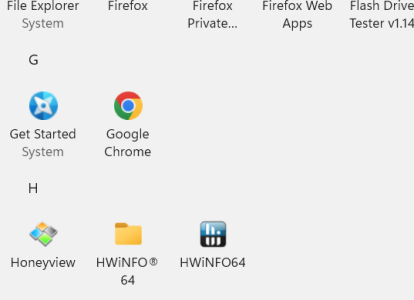
Here is what it looks like in grid view:
 

Attachments

  • Screenshot 2026-03-03 133918.png
    Screenshot 2026-03-03 133918.png
    26.4 KB · Views: 7
Last edited:
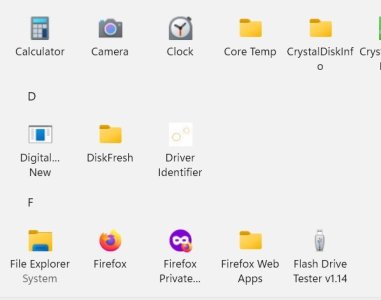
This might be a better screen shot:

Again, it was taken of a small section while set for grid view.
 

Attachments

  • Screenshot 2026-03-03 134940.jpg
    Screenshot 2026-03-03 134940.jpg
    25.2 KB · Views: 7
It has both labels AND icon (pictures). For most of the items, not all.

Same in list view.

In category view, there are only icons, but if you mouse over them, you see the text labels.

Here is what it looks like in grid view:

If you switch it out of category view (the default setting), sure.
 
/shrug, the windows 11 start menu has been pretty much useless since inception. This finally adds some nice features to it. I like it.

I thought it wasn't too bad. It fixed the main problem of doing more clicking to get to the "all" list when the app isn't pinned to the start menu. For me, it is a slight improvement, but nothing especially grand.

Mikey mike seems to have a real hard-on for it though. Maybe a future update will finally make it usable for mikey too. I sure hope so.

It's a shame to see that.
 
nvm, Jimminy was talking about Grid view, I was not, and I'm not yet fluent with what the different views are so I initially thought we were talking about the default (Category) view, and with responses a day or two apart, the thread of the conversation was not fresh in my mind.
 
Last edited:
Back
Top