Please read this entire missive before beginning.  Also, I must state that I assume no liability for anything bad that could (unlikely) happen.

I recommend beginning by booting from USB installation media.  Once you get to the first screen, use shift-F10 to get to a command prompt and run diskpart.

diskpart> list disk
 Disk ###  Status         Size     Free     Dyn  Gpt
  --------  -------------  -------  -------  ---  ---
  Disk 0    Online         1907 GB      0 B        *
  Disk 1    Online         1024 GB      0 B        *


Pick the 990 by:
diskpart> select disk y

Disk y is now the selected disk   ; where y is the # of the 990

diskpart> list partition

 Partition ###  Type              Size     Offset
  -------------  ----------------  -------  -------
  Partition 1    Reserved           128 MB    17 KB
  Partition 2    Primary            100 MB   129 MB
  Partition 3    Primary           1906 GB   229 MB
  Partition 4    System             100 MB  1906 GB
  Partition 5    Recovery           832 MB  1906 GB

If you see a partition with the type SYSTEM, select it. If you don't see a SYSTEM partition, skip to the bottom of this tutorial for how to make one.  Afterwards, resume from list partition above.

diskpart> select partition 4

Partition 4 is now the selected partition.

Now assign an unused drive letter.  I'll use z: for this purpose:
diskpart> assign letter=z

DiskPart successfully assigned the drive letter or mount point.
diskpart> exit

Now back at a regular drive letter prompt, type the following:

bcdboot c:\windows /s z: /f UEFI

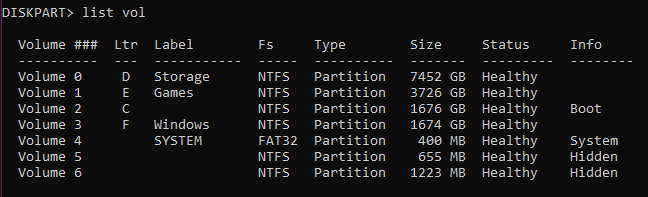
bcdboot should tell you that it transferred the files successfully.  Afterwards, you can go back into diskpart, list volume, select the volume with the drive letter z: and type
diskpart> remove letter=z

DiskPart successfully removed the drive letter or mount point.

diskpart> exit

Afterwards, if you want to clear the 980, pick it:
diskpart> select disk x                                              ; where x is the 980
diskpart> clean                                                         ; this command will remove everything on the SSD, so make sure you're doing the right one. You should get a message telling you diskpart was successful.

You may need to set the correct boot in the UEFI BIOS, especially if you didn't clean the 980.


***If you don't see a partition with the type SYSTEM, we'll need to allot the space for it.  This example is using the partitions listed above:

diskpart> select partition 3

Partition 3 is now the selected partition.

diskpart> shrink desired=200

diskpart successfully shrunk the partition by: 200 MB

diskpart> create partition efi

diskpart succeeded in creating the specified partition

diskpart> format fs=fat32 quick

diskpart should tell you it formatted the partition successfully.  Resume from above.



 Discussion Zen 5 Speculation (EPYC Turin and Strix Point/Granite Ridge - Ryzen 9000)

