• We’re currently investigating an issue related to the forum theme and styling that is impacting page layout and visual formatting. The problem has been identified, and we are actively working on a resolution. There is no impact to user data or functionality, this is strictly a front-end display issue. We’ll post an update once the fix has been deployed. Thanks for your patience while we get this sorted.

Question How fast is your browser?

Page 11 - Seeking answers? Join the AnandTech community: where nearly half-a-million members share solutions and discuss the latest tech.

Magic Carpet

Diamond Member
This benchmark simulates user actions for adding, completing, and removing to-do items using multiple examples in TodoMVC. Each example in TodoMVC implements the same todo application using DOM APIs in different ways. Some call DOM APIs directly from ECMAScript 5 (ES5), ECMASCript 2015 (ES6), ES6 transpiled to ES5, and Elm transpiled to ES5. Others use one of eleven popular JavaScript frameworks: React, React with Redux, Ember.js, Backbone.js, AngularJS, (new) Angular, Vue.js, jQuery, Preact, Inferno, and Flight. Many of these frameworks are used on the most popular websites in the world, such as Facebook and Twitter. The performance of these types of operations depends on the speed of the DOM APIs, the JavaScript engine, CSS style resolution, layout, and other technologies.

Core M-5Y10c @ 52.02

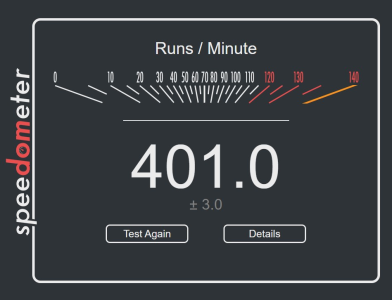
Images aren't necessary, but please state your cpu speed. The web browser of your choice. Mine is Edge 83. Thank you.
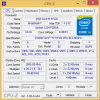

speed.pngspeed2.png
 
Last edited:
For the most part, the speed of your browser performance is dependent on the download speed of Internet service provider and your type of router setup! Direct modem to 2.5Gb Ethernet line is the best! If you have opportunity to go to use a large university’s, big corporate 100s, or Pentagon’s DOD internet browser. It is instantaneous!

I upgraded to a Linksys mesh two node router Wi-Fi 6 two years ago and easily double my download speed. I only have a 140MBS DNS line and it really close 80-100MBS speed now. Before my upgrade, I was getting 35-55MBS speed!
 
Last edited:
For the most part, the speed of your browser performance is dependent on the download speed of Internet service provider and your type of router setup! Direct modem to 2.5Gb Ethernet line is the best! If you have opportunity to go to use a large university’s, big corporate 100s, or Pentagon’s DOD internet browser. It is instantaneous!

I upgraded to a Linksys mesh two node router Wi-Fi 6 two years ago and easily double my download speed. I only have a 140MBS DNS line and it really close 80-100MBS speed now. Before my upgrade, I was getting 35-55MBS speed!
The fastest internet provider (consumer) that I know of is one gig service. Simply use that service for the fastest consumer speed. I could have it for $60 a month, and its fiber optic from my house all the way to the internet, but I don't need that.
 
For the most part, the speed of your browser performance is dependent on the download speed of Internet service provider and your type of router setup! Direct modem to 2.5Gb Ethernet line is the best! If you have opportunity to go to use a large university’s, big corporate 100s, or Pentagon’s DOD internet browser. It is instantaneous!

I upgraded to a Linksys mesh two node router Wi-Fi 6 two years ago and easily double my download speed. I only have a 140MBS DNS line and it really close 80-100MBS speed now. Before my upgrade, I was getting 35-55MBS speed!

Not really, above a certain threshold which is well below 1 gigabit it doesn't matter - because even if you have 1 gigabit service at home you don't have that 1 gigabit dedicated to you along the full path to the web servers you are hitting (and even loading a single page will usually hit multiple servers located along different paths)

This benchmark is intended to show how fast a given browser/OS/hardware combo renders pages, executes Javascript etc. independently of how fast the network is. Obviously if you are stuck behind a 1.5 Mbps DSL line then you'll get worse performance with the above M2 Macbook Air than you would behind gigabit fiber with a Windows 7 PC running 2009 era software.
 
Not really, above a certain threshold which is well below 1 gigabit it doesn't matter - because even if you have 1 gigabit service at home you don't have that 1 gigabit dedicated to you along the full path to the web servers you are hitting (and even loading a single page will usually hit multiple servers located along different paths)

This benchmark is intended to show how fast a given browser/OS/hardware combo renders pages, executes Javascript etc. independently of how fast the network is. Obviously if you are stuck behind a 1.5 Mbps DSL line then you'll get worse performance with the above M2 Macbook Air than you would behind gigabit fiber with a Windows 7 PC running 2009 era software.
Well, in the case of Ziply Fiber (used to be Frontier), the fiber goes from the side of the house all the way to the hub. I doubt seriously that the speed is less than a gig anywhere from that hub to the web servers in this day and age. Now this network is only in parts of the US, and I have no idea about the rest of the world, but in these regions, its all fiber. The bandwidth is so high in these regions, its insane.
 
Should one run this test on its own or with other tabs open in the browser?
I'm inclined to run it with other tabs active so as to get a more accurate result for real world implications.
 
NUC with Intel i5-1135G7 @ 2.4GHz (boost to 4.2GHz) running Chrome v107.0.5304.88
View attachment 70510
I got the same score on an i5-1235U with HT disabled on battery power!

 
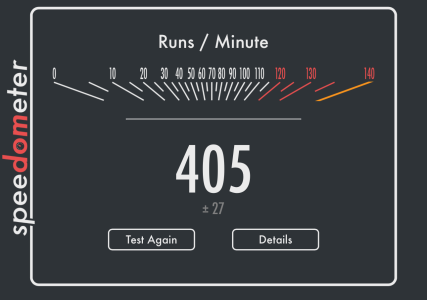
7950x3d with 6000CL40 RAM and latest Edge seem to be performing great too:

1690193340414.png

Compared to previuos effort on 13900KS @6Ghz this was very light on memory tuning and already great results.
AMD seems to be getting somewhere with latest AGESA, after Q-Flash button bios updating to 1.07 agesa, board went from not booting with 2x32GB to smooth experience.

EDIT: obviuosly the Edge is newer version, so performance is not directly comparable, but safe to say that 7950x3d is fine chip.
 
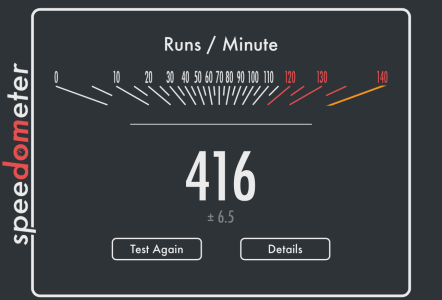
iPhone 14 Pro Max, iOS 17 Open Beta:

View attachment 83445
I heard iOS 17's/macOS 14 safari is really good.

I expect great results with the iphone 15 Pro.

7950x3d with 6000CL40 RAM and latest Edge seem to be performing great too:

View attachment 83444

Compared to previuos effort on 13900KS @6Ghz this was very light on memory tuning and already great results.
AMD seems to be getting somewhere with latest AGESA, after Q-Flash button bios updating to 1.07 agesa, board went from not booting with 2x32GB to smooth experience.

EDIT: obviuosly the Edge is newer version, so performance is not directly comparable, but safe to say that 7950x3d is fine chip.
That's a great score. Nice to see improvements
 
I heard iOS 17's/macOS 14 safari is really good.

I expect great results with the iphone 15 Pro.


That's a great score. Nice to see improvements
iOS 17 appears to be a bit faster in general. My GB5 scores were close to the top, while my GB6 scores were the fastest I could find.

Will see how the retail version performs.

EDIT: Did another run just now for fun:

1690234147009.png
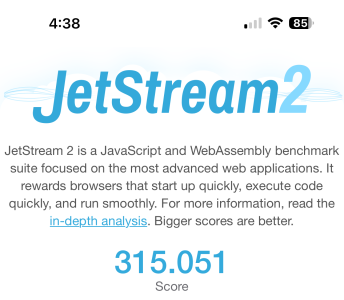
EDIT: Jetstream 2:

1690234726205.png
 
Last edited:
Back
Top