• We’re currently investigating an issue related to the forum theme and styling that is impacting page layout and visual formatting. The problem has been identified, and we are actively working on a resolution. There is no impact to user data or functionality, this is strictly a front-end display issue. We’ll post an update once the fix has been deployed. Thanks for your patience while we get this sorted.

Question How do I delete old network drive connections?

jamesdsimone

Golden Member
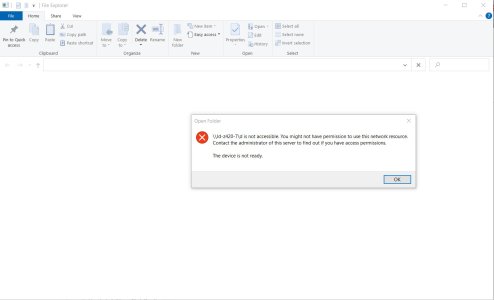
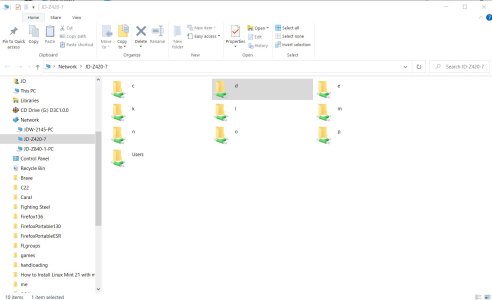
I have a workstation that I use as a hub of sorts. It has 2 USB docks with 6 drives total. I recently switched a couple of the drives. I partitioned them as usual etc. When I accessed the computer from another one on my network the old drive connections still appear. Of course, there are no drives associated with those letter anymore so clicking on them give an error code. I can't see how to delete them though.
 
The D drive was an internal drive that went bad. I removed it but didn't replace it. It still shows up on all my other computer's network connections. C and E are internal drives which work fine. L and M were drives I had in an external USB dock. I replaced both but the old connections persist and the new drives are not detected.
 

Attachments

  • Screenshot 2025-08-23 135246.jpg
    Screenshot 2025-08-23 135246.jpg
    113.8 KB · Views: 5
  • Screenshot 2025-08-23 135359.jpg
    Screenshot 2025-08-23 135359.jpg
    89.6 KB · Views: 5
It has to be some sort of caching, perhaps the indexing on the other PCs. Have these other PCs been rebooted? You could also try re-indexing to see if that gets rid of the drives.
 
It has to be some sort of caching, perhaps the indexing on the other PCs. Have these other PCs been rebooted? You could also try re-indexing to see if that gets rid of the drives.
Yes I have rebooted. How do you re-index? I have another machine that connects to some other computers but not to others. They all show up on the network but some are "unavailable" when I try to connect.
 
I have a workstation that I use as a hub of sorts. It has 2 USB docks with 6 drives total. I recently switched a couple of the drives. I partitioned them as usual etc. When I accessed the computer from another one on my network the old drive connections still appear. Of course, there are no drives associated with those letter anymore so clicking on them give an error code. I can't see how to delete them though.
Right click and select delete?
 
Yes I have rebooted. How do you re-index? I have another machine that connects to some other computers but not to others. They all show up on the network but some are "unavailable" when I try to connect.
Open up settings and search for indexing. There should be an option to rebuild the index.
 
Back
Top