• We’re currently investigating an issue related to the forum theme and styling that is impacting page layout and visual formatting. The problem has been identified, and we are actively working on a resolution. There is no impact to user data or functionality, this is strictly a front-end display issue. We’ll post an update once the fix has been deployed. Thanks for your patience while we get this sorted.

High ADSL pings

The Green Bean

Diamond Member
I'm getting 40ms-70ms to my ISP's DNS server and they say it's normal. At these pings it's impossible to play FPS games. Is this really normal? I have other ISP's to choose from but I'm afraid that they are all DSL. We do have cable, which I had but it's total crap.

However, my current ISP is giving me 99% uptime at good rates and I don't want to switch just to play the odd online game. I used to play on cable and I used to get pings of 15ms. Maybe I'm spoilt? Now servers show 80ms. And here in Pakistan, we don't have too many servers to choose from.

Opinions? What pings do you get on your ISPs?
 
Last edited:
You can try another DNS.

Download this trace program, http://www.d3tr.de/download.html

Use the Trace as List feature

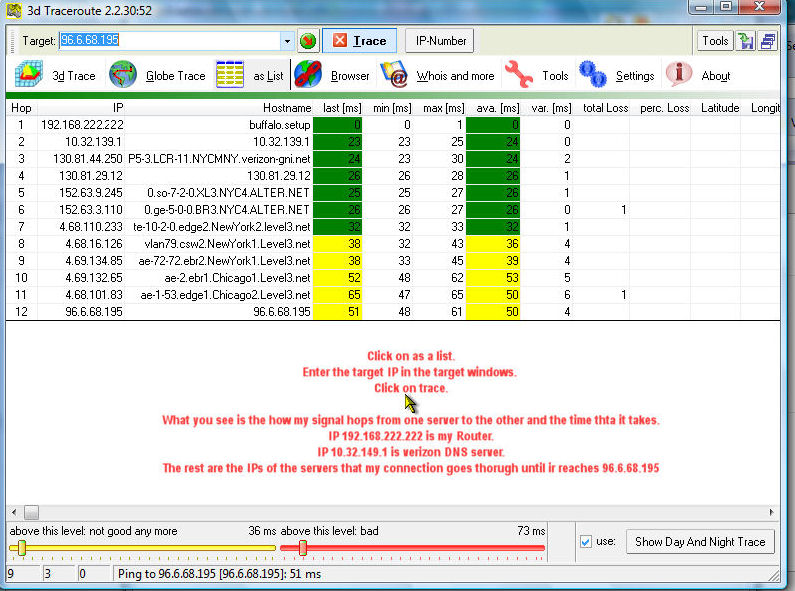
Output should look like this,


trace.jpg


The table shows the result of multi ping from my computer through a Buffalo Router to Internet site 96.6.68.195*

The important columns in the table (for this discussion) are the two in the middle. I.e. Min. ms and Max ms.

The numbers there show a typical outcome. As the trace progress on the Internet the variation changes dramatically.

So while the variation on my Router is 1ms, and the connection to the direct ISP's server is 2ms, the variation later on is almost 20ms.

What practically this means?

One should run a similar trace to his favorite Games IPs and if the first number on the table present a bigger variation than the number later own One should get a new Router.

* The target IP number is an Akami server. Akami servers are probably the best server system on the Internet far surpass most the gaming servers.


.
 
Last edited:
I have 2 routers. One for the DSL, and one acting as a broadband router. I think I'm losing 1ms on average for that and perhaps I should let the main router act as the DHCP. Will that make a difference.

I think I understood what the problem might be. The ping is significantly higher when downloading (steam in this instance). Perhaps I should use Qos for this. My ADSL router does not have this option though. I would have to use the 2nd router to achieve this. I'm using a WRT54G with DDWRT.

Now I'm getting an average ping of 30ms to the DNS server 50ms to the gaming server. Should I still try another DNS server? My previous ADSL ISP gave me within 20ms to their DNS server if I can remember correctly.

I think I should be happy with 50ms. It's probably quite good.
Thanks for the help.
 
Here are my pings. What is a 192.168.3.5 doing there AFTER the ISP's DNS? Isn't that a local address? I still can not configure QoS, and at times, pings are really really bad.
lag.jpg
 
I think that you should start from default configuration of Local Network in the Router and in the computers.

No QOS configuration or any other Local tricks.

Only when the default works OK you can try to adjust the network for your specific needs.

Then change the DNS Server to 4.2.2.2 & 4.2.2.3


Then see what the Trace shows.

Try also a trace to a known fast IP since the game server that you trace to does not look so good either.


😎
 
Last edited:
I should've thought of this before. I simply reset the modem and it's much better now. I also restored the router to default settings. I have about 10-15 DHCP clients at a time and it's very difficult to keep leeching in check. Not only does this throw gaming out of the window, but torrents cause browsing to effectively stop working. Is there are software for the wrtg5G, that will let me assign bandwidth to each computer.

On the weekdays, I live elsewhere and I used a shared ISP (with the rest of the building) there. What they have done is enhanced usage by only allowing specific MAC IDs. Furthermore, they have also limited bandwidth to each MAC. In effect, they have set up their own mini ISP. Is there anything similar I can do with a wrt-54g?
 
I should've thought of this before. I simply reset the modem and it's much better now. I also restored the router to default settings.

better.jpg


Should I leave the DNS IP to the one you suggested I use, or should I use my ISP's?

Also, I have about 10-15 DHCP clients at a time and it's very difficult to keep leeching in check. Not only does this throw gaming out of the window, but torrents cause browsing to effectively stop working. Is there are software for the wrtg5G, that will let me assign bandwidth to each computer.

On the weekdays, I live elsewhere and I used a shared ISP (with the rest of the building) there. What they have done is enhanced usage by only allowing specific MAC IDs. Furthermore, they have also limited bandwidth to each MAC. In effect, they have set up their own mini ISP. Is there anything similar I can do with a wrt-54g?
 
Back
Top