• We’re currently investigating an issue related to the forum theme and styling that is impacting page layout and visual formatting. The problem has been identified, and we are actively working on a resolution. There is no impact to user data or functionality, this is strictly a front-end display issue. We’ll post an update once the fix has been deployed. Thanks for your patience while we get this sorted.

Question HELP PLZ!!!

Page 2 - Seeking answers? Join the AnandTech community: where nearly half-a-million members share solutions and discuss the latest tech.

Justin lore

Junior Member
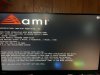
I built a pc and I’m stuck on American mega trends screen, I’m pressing f2 or delete at startup like the manual says but it doesn’t take me to bios, instead I’m starting at the American mega trends screen, I’ve tried every scenario I can think of, resetting, tried using 1 stick of ram, unplugging graphics card, I’m not getting any beeps or errors but no matter I do I can’t get into bios I’ve also checked all connections, I’ve reset the cmos with pc off, only plugging in what was needed such as monitor, keyboard, and my flash drive that has windows 10 so I could boot from that, I’m stuck any help or suggestions would be greatly appreciated

PC components:
Intel i9 10900k
Asus z590m prime plus motherboard
evga GeForce rtx 3060 xc graphics card
Team group ddr4 3600, total ram 128 gb
 

Attachments

  • image.jpg
    image.jpg
    673.9 KB · Views: 22
I just saw your pic that you posted in your reply to Larry, and you are still on version 406. 0811 is the latest version. So it didn't update?
No it didn’t update, I downloaded the file from my laptop onto a usb, plugged the usb into my desktop turned on the power and still nothing, I followed the instructions to a “T” and still nothing
 
No it didn’t update, I downloaded the file from my laptop onto a usb, plugged the usb into my desktop turned on the power and still nothing, I followed the instructions to a “T” and still nothing
Then I think you may have a bad bios chip. I think you need to contact Asus support at this point.
 
Be sure to post what they say. You have one other option, and that would be to return the motherboard, and get a replacement.
I will, I actually have another motherboard on the way but it’s aorus b460m I only bought this one from asus so I could get it faster, still want a replacement if it is defective
 
No it didn’t update, I downloaded the file from my laptop onto a usb, plugged the usb into my desktop turned on the power and still nothing, I followed the instructions to a “T” and still nothing

I wouldn't take anything from that. Just for fun I tried Crash Free 3 here and it did not work. EZ Update and Easy Flash do work though but you need to be either in Windows or UEFI Bios. Getting help from ASUS these days may take some patience. Another keyboard is the next step.
If that does not work I suggest returning the board since its likely under warranty. The retailer will be far more accessible than ASUS.
 
I wouldn't take anything from that. Just for fun I tried Crash Free 3 here and it did not work. EZ Update and Easy Flash do work though but you need to be either in Windows or UEFI Bios. Getting help from ASUS these days may take some patience. Another keyboard is the next step.
If that does not work I suggest returning the board since its likely under warranty. The retailer will be far more accessible than ASUS.
I know I’ve literally been on the phone with asus 3 different times and they basically have told me nothing, “not my problem” is kinda how it felt talking to them, I wasn’t sure if the crash free bios would work because I thought I actually had to be in bios in the first place for it to work, which is my main problem, I can’t even get there, I do have another motherboard from gigabyte coming I only bought this motherboard so I could get in faster, I think I might try a pc repair shop and see if they can diagnose it, I figured that would be easier
 
VirtualLarry has covered the waterfront on the peripherals and connections and our other comments have suggested the problem may originate with the keyboard or the motherboard itself. On reviewing your original complaint I notice that that the board " does not beep ". That is odd perhaps indicating there is no POST routine , arising from a fundamental issue with the board.
Do let us know.
 
I know I’ve literally been on the phone with asus 3 different times and they basically have told me nothing, “not my problem” is kinda how it felt talking to them, I wasn’t sure if the crash free bios would work because I thought I actually had to be in bios in the first place for it to work, which is my main problem, I can’t even get there, I do have another motherboard from gigabyte coming I only bought this motherboard so I could get in faster, I think I might try a pc repair shop and see if they can diagnose it, I figured that would be easier
Then I would return the motherboard, and get a replacement. Time is of the essence, and taking it to some shop will only waste your time.
 
VirtualLarry has covered the waterfront on the peripherals and connections and our other comments have suggested the problem may originate with the keyboard or the motherboard itself. On reviewing your original complaint I notice that that the board " does not beep ". That is odd perhaps indicating there is no POST routine , arising from a fundamental issue with the board.
Do let us know.
The motherboard I'm currently using doesn't beep. It just boots into Windows.
 
Presuming the new keyboard does not make a difference, you might have a ground issue between your case and motherboard due to an improperly placed standoff.

Did you test the hardware before installing it in the case? If not, I'd pull the motherboard, place it on a piece of cardboard with the cooling system still hooked up, plug in one memory module (place it in slot B2, the farthest from the CPU), the video card, and hook up all the power connectors (leave the m.2 drive out for now). Unplug all USB devices except the keyboard. Then, perform the CMOS reset procedure as detailed in your manual (with the power turned off and the plug unplugged from the wall). Once CMOS is reset, plug the cord back in to the wall receptacle and try to boot the board by shorting the switch pins with a screwdriver.

If the system still doesn't enter BIOS in this setup, you probably have a bad motherboard. As others have pointed out, returning the board to a retailer for a swap is infinitely preferable to dealing with ASUS' miserable technical support.
 
Last edited:
Ok so upon further investigation I decided to pull out every single component and inspected everything, turns out it’s definitely the motherboard, the socket pins are bent, only thing I can figure is that I must have over tightened the AIO, which I didn’t think I had that tight considering I only used a small screwdriver (non electric) but apparently I must have, unless it came shipped like that which I’m not exactly sure, my only question is has anyone else ran into this? I read the manual as I did the original install and I didn’t read anywhere saying anything about torque specs for installing AIO to the cpu/motherboard
 
It shows 2 keyboards in my device manager. I think the Bluetooth module for my Logitech mouse is seen as a keyboard. The mouse itself is still seen as a mouse.
I always have my bios on fast boot, so I've never notice. I'll have to play around with mine.
 
Ok so upon further investigation I decided to pull out every single component and inspected everything, turns out it’s definitely the motherboard, the socket pins are bent, only thing I can figure is that I must have over tightened the AIO, which I didn’t think I had that tight considering I only used a small screwdriver (non electric) but apparently I must have, unless it came shipped like that which I’m not exactly sure, my only question is has anyone else ran into this? I read the manual as I did the original install and I didn’t read anywhere saying anything about torque specs for installing AIO to the cpu/motherboard

Ugh that sucks
 
Ok so upon further investigation I decided to pull out every single component and inspected everything, turns out it’s definitely the motherboard, the socket pins are bent, only thing I can figure is that I must have over tightened the AIO, which I didn’t think I had that tight considering I only used a small screwdriver (non electric) but apparently I must have, unless it came shipped like that which I’m not exactly sure, my only question is has anyone else ran into this? I read the manual as I did the original install and I didn’t read anywhere saying anything about torque specs for installing AIO to the cpu/motherboard
Ugh that sucks
The problem with socket pins is that all motherboard manufacturers consider that a user damaged issue, and will void the motherboard warranty.
 
The problem with socket pins is that all motherboard manufacturers consider that a user damaged issue, and will void the motherboard warranty.

Exactly and that is what happened with the system I had for my wife with the FX6300. That machine was a dog, nothing good about it.
I’ll admit I bent the pin from being so pissed off at taking the machine apart a third or fourth time.
 
Exactly and that is what happened with the system I had for my wife with the FX6300. That machine was a dog, nothing good about it.
I’ll admit I bent the pin from being so pissed off at taking the machine apart a third or fourth time.
HUH?
The FX-6300 doesn't have "socket pins".
 
HUH?
The FX-6300 doesn't have "socket pins".

I bent a pin thingy on it one or two of these

1619462146397.jpeg

I almost didn’t buy a Ryzen because of how much I hated that machine. Everything failed at one point, multiple motherboards with the same video failure (think god I bought the micro center warranty), USB port failure, second set of memory slot didn’t work when I went to add some cheap memory I found. The machine was crap from day one. I should have spent the extra $100 for a proper i3 machine.
I admit I did everything wrong I bought the cheapest of everything because at the time it was a Facebook machine. Facebook was 90% of what it needed to do.
 
I bent a pin thingy on it one or two of these

View attachment 43643

I almost didn’t buy a Ryzen because of how much I hated that machine. Everything failed at one point, multiple motherboards with the same video failure (think god I bought the micro center warranty), USB port failure, second set of memory slot didn’t work when I went to add some cheap memory I found. The machine was crap from day one. I should have spent the extra $100 for a proper i3 machine.
I admit I did everything wrong I bought the cheapest of everything because at the time it was a Facebook machine. Facebook was 90% of what it needed to do.
Those pins are on the CPU not mobo socket. And I like you, you are a good guy, but I am going with PINIC/PEBKAC on the FX issues. 😛 I had a A8 APU for my wife's FB machine to play Farmville bitd, and it was great until I sold it down the road. I am playing with a FX6100 combo now, and it is still purring along all these years later. And those old i3s aged like milk.
 
Those pins are on the CPU not mobo socket. And I like you, you are a good guy, but I am going with PINIC/PEBKAC on the FX issues. 😛 I had a A8 APU for my wife's FB machine to play Farmville bitd, and it was great until I sold it down the road. I am playing with a FX6100 combo now, and it is still purring along all these years later. And those old i3s aged like milk.

I’ll totally own being pissed off and bending the pin(s), I totally own going cheap on everything assuming that would be fine for a barely used Facebook machine which now has become the used once per year for tax filing and maybe another time to read a pdf.
I still do not expect anything to have multiple failure with multiple different motherboards. Poor CPU, poor quality standards with the motherboards. I know the motherboards are not made by AMD however AMD (at the time) needed to have better minimum standards regarding how the motherboard is made. For example the last ASUS motherboard on the box in huge lettering “supports 1080P video!!!!”
Turn out it was 1080P ANALOG! No hdmi, no dvi. Analog only. Who in America has a 1080O monitor that is analog?
That is plainly a consumer trap, there is zero reason why they couldn’t add at minimum a dvi connector for 1080P. Crap just sell the damn motherboard for an extra dollar if the cost is an issue. AMD should have set minimum connector standards like every board will have at minimum 4 usb, 1 dvi, 1 analog connector, whatever cheap audio.
 
Back
Top