• We’re currently investigating an issue related to the forum theme and styling that is impacting page layout and visual formatting. The problem has been identified, and we are actively working on a resolution. There is no impact to user data or functionality, this is strictly a front-end display issue. We’ll post an update once the fix has been deployed. Thanks for your patience while we get this sorted.

Have you disabled your Java?

Page 2 - Seeking answers? Join the AnandTech community: where nearly half-a-million members share solutions and discuss the latest tech.
I use the noscript add-on. Seems like 90% of scripts on any given site are entirely unnecessary, But sometimes have to spend an age re-enabling one script at a time on a site to work out which one it is that actually does something useful like enable a radio button, say (be nice if they gave them names that actually meant something!).

HuffingtonPost is pretty bad. I don't care for the site in general, but sometimes it gets linked from here, and it seems like something that would be interesting. Open up NoScript to see what it takes to get some joy, and get a list of scripts from top to bottom. Usually at that point I decide it probably wasn't that great and close it, but other times I go through one by one trying to interpret names to get a video to play, or make a slideshow work :^S
 
The day when the internet runs on a standardized platform without the need of third party extensions. Flash and Java have been the bane of security experts for years now. You get the occasional browser flaws but most exploits seem to come via those two pathways.

Adobe has gotten better though now that they update Flash on a regular basis.
 
Never had it installed. Have 0 need for it. Have no flash or adobe reader on my main PC. I use a VM for running flash and reader and only use those inside a sandbox.
 
Java has been always been disabled in my browsers by default. I use Java for desktop applications all the time without worry.
 
Just disabled it. Thanks for the heads up. When will I know if it's safe to turn back on.

You should never have it on by default in the browser. Even without security holes, Java has too much access to your computer for you to expose its power to random websites. Nothing wrong with enabling for sites that you trust though.
 
I have some java plug-in I installed for Linux but no idea if it even works. I know it does not work for my java based RAC card I have in one of my servers, but have not tried it with anything else that needs Java. Thankfully not that much stuff requires it. Now if flash could die too, it would be perfect. We could disable that crap too. But way too many sites require it unfortunately.
 
Just disabled it. Thanks for the heads up. When will I know if it's safe to turn back on?

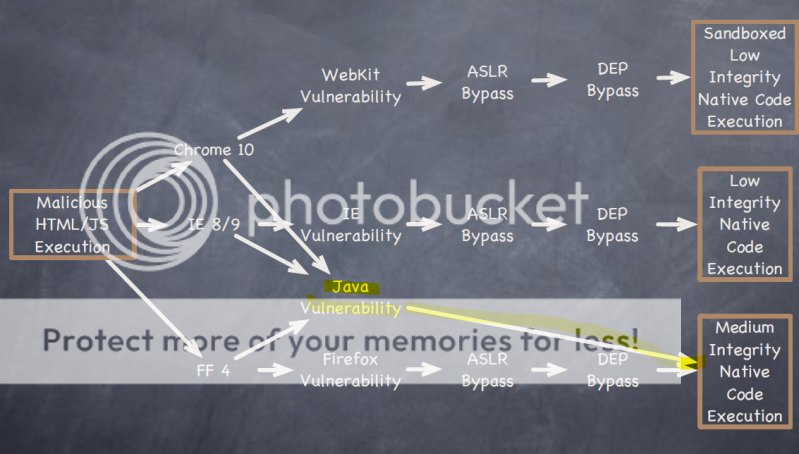
Given its track record, it never will be safe to turn it back on. It makes an easy method to take an end run around the mitigations built into your browser, such as DEP, ASLR, Integrity level and sandboxing/Protected Mode. An illustration from Dino Dai Zovi's "Attacker Math" presentation:

Data_BSOD.gif


Oh wait, wrong one 😀 Here we go..

the_Java_problem.png


If you have an insurmountable need for Java in a web browser for specific sites, you might want to have the Java plug-in enabled in just one browser, and use that browser ONLY for those sites, so that your daily-driver browser is not vulnerable to a Java exploit. Using a virtual machine is another option; use, discard changes at closing.

Have you turned it off or are you still using it?

For security reasons, I would never let it be installed, let alone enabled.

Nothing wrong with enabling for sites that you trust though.

Until one of your trusted sites gets pwned. Statistically, more than half the malicious websites online at any given time are normally safe, but have been compromised.

This being AnandTech, I'll mention a couple power-user security tweaks. One is Microsoft EMET, the other is Software Restriction Policy. The link in my signature has more info on them. In this case, SRP appears to be the go-to payload killer.
 
Last edited:
It's amazing how much shit doesn't work correctly when you disable Java. I'm going back in to add exceptions but realize now why the masses are such easy targets.
 
It's on... I tried disabling once, but certain sites didn't work properly. But ya, it's a POS. Most viruses I get are effing java related. I've gottne crap from TMZ, other legit sites, and random non-porn "clean" legit content sites, which is annoying.

Thanks to whomever reminded me to stop using an admin account for everyday access. Now, the worst thing that can happen is that I have to create a new user account, copy and paste some folders.
 
It's amazing how much shit doesn't work correctly when you disable Java. I'm going back in to add exceptions but realize now why the masses are such easy targets.

You aren't confusing javascript with Java are you? I can't remember the last time I've seen Java on the web. I stopped using it years ago, and nothing has stopped working. Javascript OTOH is used extensively, and many sites break without it.
 
You aren't confusing javascript with Java are you? I can't remember the last time I've seen Java on the web. I stopped using it years ago, and nothing has stopped working. Javascript OTOH is used extensively, and many sites break without it.

You're right. I clicked the JavaScript one as well as the Java. Oops.
 
You aren't confusing javascript with Java are you? I can't remember the last time I've seen Java on the web. I stopped using it years ago, and nothing has stopped working. Javascript OTOH is used extensively, and many sites break without it.

I did not know there was a difference... Thank you.

Just disabled java content in the Java Control Panel, we'll see how it goes.
 
You aren't confusing javascript with Java are you? I can't remember the last time I've seen Java on the web. I stopped using it years ago, and nothing has stopped working. Javascript OTOH is used extensively, and many sites break without it.
He's confusing it with javascript I'm sure.
 
Ok, smart cookies, so what is the fastest/easiest way to disable Java in IE, FF, Chrome, and Opera?

Also, what is the down side if you do so?
 
Ok, smart cookies, so what is the fastest/easiest way to disable Java in IE, FF, Chrome, and Opera?

Also, what is the down side if you do so?

Checkout this page, and the related links...

http://www.kb.cert.org/vuls/id/625617

Potential downside is something you use on the web will quit working, but that's unlikely. I started disabling/never installing it years ago due to security concerns, and I've never run into a situation where I missed out on something, but YMMV
 
Ok, smart cookies, so what is the fastest/easiest way to disable Java in IE, FF, Chrome, and Opera?

Uninstalling it completely is the fastest way.

Also, what is the down side if you do so?

Primarily, websites that require Java won't work anymore. An example would be http://www.time.gov > click a time zone. With Java installed, your browser would be able to display a rolling clock using a Java applet, not just a static time. If you uninstall Java completely, software that relies on Java won't work as designed, e.g. some P2P software uses it, some parts of OpenOffice use it.

Back when I actively hunted malware in the wild, an installation of Java was one of the best ways to get my "crash-test dummy" computer infected so I could harvest malware. In the last 18 months or so, some of the noteworthy Java exploits haven't even been real exploits... they just use loopholes in the Java Runtime security model. Best not to install it unless needed, and restrict it as much as possible if you must have it.
 
Last edited:
LOL, fucking Java. Tried to disable it through the java control panel, naturally a bug there completely prevents me from doing that and I can only access the certificates. Had to do so via FF, we'll see if anything breaks.
 
Javascript is another one that can be malicious though but sadly you pretty much need it enabled. I went with Noscript for about a year but I just got fedup of having to white list every single site I visit just so I can see it, it kinda made it pointless. Too many webmasters overuse javascript to the point a site wont even show up. News sites are notorious for it. I don't know how they manage to have like 20 different hosts that need to be white listed just for the site to even show up. Just so I can read a freaking article lol.
 
Javascript is another one that can be malicious though but sadly you pretty much need it enabled. I went with Noscript for about a year but I just got fedup of having to white list every single site I visit just so I can see it, it kinda made it pointless. Too many webmasters overuse javascript to the point a site wont even show up. News sites are notorious for it. I don't know how they manage to have like 20 different hosts that need to be white listed just for the site to even show up. Just so I can read a freaking article lol.

We have a site at work that has the subdomain "ads". It was created before the advent of AdBlock and NoScript so nobody thought about the name being a problem. After a while, we had to move the JS and CSS for that site to a different subdomain because they were getting blocked by "ads.*" entries in various blocklists.
 
Tangentially, it's never a bad time to check other commonly-exploited software that might need updating. For Windows systems, I suggest a checkup with the Secunia PSI utility: http://secunia.com/vulnerability_scanning/personal/

secunia_psi.png


Why? When your computer hits a website that's poisoned with an exploit kit, the bad guys don't just try to exploit Java and then give up if it doesn't work. A typical exploit setup could attack 5 to 10 different vectors before it's done. QuickTime, Flash Player, Shockwave Player, RealPlayer, Java, PDF readers, office software... all fair game.
 
Back
Top