• We’re currently investigating an issue related to the forum theme and styling that is impacting page layout and visual formatting. The problem has been identified, and we are actively working on a resolution. There is no impact to user data or functionality, this is strictly a front-end display issue. We’ll post an update once the fix has been deployed. Thanks for your patience while we get this sorted.

Has anyone ever gotten Transmission (bittorrent client) to work?

Red Squirrel

No Lifer
Wow, what a poorly documented app. I've been struggling for about a week trying to get this stupid thing to work. has anyone succeeded? What did you do? If not, anyone know of a good Bittorrent client for Linux that has a web interface? So far all the ones I tried are pure crap.

I'm debating on just going back to windows for my p2p box. I was kinda hoping for a fully web based interface but it's not looking too good so far.
 
Wow, what a poorly documented app. I've been struggling for about a week trying to get this stupid thing to work. has anyone succeeded? What did you do? If not, anyone know of a good Bittorrent client for Linux that has a web interface? So far all the ones I tried are pure crap.

I'm debating on just going back to windows for my p2p box. I was kinda hoping for a fully web based interface but it's not looking too good so far.


Not sure whats up but... I've never had transmission not work. I haven't really used it in a few years though because of usenet.

Also, isn't utorrent for pretty much every OS? I haven't used the web interface before though.
 
It works fine for me. You might like to try qBittorrent. I've switched over to it completely. It has most of the look of uTorrent, but not the light weight. The benefit is it's open source, which I appreciate. They make a Windows client also, and if I use Windows again, I'll install it there also.
 
The main issue I'm having with Transmission is that there is more or less no documentation so I'm on my own to figure it out.

I've come to figure out that on my distro the config is stored in /var/lib/transmission/.config/transmission-daemon/ and that the name of the service is transmission-daemon. The html client is stored in /usr/share/transmission/web so I pointed apache there, but I get errors that it can't connect. I was thinking maybe the daemon itself has a http interface, so I stopped apache and configured the RPC port (is that for the web interface? no clue) but no such luck. Pretty much guessing at everything.

I'll try qBittorrent and see if it's any better. Based on what Transmission is suppose to do when it works, it's exactly what I want, but it seems impossible to get it to work. I also had to get it from a 3rd party site because the link on their main site is broken for CentOS.
 
Is this what you are looking for?

Transmission_Preferences_web.png


Edit > Preferences > Web
 
I've never had any trouble with Transmissions. I do notice, however, that the uploads are much slower than utorrent on Windows. I have a port forwarded as well.
 
How did you get to that GUI? I do have gnome installed on the server, but I see no option in the "start" menu to get a GUI. When I do netstat, I don't even see it listening so I have a feeling the config file I'm editing is not doing anything. /var/lib/transmission/.config/transmission-daemon/settings.json is what I'm editing.
 
Last edited:
The log does say it's reading from the other one, do I still need to edit both?

Code:
[14:46:50.709] Transmission 2.21 (11855) started (session.c:708)
[14:46:50.710] RPC Server Adding address to whitelist: *.*.*.* (rpc-server.c:807)
[14:46:50.710] RPC Server Serving RPC and Web requests on port 127.0.0.1:80/transmission/ (rpc-server.c:985)
[14:46:50.710] RPC Server Whitelist enabled (rpc-server.c:989)
[14:46:50.710] RPC Server Password required (rpc-server.c:992)
[14:46:50.710] DHT Reusing old id (tr-dht.c:296)
[14:46:50.710] DHT Bootstrapping from 128 nodes (tr-dht.c:151)
[14:46:50.710] Using settings from "/var/lib/transmission/.config/transmission-daemon" (daemon.c:498)
[14:46:50.710] Saved "/var/lib/transmission/.config/transmission-daemon/settings.json" (bencode.c:1716)
[14:46:50.710] transmission-daemon requiring authentication (daemon.c:518)
[14:46:50.710] Port Forwarding (NAT-PMP) initnatpmp succeeded (0) (natpmp.c:70)
[14:46:50.710] Port Forwarding (NAT-PMP) sendpublicaddressrequest succeeded (2) (natpmp.c:70)
[14:46:58.718] Port Forwarding State changed from "Not forwarded" to "Starting" (port-forwarding.c:95)
[14:46:58.718] Port Forwarding State changed from "Starting" to "???" (port-forwarding.c:95)

I tried the port both locally and externally, no go. Firewall is off.
 
Ok so got it to work, this is my config file for future reference:

Code:
{
    "alt-speed-down": 50, 
    "alt-speed-enabled": false, 
    "alt-speed-time-begin": 540, 
    "alt-speed-time-day": 127, 
    "alt-speed-time-enabled": false, 
    "alt-speed-time-end": 1020, 
    "alt-speed-up": 50, 
    "bind-address-ipv4": "0.0.0.0", 
    "bind-address-ipv6": "::", 
    "blocklist-enabled": true, 
    "blocklist-url": "http://www.example.com/blocklist", 
    "cache-size-mb": 4, 
    "dht-enabled": true, 
    "download-dir": "/p2p/torrents/complete/", 
    "encryption": 1, 
    "idle-seeding-limit": 30, 
    "idle-seeding-limit-enabled": false, 
    "incomplete-dir": "/p2p/torrents/incomplete/", 
    "incomplete-dir-enabled": true, 
    "lazy-bitfield-enabled": true, 
    "lpd-enabled": false, 
    "message-level": 2, 
    "open-file-limit": 32, 
    "peer-congestion-algorithm": "", 
    "peer-limit-global": 240, 
    "peer-limit-per-torrent": 60, 
    "peer-port": 7881, 
    "peer-port-random-high": 65535, 
    "peer-port-random-low": 49152, 
    "peer-port-random-on-start": false, 
    "peer-socket-tos": "default", 
    "pex-enabled": true, 
    "port-forwarding-enabled": true, 
    "preallocation": 1, 
    "prefetch-enabled": 1, 
    "ratio-limit": 2, 
    "ratio-limit-enabled": false, 
    "rename-partial-files": true, 
    "rpc-authentication-required": true, 
    "rpc-bind-address": "0.0.0.0", 
    "rpc-enabled": true, 
    "rpc-password": "{81ed56ead4bc7a1bbeddc17ece074749e5737300u5ho9UrY", 
    "rpc-port": 9091, 
    "rpc-url": "/transmission/", 
    "rpc-username": "admin", 
    "rpc-whitelist": "*.*.*.*", 
    "rpc-whitelist-enabled": true, 
    "script-torrent-done-enabled": false, 
    "script-torrent-done-filename": "", 
    "speed-limit-down": 400, 
    "speed-limit-down-enabled": true, 
    "speed-limit-up": 300, 
    "speed-limit-up-enabled": true, 
    "start-added-torrents": true, 
    "trash-original-torrent-files": false, 
    "umask": 18, 
    "upload-slots-per-torrent": 14
}
 
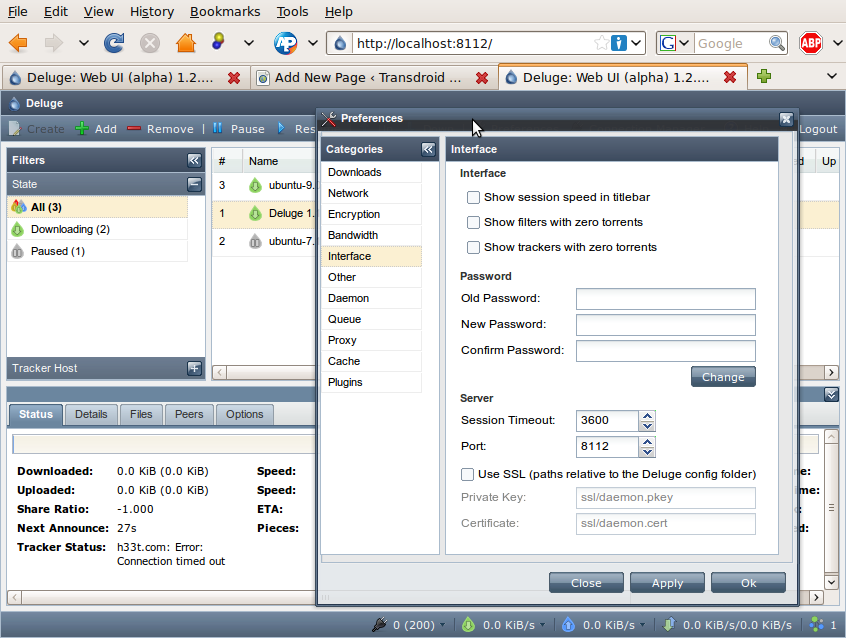
I like Deluged for Linux.

Start it up go to prefs turn on the webui. Also once you enable that you can setup the deluged daemon to run at system start chkconfig for fedora is used to enable this.
127.0.0.1:8112 password is deluge

DelugeWebUISettings.png
 
I had tried deluge, it worked for a bit, crashed,and would never open again.

Got Transmission to work though, only thing is I don't see the transfer rates anymore, it just stopped working, but overall the app is working.
 
Back
Top