• We’re currently investigating an issue related to the forum theme and styling that is impacting page layout and visual formatting. The problem has been identified, and we are actively working on a resolution. There is no impact to user data or functionality, this is strictly a front-end display issue. We’ll post an update once the fix has been deployed. Thanks for your patience while we get this sorted.

GTX 690 only sees 2 displays after 306.23

nanaki333

Diamond Member
After I updated to the latest 306.23 update, my GTX 690 no longer sees more than 2 displays. I've tried different combinations and it still only sees 2 in any combination of displays and ports. Nvidia control panel only shows 2 displays connected, even though all 3 are plugged in. I unplugged one of the working displays and the blank display lit back up. Only Maximize 3D performance and Disable multi-GPU mode are selectable. I rolled back to 301.42 and all 3 displays worked again. Span displays with Surround and Activate all displays is now selectable too. I attempted the driver upgrade again, and voila, only 2 displays again.

Anybody else having this issue? Any known fixes?
 
Inform Nvidia of your issues and use the older driver for now.

Not a ideal resolution, but at least you know the older driver supports all three monitors for you.
 
i tried to send this to nvidia, but they just forward me to the manufacturer. even their forums were down 🙁

system specs are as followed:

intel dx79si motherboard
bios (some long number) date 07/23/2012
core i7 3960x
32GB Kingston Hyper-X DDR3 1600
kingwin 1000watt modular blahblah PSU
corsair h100 cooler
samsung 830 256GB main OS SSD
mushkin enhanced chronos 480GB steam
2x1tb raptor raid0
lite-on bdrw drive
windows 7 pro fully up to date
running most up to date drivers on everything (except gpu of course)

thanks for the help.
 
Last edited:
My pleasure. I'll let you know the moment I have anything for you.
Who is the 690's manufacturer? Get the exact make and model if you could. Thanks.
 
Good. thanks.
Ok sorry, but I need a few more details.
Monitor make and models. For all of them.
Also, if your using 3 DVI, or 2 DVI + Mini-DP (for large res monitors or stereo)?

Thanks
 
sorry. had to get a surgery and was on bed rest. couldn't move my neck 🙂


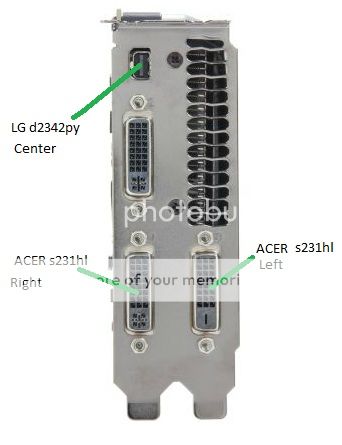
main center display is LG d2342py
2 side displays are acer s231hl
 
Ouch. ok. Feel better man.

Still need to know how you are connecting the monitors. 3 DVI or 2 DVI and 1 display port. And which monitor is on which port.

Use this pic. Take it into MS paint and show which monitor is connected to which port.

GTX690ports_zpsc70b8151.jpg

Like this below. Just an example:
GTX690connect_zps7311f26e.jpg
 
Last edited:
Back
Top