

Going 100% SSD
Page 2 - Seeking answers? Join the AnandTech community: where nearly half-a-million members share solutions and discuss the latest tech.
You are using an out of date browser. It may not display this or other websites correctly.
You should upgrade or use an alternative browser.
You should upgrade or use an alternative browser.


lopri
Elite Member
- Jul 27, 2002
- 13,329
- 709
- 126
My main system has about 7.0 TB with nearly 70%+ full. My secondary system is somewhat lighter (at about 5.0 TB), and 1.0 TB from both systems are for several VMs and I hot-swap them back and forth as needed.
So for both systems, I'm looking at 11.0 TB. (with room to grow!) How much?
Edit: Both systems have 128 GB SSD for C: drive.
So for both systems, I'm looking at 11.0 TB. (with room to grow!) How much?
Edit: Both systems have 128 GB SSD for C: drive.
Last edited:
thelastjuju
Senior member
- Nov 6, 2011
- 444
- 2
- 0
Yeah and don't ever forget about modding.
Check this poll exdeath:
http://forums.nexusmods.com/index.php?/topic/101696-poll-how-big-is-your-obliviondata-folder/
and thats just ONE of the more active modding communities out there.
--
I can't wait till we can get a 1tb SSD for a few hundred bucks. It would be AMAZING, and even browsing through tons of ultra hd images as mentioned above would also be great.. but to load up on smaller SSD's for multiple TB's of storage at this point, the GB/Price ratio is just outrageously bad.. Especially if you rip tons of HD.
Check this poll exdeath:
http://forums.nexusmods.com/index.php?/topic/101696-poll-how-big-is-your-obliviondata-folder/
and thats just ONE of the more active modding communities out there.
--
I can't wait till we can get a 1tb SSD for a few hundred bucks. It would be AMAZING, and even browsing through tons of ultra hd images as mentioned above would also be great.. but to load up on smaller SSD's for multiple TB's of storage at this point, the GB/Price ratio is just outrageously bad.. Especially if you rip tons of HD.
Last edited:

exdeath
Lifer
- Jan 29, 2004
- 13,679
- 10
- 81
I took these the other day when I ran a backup of my 378GB worth of games from a Caviar Black to a Hitachi. This is the performance at the half-way point:

Over 185,000 files of hugely random sizes, and it never budges from that number for the entire transfer (it might go 1MB up or down). I suspect the Caviar Black is actually holding things back somewhat because it isn’t as fast as the Hitachi for sequential transfers (2x500GB vs 1x1000GB).
Here’s where it’s passing over my “MP3” folder (actually they’re 320K AAC). It’s a little slower than above because the data partition starts at 500GB. But again, it pretty much never budges from that speed for the entire transfer.
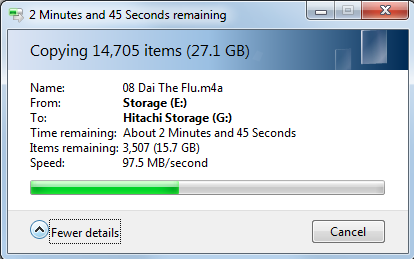
Will an SSD be faster? Yes, but at what cost? Even 600GB isn’t enough to comfortably fit all my stuff, and I can’t get a 1TB SSD for 6c per GB. Will the SSD be 16x or even 10x faster? I don’t think so, no single SSD would get 1GB/sec above.
Yeah, no thanks, those sacrifices aren’t worth it. It’s not like I sit on the edge of my seat when these transfers are running anyway.
You don't have to be a hoarder to have legitimate uses for data. I have many games customized in such a way that would be impossible or extremely difficult to replicate if I lost them. Storage should work for me, not the other way around.
My point is your PC can perform probably over a trillion operations per second. Why should moving a mere few GB of data take over an hour? It's irritating how lacking storage technology is compared to the rest of the PC, that's all. Why shouldn't anything complete instantaneously on a modern computer? It's ridiculous seeing 12 threads idle while disk lights flash or stay solid incessantly. Kilobytes per second? Megabytes per second? What is this 1980?
I've fixed the issue on my own PCs, but it still annoys the hell out of me when it takes over 30 mins to install a small application on somebody else's PC. And while waiting for that install in the background: "Ah crap I identically mouse overed "Control Panel ->" on the start menu, now I have to wait 10 seconds for the disk queue to catch up so Explorer can unfreeze." or "Oh hey there's that context menu I right clicked for like 15 seconds ago, well at least a grey box, now we gotta wait for the text to appear..."
WRT transfer rates, I often have to unexpectedly backup or restore 100s of GB of data on the job, and it throws a huge wrench into my productivity. Ok how much data is on this drive ...1 GB...2Gb...140 GB... and they need this NOW /sigh there goes the rest of my afternoon let me just cancel everything else and let a back log form because yet another slow shitty HDD is dying. Two or three of those in a row, forget about resolving more important problems for the next day or two.
I'll be happy when OEMs like Dell and HP ship their mainstream business systems, esp. laptops, with only a SSD. Then I'm happy for two reasons:
1) when I have to touch that PC, it will be reasonably fast
2) due to the size constraint of the stock SSD, end user will be forced to have external drives if they chose to hoard data, and at that point their data is solely their responsibility alone and absolutely not my concern. Whatever they do keep on the SSD I can transfer at 550 MB/sec and it will take seconds instead of hours.
End result, I have more time in the day to focus on more productive system administration and network engineering tasks instead of wasting time with dinosaur parts. At least the SAS SAN arrays are fast on the servers, but I loathe working on desktops/laptops.
Last edited:
lopri
Elite Member
- Jul 27, 2002
- 13,329
- 709
- 126
I seriously doubt anyone's denying the benefits of SSD. It is a trade-off you're going to make, depending on your usage pattern and, yes, your wallet.
Would I replace my 11 TB of HDDs with SSDs if they were the same prices? You bet. But that isn't the case so there is going to be balancing. And we don't buy things just because we can afford. (Would you buy some $20 crap off eBay just because you have $20 lying around?)
For example, BFG has about 600 GB of data he cannot dispose of. And there is a strong likelihood that his data size will grow in the future. In that case, it may make more sense for him to purchase a single 1 TB HDD to store them all in one place than to purchase a single 256 GB SSD and to store some data in SSD and some in the HDD. He could have considered four 256 GB SSDs and split his data on them, or even a single 1 TB SSD. After he assesses how often he accesses the data and the prices of SSDs (also consider that SSD prices fluctuate on a daily basis), it is not unreasonable for him to settle on 1 TB HDD, even if he can afford 4 SSDs or a 1 TB SSD.
I don't think anyone disagrees on the bottom line here. No one's wrong. It's individual needs and preferences.
Would I replace my 11 TB of HDDs with SSDs if they were the same prices? You bet. But that isn't the case so there is going to be balancing. And we don't buy things just because we can afford. (Would you buy some $20 crap off eBay just because you have $20 lying around?)
For example, BFG has about 600 GB of data he cannot dispose of. And there is a strong likelihood that his data size will grow in the future. In that case, it may make more sense for him to purchase a single 1 TB HDD to store them all in one place than to purchase a single 256 GB SSD and to store some data in SSD and some in the HDD. He could have considered four 256 GB SSDs and split his data on them, or even a single 1 TB SSD. After he assesses how often he accesses the data and the prices of SSDs (also consider that SSD prices fluctuate on a daily basis), it is not unreasonable for him to settle on 1 TB HDD, even if he can afford 4 SSDs or a 1 TB SSD.
I don't think anyone disagrees on the bottom line here. No one's wrong. It's individual needs and preferences.
Last edited:

BFG10K
Lifer
- Aug 14, 2000
- 22,709
- 3,007
- 126
Thats pretty much it. From a cost/benefit analysis, SSDs are not worth it for me. The size and cost limitations more than offset the performance gains Ive experienced with them. And having to constantly move data around and/or manage NTFS junction points wastes my time, not saves it.I seriously doubt anyone's denying the benefits of SSD. It is a trade-off you're going to make, depending on your usage pattern and, yes, your wallet.
That big backup is done only every few weeks, and I often just leave it running in the background or when Im away from the machine. Thats certainly not worth paying $1 per GB for, especially not since I plan on having two backups soon, with the second being stored offsite.
Im certainly not going to pay 3 x $1000 = $3000 so once every 3 weeks I can copy at 500MB/sec instead of 100MB/sec on 1TB SSDs.
In the grand scheme of things, the 1TB Hitachi has been a much more useful upgrade to me than any SSD has. It really lifted the backup file copying speed compared to my old SE16, while also adding an extra 250GB capacity at the same time, all at a very reasonable cost (even with flood inflated prices).
Ive actually sold my SSD and moved back to mechanical HDDs. Im debating getting 1TB VelociRaptor now or sitting tight and waiting for the refresh to the Black line.
boxleitnerb
Platinum Member
- Nov 1, 2011
- 2,605
- 6
- 81
I got rid of all HDDs in my main computer for noise reasons. I put them in a fileserver that is in a different room and is only on when I need it. It was expensive but worth it for me.
Could use more room for games, though. Currently I only have 120+250+160=530GB
Could use more room for games, though. Currently I only have 120+250+160=530GB

- Oct 4, 2010
- 1,176
- 3
- 81
I got rid of all HDDs in my main computer for noise reasons. I put them in a fileserver that is in a different room and is only on when I need it. It was expensive but worth it for me.
Could use more room for games, though. Currently I only have 120+250+160=530GB
This is similar to my motivation for doing it. Eventually I'd like to move my fileserver to a deep, dark closet where I never have to hear or look at it. I know computer noise doesn't really irritate a lot of people, but I've tried Hitachi, Samsung, and WD 5400 rpm drives and they all make noise.
Puddle Jumper
Platinum Member
- Nov 4, 2009
- 2,835
- 1
- 0
I'm close to going 100% SSD as well. Another 120gb drive plus my existing 120gb and 60gb would probably be enough for all of my applications and games and I can just relocate all of the old stuff I have archived to the server which would inherit all of my existing HDDs
I want to go HDD free to get rid of the extra noise and vibration in my case. I can keep all of my magnetic drives in the one server and the rest of my machines will be solid-state. I realize downloading onto an SSD won't make torrents faster; I'm just a little concerned about all the little writes and deletes of files over time. From what I've been able to glean, this JMicron controller has aggressive garbage collection. Hopefully the write amplification isn't too bad.
Agreed that 256 wouldnt be enough. 2x256 should do fine though.
If noise/vibration is what is bothering you, I'd say to invest in a good case with noise dampening options. I think QuietPC specializes in this kind of thing and has lots of info on how to significantly quiet you machine. I use the Fractal R3 and only thing I really hear is my video card, not my two hdds.
- Oct 4, 2010
- 1,176
- 3
- 81
If noise/vibration is what is bothering you, I'd say to invest in a good case with noise dampening options. I think QuietPC specializes in this kind of thing and has lots of info on how to significantly quiet you machine. I use the Fractal R3 and only thing I really hear is my video card, not my two hdds.
Hehe, actually I have an R3 as well with a WD Green 1.5 TB suspended on stretch magic elastics. The elastic suspension does eliminate the hum (and indeed the R3's grommets are *almost* enough to do this on their own), but I can still hear the drive seeking.
Mind you I have all my fans at 5v and an aftermarket GPU heatsink. Will soon be replacing a few of my higher RPM Noctua fans with Nexus real silent to get that extra little smidge of quiet. (My girlfriend thinks I suffer from pathological hyperacusis, btw.)
lopri
Elite Member
- Jul 27, 2002
- 13,329
- 709
- 126
I got rid of all HDDs in my main computer for noise reasons. I put them in a fileserver that is in a different room and is only on when I need it. It was expensive but worth it for me.
Could use more room for games, though. Currently I only have 120+250+160=530GB
I tried that but even with Gigabit connection (my home is hard-wired) the lag was noticeable. It's good for backups, though.
TRENDING THREADS
-
 Discussion Zen 5 Speculation (EPYC Turin and Strix Point/Granite Ridge - Ryzen 9000)
- Started by DisEnchantment
- Replies: 25K
-
Discussion Intel Meteor, Arrow, Lunar & Panther Lakes + WCL Discussion Threads
- Started by Tigerick
- Replies: 24K
-
 Discussion Intel current and future Lakes & Rapids thread
- Started by TheF34RChannel
- Replies: 24K
-

-


AnandTech is part of Future plc, an international media group and leading digital publisher. Visit our corporate site.
© Future Publishing Limited Quay House, The Ambury, Bath BA1 1UA. All rights reserved. England and Wales company registration number 2008885.
 Facebook
 Twitter