• We’re currently investigating an issue related to the forum theme and styling that is impacting page layout and visual formatting. The problem has been identified, and we are actively working on a resolution. There is no impact to user data or functionality, this is strictly a front-end display issue. We’ll post an update once the fix has been deployed. Thanks for your patience while we get this sorted.

Gigabyte Windforce Nvidia GTX 670 OC Version (User Review) & Owners' Thread

Page 2 - Seeking answers? Join the AnandTech community: where nearly half-a-million members share solutions and discuss the latest tech.
I installed Precision X to get a more detailed account of what's happening during gaming. This is 30 or so minutes playing Skyrim. It shows GPU clock all over the place, boosting to
1176 max with max GPU temp of 59c. I had Precision running for monitoring only, no adjustments:


So this is how Kepler works? I never really took the time to read up on it. Interesting..

Yeah... Basically if graphics become more demanding while you are gaming, the GPU will "Auto Over Clock" the card for better performance = your boost clock at 1176MHz... wow your's a good 14MHz higher (mines max out at 1163MHz, out of the box no adjustments too)...
 
Yeah... Basically if graphics become more demanding while you are gaming, the GPU will "Auto Over Clock" the card for better performance = your boost clock at 1176MHz... wow your's a good 14MHz higher (mines max out at 1163MHz, out of the box no adjustments too)...

Yeah what a departure from seeing a straight line 3D clock speed. I wonder how my 2nd card will do. Good card, thanks for starting the thread.
 
Vsync is the cause of stuttering. The way they designed it into these drivers for the gtx 600 series causes a problem where your fps drops and you get a really bad stutter. The fps drop doesnt even have to be that bad. I have experienced it with both adaptive vsync and real vsync enabled and my fps drop was only like 2. It happens at random times and not always in the same spot or when you di the same thing over to try repeating the effect. Vsync off is the only way around it but i just dont like screen tearing.
Im taking a wild guess here*laughs* the more i read the more i think it has sweet fa all to do with v sync and more to do with gpu boost.which could become problematic:S,i have a card coming soon too:S
ill keep quiet now till my card comes and pray to the intermittent stutter god and pray he blesses me stutter free.
 
Last edited:
Paid £339 free delivery preorder here,still waiting grrr.supposed to get on the 15 :S
 
Last edited:
Just for comparison here, I also got a custom PCB, but went the Galaxy route. I am current running at 1215mhz boost and 1700mhz memory clocks. I found my over clocks limited by 2 things:

(1) Ambiant temps and CPU load - after loading all 6 cores at 100% along with running uningine, this definitely increased the heat a TON in my case

(2) Tesselation - the difference in stable core temp is 100mhz with tessellation on (normal/extreme) vs. off in Uningine.

Memory over clocks really seems to bring the card alive. I noticed almost perfect 1:1 scaling with memory OC results.
 
@ SolMeister, it's $399 in US when Newegg or Amazon has it in stock. Reference 670 price, a big reason we're buzzing about it here.

@ ExarKun333, that Galaxy custom looked very interesting, no luck finding in US yet. Very curious about it's PCB components, no reviews yet. You like so far? Is there an LED strip on the side that lights up?
 
@ SolMeister, it's $399 in US when Newegg or Amazon has it in stock. Reference 670 price, a big reason we're buzzing about it here.

@ ExarKun333, that Galaxy custom looked very interesting, no luck finding in US yet. Very curious about it's PCB components, no reviews yet. You like so far? Is there an LED strip on the side that lights up?

How are you getting on with your cards Hauk?
 
I've got newegg set to auto-notify me when this card is back in stock. 🙁

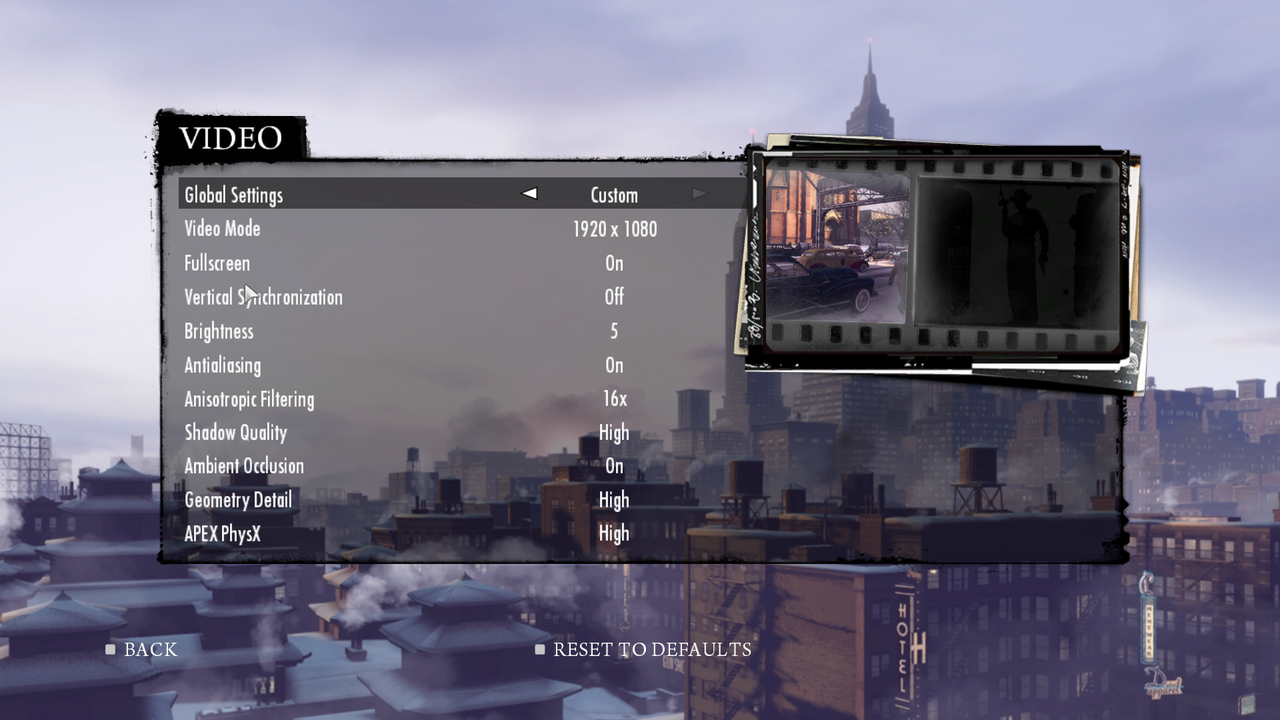
Destiny! When you run some Mafia II benchmarks, do it with physx enabled on the highest setting. If you still have your gtx570 to compare it to, I would be interested in seeing that comparison for the games you have.

I updated the Mafia II Benchmark with PhysX for the Gigabyte GTX 670... I will add the EVGA GTX 570 in the next few days.
 
I updated the Mafia II Benchmark with PhysX for the Gigabyte GTX 670... I will add the EVGA GTX 570 in the next few days.
a factory oced gtx670 can only get 48fps in Mafia 2 with those settings? I was curious and ran it on my gtx570 that's oced by 10% and got 46.4 fps. I am at 1920x1080 but that would likely only make 2 fps difference or so. either way that $400 next gen card will provide no playable advantage in Mafia 2 over my last gen gtx570 that I paid $260 for and came with Batman AC. IMO thats not progress especially considering that oced gtx670 is basically on par with the $500 gtx680.
 
Last edited:
a factory oced gtx670 can only get 48fps in Mafia 2 with those settings? I was curious and ran it on my gtx570 that's oced by 10% and got 46.4 fps. I am at 1920x1080 but that would likely only make 2 fps difference or so. either way that $400 next gen card will provide no playable advantage in Mafia 2 over my last gen gtx570 that I paid $260 for and came with Batman AC. IMO thats not progress especially considering that oced gtx670 is basically on par with the $500 gtx680.

Wow... thanks for your input!

Did you turn on PhysX High, AA and max everything else? I will try my GTX 570 again in a bit...
 
Last edited:
yep everything on high. run yours at 1920x1080 for a direct comparison though.


gif hosting


image hosting

WOW!! Literally NO Difference! Could this be the drivers for the GTX 670 is not optimized for Mafia II or does PhysX really takes a toll? 😱 D:

mafia2201205211080p.jpg
 
Well, we know the 670 is faster than the 570. I'm thinking there's a bottleneck elsewhere. CPU, temps causing throttling... or something.
 
With PhysX turned OFF

mafia2201205211080pnoph.jpg


@ toyota - can you run your Mafia II benchmark with PhysX turned off too? Thanks!
 
How are you getting on with your cards Hauk?

I have one card so far, still waiting on the other. I'm caught up in Skyrim right now so a single card is plenty. I forgot about adaptive vsync, enabled that last night; gameplay even smoother.
 
I ordered two from Amazon when it showed "sold by Amazon" for $399 each. They shipped one and backordered one. Shows shipping this week. System is ready for the other, blue PCB not so bad. So far an awesome experience. Fast and quiet:
IMG_1268.jpg

Pretty nice rig btw! 😀:thumbsup:
 
Well it seems Mafia II is very dependent on CPU,OP is ur CPU oced?I ran a i7 920 at stock and then at 2.92 Ghz,I gained almost 10% more fps in 1080p.
 
Nice work and nice card, OP!

One note - the physics test in 3dMark11 is a CPU test, so you may want to note that where you say it hasn't changed with your new card.

Overall, these gigabyte cards are just in a different class all together. The size, as you note, could be a problem, but the stock boost and fan noise make them superior to the reference design.

And in response to the poster above about stuttering, Nvidia has determined there is a problem with the drivers relating to vsync and will issue a fix in the next major driver release in June. This is according to Tom's Hardware.

I haven't really stressed my card yet, but so far I absolutely love it. The only downside I have experienced so far was the size of the card. I had to rearrange a few hard drives because the SATA cable that bridged two of them was in the way. If the plastic ends of the fan didn't jut out a bit it may not have been necessary, but oh well.

Performance is incredible and I hope to test it out on more demanding titles that I haven't played in a while. A game like Skyrim runs flawlessly, and I have yet to see the temps exceed 45 C under load. This thing is whisper quiet compared to the single fan reference design of the 5770 that I had before. At 1920x1080, anything I throw at it will meet my target of 60 fps.
 
Mafia Wars II
mafia22012052004224757.jpg

mafia22012052004205453.jpg


Running the Mafia II benchmark with a Nvidia GTX 570 average frame rates were only 2-3FPS less at 45 fps... so it seems that the Nvidia GTX 670 cannot handle PhysX better than the Nvidia GTX 570...😵
With PhysX turned off the Gigabye GTX 670 OC's average frame rates were at 90 fps.

Gaming Performance for other games coming soon!


2560 x 1440 Gaming Performance Coming Soon!

Mafia II uses hybrid-physx, some of it is run on the CPU and some of it on the GPU unless you have two cards in SLI. But it responds really well to CPU-overclocking with physx enabled. (see HERE!!) Therefore, if you don't already, you need to heavily overclock your CPU to maximize your frame rate in Mafia II when using physx on 1 Nvidia GPU.

EDIT: Here is my gtx570 (@800mhz core, 2050mhz mem) on a i7-2600k @ 4.6ghz destroying your score.
CEED0C46FD964CCF5612855149454645BF6CCB0A


EDIT #2: I had anti-aliasing off. This game's performance massively tanks with it enabled through the game (rather than through the Nvidia control panel). I will rerun to see how much of a difference it makes.
EDIT #3: I get 45 fps with in-game AA enabled, and 56.9 fps with 4x AA through nvidia control panel (override application setting).
 
Last edited:
@ SolMeister, it's $399 in US when Newegg or Amazon has it in stock. Reference 670 price, a big reason we're buzzing about it here.

@ ExarKun333, that Galaxy custom looked very interesting, no luck finding in US yet. Very curious about it's PCB components, no reviews yet. You like so far? Is there an LED strip on the side that lights up?

Been very happy. The card is VERY quiet, even with 80% fan (which is amazing). The card is topping-out at 74C OCd, and the memory overclocks very well. My limiting factor appears to be my graphics core, as it hits a wall around 1250 for stability with tessellation enabled.
 
Back
Top