• We’re currently investigating an issue related to the forum theme and styling that is impacting page layout and visual formatting. The problem has been identified, and we are actively working on a resolution. There is no impact to user data or functionality, this is strictly a front-end display issue. We’ll post an update once the fix has been deployed. Thanks for your patience while we get this sorted.

Forza Apex 6

How do I change my settings ? I can only see 3 option in video settings, also which program to see fps in game ?

GPU usage on a single 980ti is around 45% at 1440p..
 
This game runs extremely well for me getting a locked 60fps at 3200X1800 VSR with max settings, 5820k,390X.

the game hammers one or two threads on the cpu really hard and the rest are almost idle


How do I change my settings ? I can only see 3 option in video settings, also which program to see fps in game ?

GPU usage on a single 980ti is around 45% at 1440p..

Change one of those 3 options to custom (forgot which one) and the graphics settings will appear .
 
Last edited:
Says I need to update to Windows 10. Already running Windows 10 Pro x64 which says it's already up to date.

Maybe I'm not on the latest build?
 
I wanna try this out but I don't have my office set up yet... :\

Wonder how it will perform on a 55" 4K screen with my 970, but all I have for controls is a Logitech K700...
 
Says I need to update to Windows 10. Already running Windows 10 Pro x64 which says it's already up to date.

Maybe I'm not on the latest build?

Check if you have the Novemeber update, if not download it from Microsoft directly: https://www.microsoft.com/en-us/software-download/windows10


No wheel support.

Drivers crashing every 15-20 min for me (290X,4970K). Giving up on it for now.

Wheel support is coming in a future patch.

What drivers? You need AMD 16.5.1
 
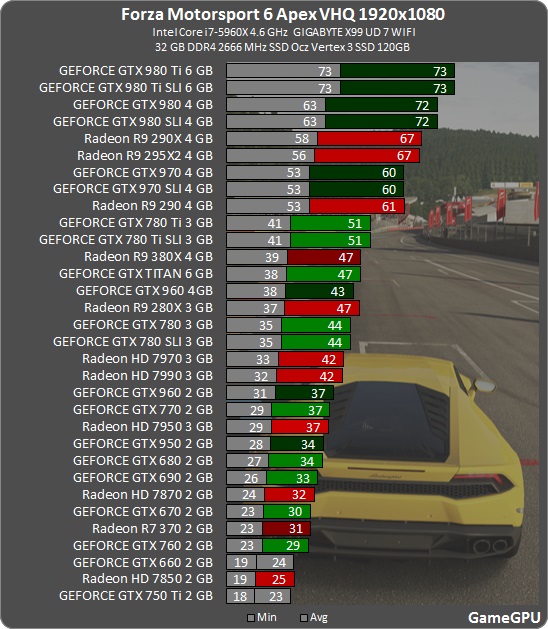
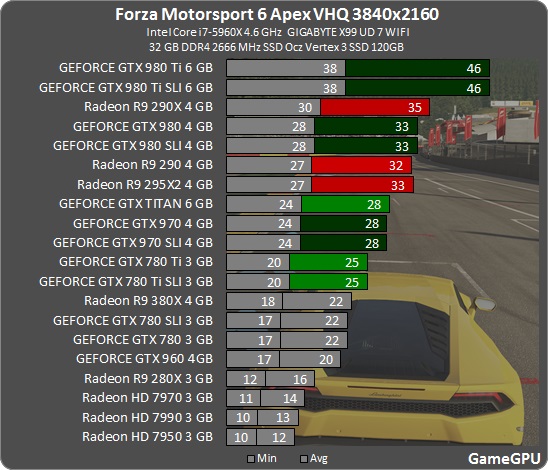
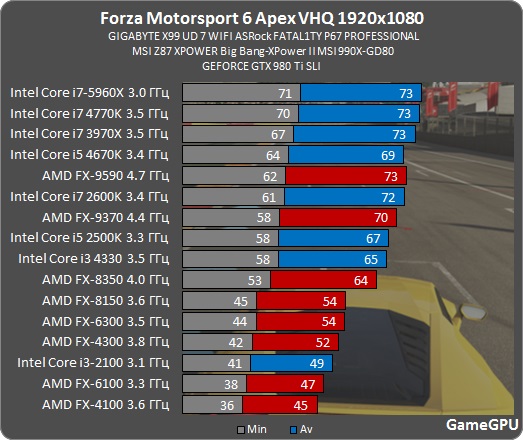
http://gamegpu.com/racing-simulators-/-гонки/forza-motorsport-6-apex-test-gpu

Forza_1920.jpg


Forza_2560.jpg


Forza_3840.jpg


Forza_proz.jpg


Forza_intel.jpg


Forza_AMD.jpg


Odd I'm getting much better results than these benches would suggest ,My 390x is at 1180/1650 though.

Edit: Look at the 280X Scrapping with the 780,OG Titan and 780ti! Tahiti just wont quit
 
Last edited:
Check if you have the Novemeber update, if not download it from Microsoft directly: https://www.microsoft.com/en-us/software-download/windows10


Wheel support is coming in a future patch.

What drivers? You need AMD 16.5.1

Gotta love MS and the way they work or is don't work. Not sure why it wouldn't have just updated itself in the end. I wound up just going to the aka.ms/update page it showed and it downloaded Win 10 again, installed and now it's letting me download the game....Screwy MS!
 
Yeah gonna call BS on those gamegpu tests.

With everything maxed (inc 8x AA) I got nearly flawless 60fps with my stock 290 @ 2560x1600 which is higher than their 1440p results.
 
Gotta love MS and the way they work or is don't work. Not sure why it wouldn't have just updated itself in the end. I wound up just going to the aka.ms/update page it showed and it downloaded Win 10 again, installed and now it's letting me download the game....Screwy MS!

Did you set updates to defer? Thats what most people have done that have a problem, or used some 3rd party application that messed with updates.
 
Did you set updates to defer? Thats what most people have done that have a problem, or used some 3rd party application that messed with updates.

Just did a reinstall a month or so ago. Didn't fiddle with update settings. Looks like it's good to go now at least. Just gotta wait for game to finish installing.
 
This game runs extremely well for me getting a locked 60fps at 3200X1800 VSR with max settings, 5820k,390X.

the game hammers one or two threads on the cpu really hard and the rest are almost idle


Change one of those 3 options to custom (forgot which one) and the graphics settings will appear .

That did the trick, thanks 🙂
 
Back
Top