FLARE X Series ram 3200 for Ryzen

Gunsum

Junior Member
Feb 8, 2018
9
1
6
I bought 16GB of FLARE X ram a while ago.
My bios is fully updated on an MSI x370 Pro Carbon. All backed by the Ryzen 1800x

I have tried Ryzen master. Different settings bios. Bios reads a higher number than Ryzen master for ram MHz. Not sure which to belive. Can't get the RAM over 1600 MHz. I've tried under 3000. Nothing holds. I just would like something around 3000 mhz hold. Not 1600!

I'm hoping someone has the solution with the exact same setup.
Sorry if I posted in wrong area. I tried the search nothing came up for FLARE X Series

Please help.
I've even tried to up the RAM v. To 1.40.
Still nothing . 1600 mhz only.


Lmfao
 
Last edited:

VirtualLarry

No Lifer
Aug 25, 2001
56,587
10,225
126
For various flavors of DDR RAM, the RAM "speed" rating is actually double the frequency. So, DDR4-3200 RAM, is really running at a clock speed of 1600Mhz, but of course, it's DOUBLE data-rate, thus 3200.
 
  • Like
Reactions: Crono and Gunsum

Gunsum

Junior Member
Feb 8, 2018
9
1
6
For various flavors of DDR RAM, the RAM "speed" rating is actually double the frequency. So, DDR4-3200 RAM, is really running at a clock speed of 1600Mhz, but of course, it's DOUBLE data-rate, thus 3200.
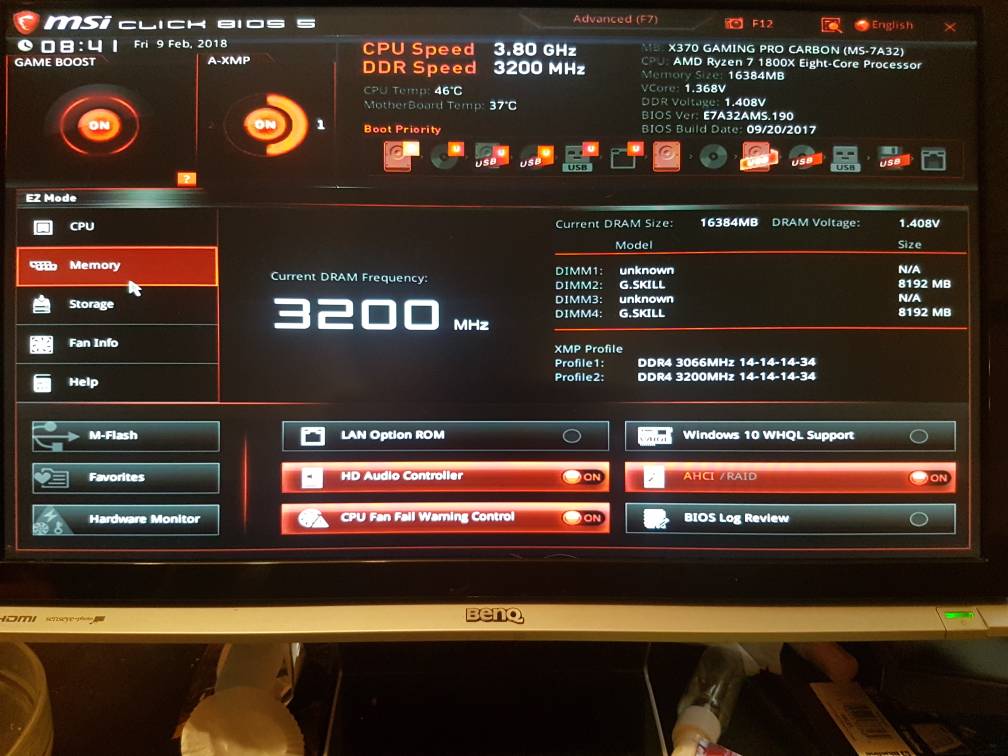
Thank you guys very much for the quick and accurate reply overlooking everything last night I was confused to see the 1600 and I noticed I was only getting single Channel. I quickly went through the motherboard manual and found that I had the two sticks far left when they were supposed to be spaced out for dual Channel. That's from 1600 megahertz I thought something was kind of fishy saying it was single Channel I was kind of hoping that the 16 was half of the 32 thank you for confirming that it's just strange that in the MSI bios it'll post that I'm running 3200 megahertz but when I get into Windows 10 it'll show in Speccy but there's only 1600. Even on the Asus GPU application. Such a silly thing could easily be patched.

So problem solved ! Thank you all who replyed with patience. Never thought this form would be so solid and professional.
Honestly thought I was going to be admin trolled with "search the forms" or just laughed at. So thank you all, kindly.

If you guys still want screens let me kno. But as far as I'm concerned the problem is fixed.

Lmfao
 
Last edited:
  • Like
Reactions: Crono

thecoolnessrune

Diamond Member
Jun 8, 2005
9,673
583
126
You can still post screens for a sanity check. Sounds like you were trying to clock your RAM to Infinity and Beyond! :D I actually had a friend new to computer building do this a couple of months ago, so you're certainly not alone.
 
  • Like
Reactions: Crono and Gunsum

Gunsum

Junior Member
Feb 8, 2018
9
1
6
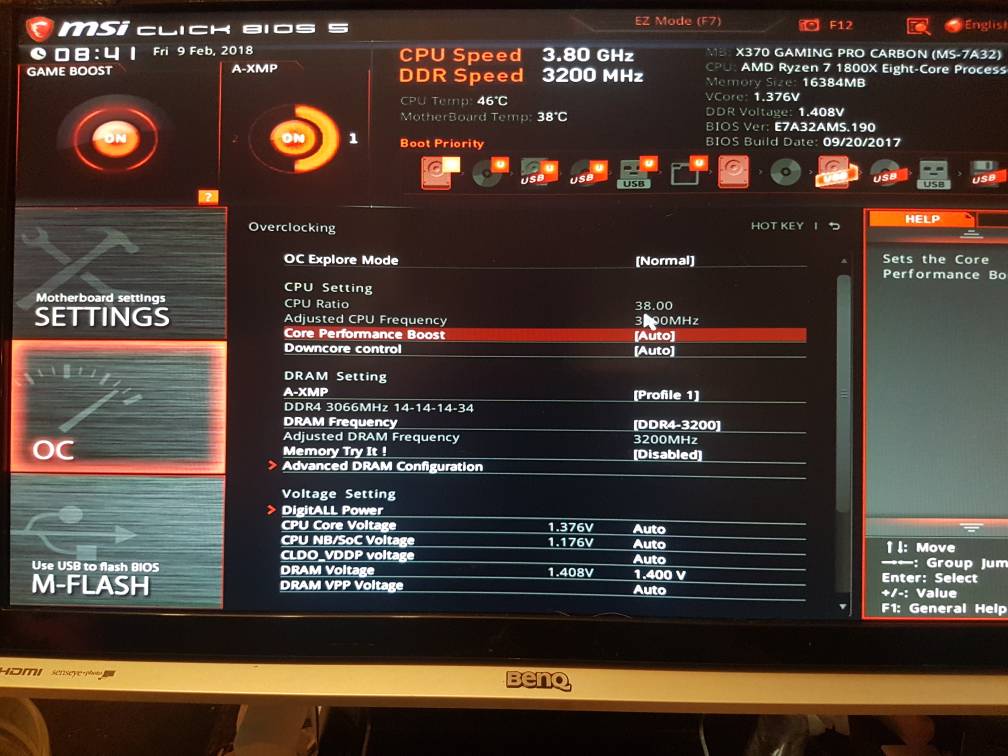
Now I want to get it to 4.0 GHz. I cannot change the multiplier there is no option.
Assuming this is another form all together.
I can change it in Ryzen Master but it's not permanant. I rather do thus O/C through the bios.
9261871f541bc3d705faa941d6c4fc41.jpg
17d05ec391b9d71e4575811bc02349d7.jpg
eda4c241806d7da82b75b79604fa2468.jpg
378dfde84351a7540e3138cc8f431e5e.jpg


Sorry for the budget pictures in bios screen shot would not save to my external

Lmfao
 
Last edited:

dlerious

Platinum Member
Mar 4, 2004
2,198
982
136
Now I want to get it to 4.0 GHz. I cannot change the multiplier there is no option.
Assuming this is another form all together.
I can change it in Ryzen Master but it's not permanant. I rather do thus O/C through the bios.
Change OC Explore Mode to Expert.
 
  • Like
Reactions: Gunsum

Gunsum

Junior Member
Feb 8, 2018
9
1
6
Change OC Explore Mode to Expert.
I took that shot in regular just to simplify the screen shots. I'll go to expert and show you what I'm working with later.
Or I'll just Google it and show the screen shot here
 

Gunsum

Junior Member
Feb 8, 2018
9
1
6
I was just about to post a pic of the bios at at stable 4.0 Ghz when after watching the temperature peak to 74 then drop to high 60s. Then followed by instant crash and black screen. I have determined it is not worth pushing the processor past it's already optional clock of 3.8 Ghz. I don't have a warranty on this CPU lol. 3.8 Ghz is good enough for me. Liquid cooling and a proper volt clock would probably help. I'm not touching it any further. So it's complete. The ram clocks at a full 3200 Mhz all I wanted really :)
 

dlerious

Platinum Member
Mar 4, 2004
2,198
982
136
I was just about to post a pic of the bios at at stable 4.0 Ghz when after watching the temperature peak to 74 then drop to high 60s. Then followed by instant crash and black screen. I have determined it is not worth pushing the processor past it's already optional clock of 3.8 Ghz. I don't have a warranty on this CPU lol. 3.8 Ghz is good enough for me. Liquid cooling and a proper volt clock would probably help. I'm not touching it any further. So it's complete. The ram clocks at a full 3200 Mhz all I wanted really :)
Have you tried running your RAM with 1.35V or lower (I see 1.408V in pics)? Also curious if you did anything with LLC? The crash almost sounds like a vdroop problem.
 

Gunsum

Junior Member
Feb 8, 2018
9
1
6
Have you tried running your RAM with 1.35V or lower (I see 1.408V in pics)? Also curious if you did anything with LLC? The crash almost sounds like a vdroop problem.
Didn't touch LLC. Rams firing at the full 3200 at these settings. 100% satisfied. I could lower the v. to prolong it's life. In the end I believe I set it to Auto. So 1.35V should be around it's default
Now I I'm trying to determine is it really worth the .20 gigahertz to have the CPU run at 4.0 gigahertz. It is already game boosted to 3.8 Ghz and runs fine. Last time I clocked to 4.0 temps went up uncomfortably high. Not worth a cooler for $200 to go to 3.8 Ghz in my opinion..
What do you guys think ?
 

dlerious

Platinum Member
Mar 4, 2004
2,198
982
136
Didn't touch LLC. Rams firing at the full 3200 at these settings. 100% satisfied. I could lower the v. to prolong it's life. In the end I believe I set it to Auto. So 1.35V should be around it's default
Now I I'm trying to determine is it really worth the .20 gigahertz to have the CPU run at 4.0 gigahertz. It is already game boosted to 3.8 Ghz and runs fine. Last time I clocked to 4.0 temps went up uncomfortably high. Not worth a cooler for $200 to go to 3.8 Ghz in my opinion..
What do you guys think ?
I've had my 1800X running 4.15, but the voltage was nearing 1.5V. I don't remember what 4.0 was. I'm happy running 3.9 now at 1.35V-1.375V (using HWINFO64 to monitor).Higher temps weren't worth it to me.