
• We’re currently investigating an issue related to the forum theme and styling that is impacting page layout and visual formatting. The problem has been identified, and we are actively working on a resolution. There is no impact to user data or functionality, this is strictly a front-end display issue. We’ll post an update once the fix has been deployed. Thanks for your patience while we get this sorted.

FIXED--[Dual-Monitors] Idle temp 55C+/Memory clock Idle @ 100%

RavenSEAL

Diamond Member
FYI: Issue has been fixed by replacing the input to the second monitor from HDMI/DP to DVI.

Thanks for the help everyone!

Hello ATVC&G,

I now turn to you after attempting to fix this issue myself without success...

I am now running a dual monitor setup via DP+DVI and the first out of my two HD 6870s (AKA, the one with CrossFire Enabled ON) always seems to run the "GPU Memory Clock" at full load regardless of what I am doing on the machine and EVEN with my overclock disabled via Trixx.
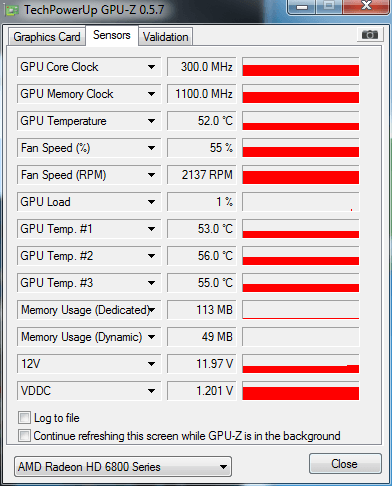
2e.png


Meanwhile, my second GFX card doesn't even bother waking up until I start up a game...

gxc.png


With my first GPU, I'm looking at idle temps in the 50s and this is starting to get in my nerves...I've re-installed, and re-installed and re-installed drivers. Reset and reset the clocks, all to no avail.

Am I bound to these idle temperatures as a result of the operation of the second monitor or is there a culprit?

Any help one can give would be greatly appreciated.
 
Last edited:
This is pretty standard for ATi cards. Its due to 2+ monitors. I think you can actually partially remedy this by having all your monitors on displayports, or all your monitors on the other outputs (DVI+DVI/HDMI).
 
This is pretty standard for ATi cards. Its due to 2+ monitors. I think you can actually partially remedy this by having all your monitors on displayports, or all your monitors on the other outputs (DVI+DVI/HDMI).
AFAIK it has to all be on DisplayPort (or using an active adapter). The reason AMD has to bump up their clocks is because they need to be able to keep the monitors refresh intervals in sync; this is easy on DP (packet based with one common clock), but hard on DVI/HDMI (TMDS based with a clock for each device).
 
This is pretty standard for ATi cards. Its due to 2+ monitors. I think you can actually partially remedy this by having all your monitors on displayports, or all your monitors on the other outputs (DVI+DVI/HDMI).

I have run dual monitors for a few years now and it has been this way with both nVidia and AMD for quite a while. If you have 2 monitors connected to 1 video card you will have higher 2d temps due to the card running higher clocks than with one monitor. I know there is a work around for AMD cards but I do not recall what it is. Maybe using Radeon pro or something
 
I have run dual monitors for a few years now and it has been this way with both nVidia and AMD for quite a while. If you have 2 monitors connected to 1 video card you will have higher 2d temps due to the card running higher clocks than with one monitor. I know there is a work around for AMD cards but I do not recall what it is. Maybe using Radeon pro or something

Any chance you can find me a link? I'm growing desperate...

I've gone ahead and switched the second display to HDMI but the idle temps are still insane. (50C-60C /w fan @ 60%)
 
Last edited:
I do not remember what the actual fix was. Why not just get a cheap card to run the other monitor with. If the monitors have dual inputs you can hook both cards up to them so you can still switch to either monitor using the powerful card.


**edit**

You beat me to it.

Didn't know realize you were running Crossfire
 
This is the reality of things when running dual monitors on either AMD or nvidia cards. I believe the only way around this is if the monitors are identical and running in a certain mode, extended I believe.

There was supposed to be a sort of workaround on nvidia using nvinspector that does prevent the high idle temps, but you have to then add every single 3d program that needs full speeds manually and it still doesn't work when you ramp up a game in some cases, causing more issues than it's worth.

The best solution is using the windows key+P to turn off the second monitor when it's not needed in my experience.
 
This is the reality of things when running dual monitors on either AMD or nvidia cards. I believe the only way around this is if the monitors are identical and running in a certain mode, extended I believe.

There was supposed to be a sort of workaround on nvidia using nvinspector that does prevent the high idle temps, but you have to then add every single 3d program that needs full speeds manually and it still doesn't work when you ramp up a game in some cases, causing more issues than it's worth.

The best solution is using the windows key+P to turn off the second monitor when it's not needed in my experience.

They're both identical, running via HDMI/DVI, at the same resolution, refresh rate and extended mode 🙂

I've tried the whole Windows+P trick but I find myself using the second monitor 90% of the time I'm sitting my machine.
 
They're both identical, running via HDMI/DVI, at the same resolution, refresh rate and extended mode 🙂

I've tried the whole Windows+P trick but I find myself using the second monitor 90% of the time I'm sitting my machine.

That's odd. It may not be extended mode, but duplicate, see if that does it. Of course the second monitor is all but useless at that point 😛
 
Can you additional video cables and set each monitor to auto-switch to an active cable, then switch between crossfire and non-crossfire using profiles?

You can have a profile to normally run one monitor per one video card, allowing each card to throttle down to idle core/mem speed of 157/300.

Then when you run crossfire, the signal would go to the monitors through other video cables and the monitors would auto-switch?
 
FYI: Issue has been fixed by replacing the input to the second monitor from HDMI/DP to DVI.

Thanks for the help everyone!
 
FYI: Issue has been fixed by replacing the input to the second monitor from HDMI/DP to DVI.

Thanks for the help everyone!

Can you spill any more details? Are you able to reproduce the weird heating issues by swapping cables just like that?
 
To resolve this issue, do I have to connect two monitors both on DP or both on HDMI, Or I can connect one on DP and the other on HDMI?
 
Back
Top