

-
We’re currently investigating an issue related to the forum theme and styling that is impacting page layout and visual formatting. The problem has been identified, and we are actively working on a resolution. There is no impact to user data or functionality, this is strictly a front-end display issue. We’ll post an update once the fix has been deployed. Thanks for your patience while we get this sorted.
You are using an out of date browser. It may not display this or other websites correctly.
You should upgrade or use an alternative browser.
You should upgrade or use an alternative browser.
Question FireFox 73 is Out
- Thread starter Iron Woode
- Start date

PowerEngineer
Diamond Member
Updating now.... Seems like minimal change based on their notes?

balloonshark
Diamond Member
Just upgraded to Windows 10 and running firefox 73. Is there anything we can do to make the windows less square without a border and to be able to see which tab I'm actually using. This is the ugliest and least usable windows and firefox UI imaginable.
Edit: Going to "customize" in firefox and ticking the drag space box helps make the tabs a little more visable. Still don't like the square borderless look.
Edit: Going to "customize" in firefox and ticking the drag space box helps make the tabs a little more visable. Still don't like the square borderless look.
Last edited:

Charlie98
Diamond Member
but turning on the menubar might give you some space up top.
That's what I did, but the contrast on everything is just mud, particularly in Explorer.
balloonshark
Diamond Member
Turning on the drag space helped but like Charlie said the contrast is horrible in windows 10. Before I turned on the drag space I was constantly clicking on the wrong tab. With the drag space the only difference is I see a very thin blue stripe above the tab I'm viewing.



Chiefcrowe
Diamond Member
Have you tried using the new Firefox color theme management system? It can't change the squareness of the tabs but the themes are pretty good and it seems to work for me in identifying which tab I am on.

Just upgraded to Windows 10 and running firefox 73. Is there anything we can do to make the windows less square without a border and to be able to see which tab I'm actually using. This is the ugliest and least usable windows and firefox UI imaginable.
Edit: Going to "customize" in firefox and ticking the drag space box helps make the tabs a little more visable. Still don't like the square borderless look.
balloonshark
Diamond Member
Thanks for the suggestion. I've installed the add-on and will play around with it and see if I can find something easy on the eyes and with more contrast. I think this add-on could be a decent fix.Have you tried using the new Firefox color theme management system? It can't change the squareness of the tabs but the themes are pretty good and it seems to work for me in identifying which tab I am on.
Edit: Here is a theme I quickly threw together. Also go into firefox's customize and turn on drag space at the bottom of the page. Here and here is one that is cream and light blue theme. The 2nd one just has a subtle pattern in the background.
Last edited:

Mantrid-Drone
Senior member
I've been using the Dark Theme for some time and I much prefer it to the Default. It'll be interesting to see how it behaves with the new update.
I've hated the changes FF has made to the GUI since Quantum was introduced and the severe reduction in the customisation options. I seem to spend half my time trying to find out how to turn off functions I do not want, restore functions I do want but are now missing and how to enable plugins/extensions that used to work but now don't.
My FF CSS is growing ever longer and I can not count the number of edits I've done to the "about:config".
FF has just become less attractive, less user friendly over the last few years and every update heralds new annoyances.
I've hated the changes FF has made to the GUI since Quantum was introduced and the severe reduction in the customisation options. I seem to spend half my time trying to find out how to turn off functions I do not want, restore functions I do want but are now missing and how to enable plugins/extensions that used to work but now don't.
My FF CSS is growing ever longer and I can not count the number of edits I've done to the "about:config".
FF has just become less attractive, less user friendly over the last few years and every update heralds new annoyances.
Chiefcrowe
Diamond Member
I checked out the theme you made and it's pretty good for contrast.
Thanks for the suggestion. I've installed the add-on and will play around with it and see if I can find something easy on the eyes and with more contrast. I think this add-on could be a decent fix.
Edit: Here is a theme I quickly threw together. Also go into firefox's customize and turn on drag space at the bottom of the page. Here and here is one that is cream and light blue theme. The 2nd one just has a subtle pattern in the background.
Chiefcrowe
Diamond Member
Yes, I agree that there are a lot of changes to the GUI that may not really be necessary.
Which plugins/extensions do you use that don't work anymore?
Which plugins/extensions do you use that don't work anymore?
I've been using the Dark Theme for some time and I much prefer it to the Default. It'll be interesting to see how it behaves with the new update.
I've hated the changes FF has made to the GUI since Quantum was introduced and the severe reduction in the customisation options. I seem to spend half my time trying to find out how to turn off functions I do not want, restore functions I do want but are now missing and how to enable plugins/extensions that used to work but now don't.
My FF CSS is growing ever longer and I can not count the number of edits I've done to the "about:config".
FF has just become less attractive, less user friendly over the last few years and every update heralds new annoyances.
balloonshark
Diamond Member
Thanks again for mentioning the add-on. It's not perfect but at least I can tell which tab I'm using.I checked out the theme you made and it's pretty good for contrast.
Mantrid-Drone
Senior member
Yes, I agree that there are a lot of changes to the GUI that may not really be necessary.
Which plugins/extensions do you use that don't work anymore?
Classic Theme Restorer and DownLoadThemAll are the ones I miss most but I have them working on Waterfox thanks to an addon archive. The former allowed all sorts GUI customisation options, it was a very useful tool box.

Red Squirrel
No Lifer
Just upgraded to Windows 10 and running firefox 73. Is there anything we can do to make the windows less square without a border and to be able to see which tab I'm actually using. This is the ugliest and least usable windows and firefox UI imaginable.
Edit: Going to "customize" in firefox and ticking the drag space box helps make the tabs a little more visable. Still don't like the square borderless look.
FF under Windows has been ugly for a while now. I don't know who thought it was a good idea to stick the menu bar inside the title bar and then make the title bar thicker and just overall messing with it. There's an extension called Classic Theme Restorer that can fix all of that though.
I'm glad that under Linux they don't seem to mess with the GUI.

Mantrid-Drone
Senior member
FF under Windows has been ugly for a while now. I don't know who thought it was a good idea to stick the menu bar inside the title bar and then make the title bar thicker and just overall messing with it. There's an extension called Classic Theme Restorer that can fix all of that though.
I'm glad that under Linux they don't seem to mess with the GUI.
Classic Theme Restorer does not work with any post-Quantum FF AFAIK. If that has changed then thanks for the information.
Red Squirrel
No Lifer
Classic Theme Restorer does not work with any post-Quantum FF AFAIK. If that has changed then thanks for the information.
Oh that sucks. Yeah have not tried the newer ones under Windows so my info might not apply then.
balloonshark
Diamond Member
I agree and using it with Windows 10 is even uglier. I used to use CTR and miss it. It gave me the option to put my extensions in a bar at the bottom of the screen. I believe you can still do it in Palemoon.FF under Windows has been ugly for a while now. I don't know who thought it was a good idea to stick the menu bar inside the title bar and then make the title bar thicker and just overall messing with it. There's an extension called Classic Theme Restorer that can fix all of that though.
I'm glad that under Linux they don't seem to mess with the GUI.
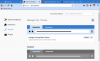
Here is a screenshot where I disabled my colored theme. Also ignore my customized icon arrangement. Look how square, borderless and bland everything looks. Also notice the active tab has little contrast. You would hardly notice it if I didn't add the drag space above.



lxskllr
No Lifer
It isn't spyware disguised as a browser. It's also competition to hopefully prevent google from becoming the defacto web standards authority, cause that worked so well the last time a company did that. For day to day use, it's at least the equal of chrome, if not better.
TRENDING THREADS
-
 Discussion Zen 5 Speculation (EPYC Turin and Strix Point/Granite Ridge - Ryzen 9000)
- Started by DisEnchantment
- Replies: 25K
-
Discussion Intel Meteor, Arrow, Lunar & Panther Lakes + WCL Discussion Threads
- Started by Tigerick
- Replies: 25K
-
 Discussion Intel current and future Lakes & Rapids thread
- Started by TheF34RChannel
- Replies: 24K
-

-
